How to Include HTML Code Within a Blog Post

Maintaining a blog is not a big deal. Most people know how to publish a post in a blog. I have been using blogspot blogs for quiet a long time. Whenever we publish post, we can see the source code means html code for the posts. In blogspot we can see the html edit section also.
Some days before I was trying to publish a post regarding html code that gives a particular result. But whenever I tried to put that code in my post, it was showing the result. My aim was to show that particular html code group as a new post.
I know the result that will be getting after using the html code. But I want share the code with others by including Html Code with in a blog post. So what to Do? I know you people also may face this same problem.
So in the following section I am going to give you the very useful tip to Include Html Code Within a Blog Post
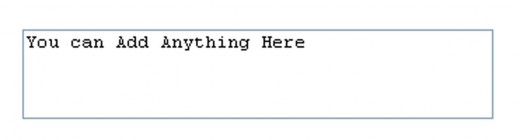
What we need now is a separate place to put Html code. The following box is the place where we can put any of Html code separately within a blog post.
Now what you need is the html code to make this box. Right?
Now I am sharing the HTML Source code for making this box with you. So what you have to do is, just copy the html code showing in the box and use it whenever you are in need.
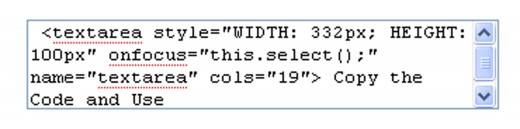
<textarea style="WIDTH: 332px; HEIGHT: 100px" onfocus="this.select();" name="textarea" cols="19">
Copy the Code and Use
The boxes showed here is just an example. You can increase and decrease its width and length