- HubPages»
- Technology»
- Computers & Software»
- Operating Systems»
- Windows
Quick Fixes Slow Loading Start Menu

It's a common problem that when your Windows operating system just installed it's very fast. But day by day it becomes very slow. This type of problem can easily be solved. This page will tell you one type of problem and solution. It is related to Start Menu related of Windows.If you are using Windows operating system, then click on Star menu. If the start menu is loading slowly then you can fix this problem. In this page, you will find the tips and tricks to solve the problem slow loading start menu by modifying Registry Editor's value field. Just keep reading:

Steps to solve "Slow Loading Start Menu"
The steps for solving slow loading start menu problem is described below. Follow the steps:
- Click on Start menu and then click on Run.
- In the Run window type regedit.exe and hit Enter key of your keyboard. Now, Registry Editor window will be opened.
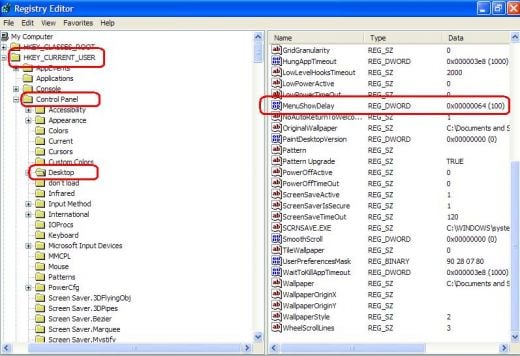
- From the Registry Editor window click on HKEY_CURRENT_USER.
- Under HKEY_CURRENT_USER, click on Control Panel.
- Under Control Panel, click on Desktop.
- Now, look the right side of Registry Editor window and search MenuShowDelay.
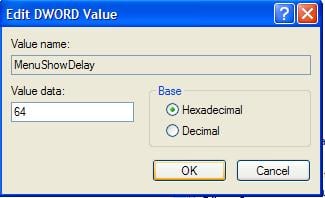
- Double click on MenuShowDelay.
- After finishing the above steps, Edit DWORD Value window will be appeared.
- Now put the value in Value Data field. Here, the lower the value you will be assigned, the faster the Start Menu will be loaded.
- At last, click on OK.
By following the above steps, you can easily load faster Start Menu of your Windows computer.
© Written by rancidTaste
If you are enjoyed this post, please consider to give a thumbs up and leave a comment. You may Subscribe to rancidTaste's RSS feed to get new pages which will be delivered to your feed reader. You can also read more hubs by rancidTaste.