- HubPages»
- Technology»
- Computers & Software»
- Computer How-Tos & Tutorials
Windows XP Driver Updates

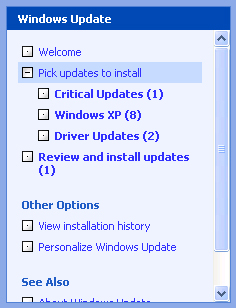
Windows Update
To keep your system running at it's best you are going to want to keep your software AND hardware up to date. Device driver updates can occur monthly depending on the type of device. Windows XP provides automatic updates via the Windows Update feature. While some drivers are offered, the main function of this update process is to provide bug fixes and service packs for Windows itself. Also to be noted is that any drivers offered by Microsoft Windows Update will be "Microsoft Certified". While this sounds good, what it actually means is that they are possibly older drivers because it takes time to go through the certification process. You can not count on Windows Update alone to provide you with all of the updates you may require.
Locating Device Drivers
The process of updating your device drivers can be very intimidating for the average computer user. Many of us buy a computer not knowing or even caring what kind of devices are in it. To be able to update the drivers for your system you are going to need to know the manufacturer and model/serial number of each device you want to update. So how do we find this information out? If you own a major brand name system such as Dell or HP, you could check their websites for information or call their customer support line. After being bombarded with advertisements for their latest system or attempting to communicate with the customer service representative, you may still be at a loss for finding that ellusive driver. Alternately, you could try looking inside the computer case and try locating model numbers and serial numbers to attempt to identify your devices. I do not recommend that approach to the average user as you can easily cause damage to your system if it is handled improperly. If you are like me you don't want to spend your time hunting down these drivers every time. Thankfully there is automatic driver update software available.

Automatic Driver Update
A program called Driver Detective can update your drivers in minutes. This is how it works. It will scan your system to identify all of your devices. Next it will locate within it's database the most current drivers for each of your devices. After a few clicks you will have downloaded the drivers you need. No more time consuming and frustrating search for drivers. Check if your sytems device drivers are up to date with the free scan below.





![How to Remove Kaspersky Password Protection? [Easily Recover]](https://images.saymedia-content.com/.image/t_share/MTc2Mjk3NDcwOTAzNTkyMTI2/how-to-remove-kaspersky-password-protected-easily-recover.png "How to Remove Kaspersky Password Protection? [Easily Recover]")