Hubpages RSS : How to Add RSS Capsule on Hubpages?

RSS(Really Simple Syndication or RSS 2.0) is a family of Web feed formats used to publish frequently updated posts of any blog entries, news headlines, audio, and video in a standardized format. By using it, you can display the most recently published pages. It's very easy to implement. Just follow the instructions.
Steps of Adding RSS Capsule on Hubpages:
You can add a RSS capsules easily by the following steps:
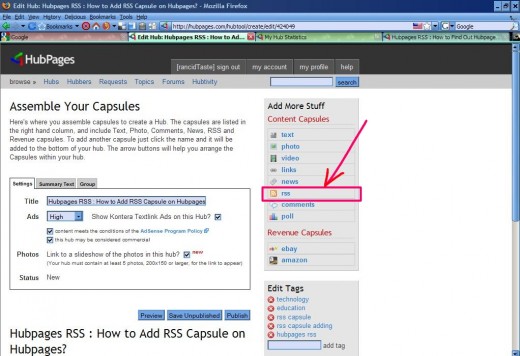
- After login, go to the Edit mode of the hub which you want to add a RSS capsule.
- When you are in edit mode, click on the rss and soon you will see a rss capsule is added at the bottom of your edit page.
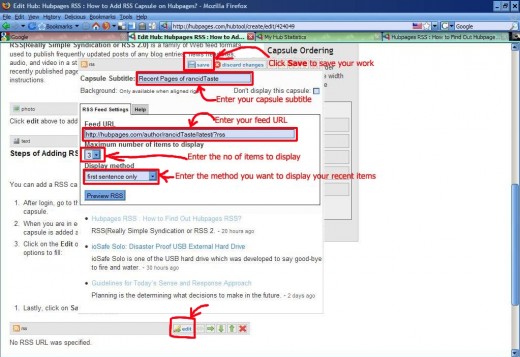
- Click on the Edit of the recently added rss capsule and it has the following options to fill:
- Capsule Subtitle: Enter the Subtitle of your Capsule. For example, I write my capsule subtitle as "Recent Pages of rancidTaste". Choose your desired text as capsule subtitle.
- Feed URL: It's the actual feed URL of your account. For example, I write my my own feed URL as "http://hubpages.com/author/rancidTaste/latest/?rss". If you don't even know your feed url, you may read Hubpages RSS : How to Find Out Hubpages RSS? to find out your own feed URL.
- Maximum no of items to display: It counts and shows the total no of items to display. For example, if you choose "3", then it will show the recent three items.
- Display method: It's the way to display your feed. It has three options: full description (describes the full description of the showed posts), shortened description (shows short description of your posts) and first sentense only (shows only the first line of your posts).I like to use the last option.
5. Lastly, click on Save to save your work.
By following the above steps, you can easily put your RSS feed on your own hubpages. I think you success.
If you like this page, don't forget to put your own opinion of the comment box and thumbs up to this post.
Smile !!