create your own

Best Trackball Mouse Models

81
rate or flag this page

By Isabella Snow


There are two basic categories of people: Those who love, love, love their trackball mouse, and those who scream and yell whenever they have to use one. The latter group would actually fall into the first category if they took a bit of time to get used to it -- but they almost never do. And I can understand why; I used to be one of them. In fact, the only reason I fell in love with the trackball mouse, was because I had no choice but to use one. 8 years later, and you couldn't pay me to go back to the regular kind. (Who says arranged marriages can't work?)

Yes, sure; I hated that sucker in the beginning. It seemed like something you'd find in a masochist's toy box. I couldn't control the pointer no matter how hard I tried. But it really didn't take all that long before I could -- and from there on out, using the computer was so much easier, because I no longer had to slam the mouse down on the desk when it stopped working (what?) because it didn't stop working. I didn't have to pay attention to what was underneath it, and I didn't have to move it all over the desk just to get it to move 1 inch on the screen.

I'm not going to lie; trackball mice can be rather annoying when you're learning how to use one. But once you've gotten used to it, you will never, ever go back to the regular mouse. And yes, they work on both Macs and PCs; when I changed over, I simply unplugged my trackball mouse from my PC and connected it to my iMac and voila!
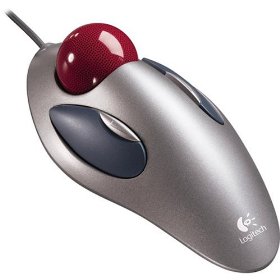

Logitech Trackman Marble Mouse Logitech Trackman Marble Mouse
Price: $21.99
List Price: $35.00

Logitech Optical Marble Mouse

This Logitech trackball mouse is the one I currently have. I really love it. It's simple, basic and easy to use. The buttons are on either side of the ball itself, so if you're just switching from a regular mouse, this is probably the easiest one to transition with, as it's the most similar. Its quite comfortable, too!
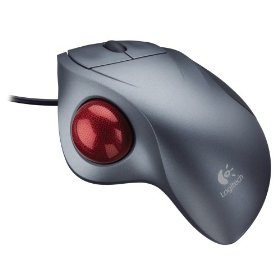

Logitech Trackman Wheel Optical (Silver) Logitech Trackman Wheel Optical (Silver)
Price: $24.84
List Price: $29.99

Logitech Trackman Wheel

This Logitech trackball mouse was the first model I ever used. It was incredibly frustrating, particularly since both buttons were on the right and I found it difficult to manipulate the ball and click at the same time. But I did get used to it, and I was quite happy with it. When it came time to get a new mouse, I looked for this model again but couldn't find it, which is why I bought the previously mentioned model (which I like just as much).
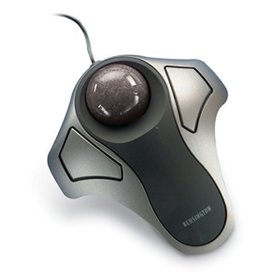

Kensington Orbit Optical Trackball Mouse 64327 Kensington Orbit Optical Trackball Mouse 64327
Price: $19.28
List Price: $44.95

Kensington Orbit Trackball

This Kensington trackball mouse is pretty space age looking, isn't it? I like the look quite a bit. It's similar to the first model in that it has the trackball in the center and the buttons on either side. This model is wider the first model on the list, and those with big hands may find it more comfortable.
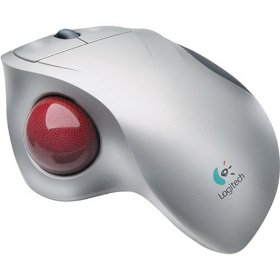

Logitech Cordless TrackMan Wheel Logitech Cordless TrackMan Wheel
Price: $36.50
List Price: $49.95

Logitech Cordless TrackMan

This Logitech trackball mouse is the same as the second model on the list, but it's wireless. If you don't like desktop clutter, or if you have a computer with few USB ports (if you have an iMac, for example), you may want this mouse.
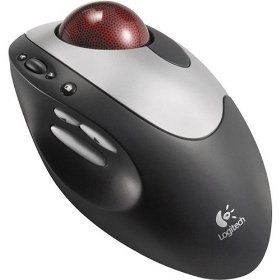

Logitech Cordless Optical Trackman (USB/PS/2) Logitech Cordless Optical Trackman (USB/PS/2)
Price: $45.90
List Price: $59.99

Logitech Cordless Trackman

Another cordless Logitech trackball mouse, this one has the ball on the right side. The buttons are bit different on this one and may take some getting used to, but if this is your first trackball mouse, you'll need to get used to it anyway, so you might as well include this in your learning curve.

Comments

RSS for comments on this Hub

multimastery profile image

multimastery  says:
9 months ago

Hi Isabella nice attractive hub on trackball mice! I must admit that this is still all new to me and I don't really see why I would want to transition over from my regular mouse to a trackball mouse. My regular one seems fine to me but hey maybe I'm missing out on some extra benefits & conveniences that I could have with a Trackmouse! You said you had no choice but to use one of these. I'm curious to know why?

sabrebIade profile image

sabrebIade  says:
9 months ago

Multi, once you get used to a trackball you wont want anything else. I hated mine at first but now I love it.

Isabella Snow profile image

Isabella Snow  says:
9 months ago

Multimastery - Oh, just because that's what the person I was dating at the time already had when we moved in together. A regular mouse is fine -- but a trackball mouse is fantastic.

Sabreblade - Glad you agree!

Void  says:
7 months ago

The marble mouse has been discontinued. I find it too small and awkward for me (plus lack of wheel brives me nuts), and I hate thumb balls (my hand cramps up) like the trackman, but this is still horrible news. Logitech is apparently exiting the trackball market, and that means all that will be left is kensington, whose balls I find to be large and clunky. I wish the Trackball explorer were still made; MS can't program OSs for thier life, but there hardware is pretty good.

Isabella Snow profile image

Isabella Snow  says:
7 months ago

Are you sure? When I checked just now there was a newer version available so I've updated the Amazon link....

Propelpro profile image

Propelpro  says:
3 months ago

I thought these were for old people. :D I was never interested in trackballs. please tell me what are the benefits of the trackball? :]

pisco profile image

pisco  says:
2 months ago

I have one of the first Logitech Trackman , dont really know for how many years, i think maybe 10 or so.

I used it when i got yet and then stored it away, because i used to play online and needed fast and acurate aiming on the desktop, but as soon as i got my first laptop, it really beats anything.

In fact i'm here writing in my bed with the trackball and i have absolute control on the mouse, don't have to bother if the surface is leveled or not. This is just the most hassle free mouse you can get, and you wont go back ... trust me :)

Submit a Comment

Members and Guests

Sign in or sign up and post using a hubpages account.


optional


  • No HTML is allowed in comments, but URLs will be hyperlinked
  • Comments are not for promoting your hubs or other sites

working