How to Design Your Own Business Cards


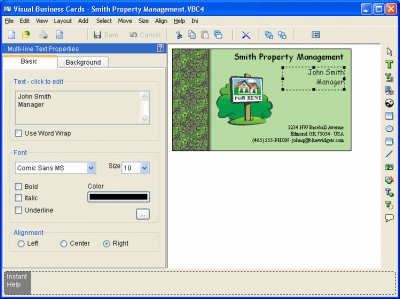
After you design your business cards, you can either print them out yourself or have them professionally printed. There are plenty of templates you can find online to design your business card, or even use programs like Microsoft Word and Publisher. If you are sending the design out to a professional printer, you can create the card in any program you are comfortable with.
Business Card Basics
Your cards represent you professionally, so you should make sure they are clear and easy to read. Your card should definitely include your:
- Name
- Address (mailing or physical)
- Telephone Number
- Email Address
- Business Name
- Business Logo
- Job Title
You can also include your:
- Fax Number
- Business Hours
- Business Motto
Design Options
There are a lot of options you can choose from when deciding on the design for your business cards. You can choose to use different colors or even transparent cards. You can have information on both sides of the card, or just one side.
You need to decide what is most important to have on your card: the bare minimum of information, perhaps with some artwork. Or, maybe you want your card to be content rich. No matter what you decide, you need to make sure the information is both legible and clear. Too much information on a card can make it hard to read, but not enough can leave people unsure of how to contact you.
Another idea is to create magnet business cards. These are pretty handy, especially if you provide the kind of service that people might like to have the number of on their refrigerator. If you choose to have this kind of specialized business card, you also need to have regular cards on hand.
Unprofessional Business Cards
I’ve seen a lot of wild business cards, and I have to admit that they are very unprofessional. Too many pictures and too many contrasting colors truly make a business card difficult to decipher.
If you want to have this sort of content on a card, it should be on your personal card—not one that represent your company. The only time this kind of card is acceptable for business purposes is if your company is funky and eclectic (and known for that). Even still, you will want to make sure that the card is easy to read.
Related

Business Card Etiquette - The Correct Way to Present Your Business Card
How to Include Social Media Icons in Your Business Card Design
Software Package to Design and Print Your Own Personalised Greeting Cards: A Personal Review
Unique Handmade Christmas Cards: Ink and Wash Watercolor Cards

The History of Greeting Cards


![Women in Short Skirts Are [Insert Opinion Here]](https://images.saymedia-content.com/.image/t_share/MTk5MTk2NjE2MjQ5Mzg2Mzk4/women-in-short-skirts.png "Women in Short Skirts Are [Insert Opinion Here]")