create your own

Dragon Naturally Speaking Review

83
rate or flag this page

By MarcNorris


What is it?

  • Award-winning Voice Recognition Software
  • 99% Accurate
  • Dictate, edit and control applications
  • Easy to use
  • Wireless Microphone and PDA support.

Dragon Naturally Speaking Demo

Dragon NaturallySpeaking allows you to dictate to your computer and have those words appear on your screen. It gives you the freedom to create documents at a faster pace than you would by typing them out on your computer. You can use the software to create documents in a word processor, create and send e-mails, and even surf the web by just using your voice.

I used the software in the past and quite honestly it didn't work for me. It could've been the software's fault or the fact that I'd been using a cheap headset. I decided to give it another chance with the new Plantronics headset that I bought in the following is a review of my experiences with Dragon Naturally Speaking 9 Preferred edition.

Note: There is now Dragon Naturally Speaking 10 - expect better results with the newer version, but my review will still give you a good idea of what to expect.


Get a Copy of Dragon Naturally Speaking 10

Dragon NaturallySpeaking 10 Standard Dragon NaturallySpeaking 10 Standard
Price: $54.89
List Price: $99.99
Dragon NaturallySpeaking 10 Preferred Dragon NaturallySpeaking 10 Preferred
Price: $129.99
List Price: $199.99
MacSpeech Dictate MacSpeech Dictate
Price: $167.76
List Price: $199.00
Dragon NaturallySpeaking 10 Preferred Student Edition Dragon NaturallySpeaking 10 Preferred Student Edition
Price: $79.99
List Price: $79.99

Calibrating the Software

The first step in using Dragon NaturallySpeaking after installing it is to calibrate the software to the headset that you are using and the volume of your voice. This involves reading a number of paragraphs of text back to the computer while it adjusts the volume settings on your microphone. For some people this process is rather quick, for others it can take a little time.

Learning the Ropes

I then proceeded to go through the tutorials provided with the software. These tutorials teach you how the software works as well as basic voice commands that you can use while dictating to the computer. They are very well done and follow the same pattern for each of the 14 short lessons.

With each lesson, they explain a simple task to you by voice, show you a demonstration of it in action, and then give you a chance to practice on an example.

After completing the 14 lessons I felt that I had a good grasp of the software, how to use it, and what to expect.


Using the Software

I was amazed at how easy the software is to use. It is a pretty much "hands-free" process, and you only need to turn the microphone on with your hands.

The most noticeable change such a notice on your computer screen is the DragonBar which is usually docked at the top of the desktop. On the Dragon Bar, you find controls to turn on the microphone, change users, increase the software's accuracy, access the help functionality, and access the advanced options.

In most cases, except for turning on the microphone, chances are you won't need to use the DragonBar very often.


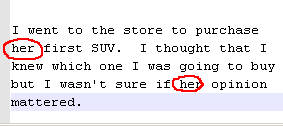
Example of program mistakes

Accuracy of Dragon Naturally Speaking

For the most part, Dragon Naturally Speaking is 99% accurate just as their website claims. But from time to time, software has problems determining exactly what you say.

For example, I had a lot of problems with "our" being interpreted by the program as "her". But as time went on, the program seemed to become more accurate at understanding what I was trying to say.

If accuracy is a big problem for you, they do have an option in the DragonBar, the "Accuracy Center", that allows you to train the software to better understand your voice.


The Final Verdict

Overall, I was very impressed with the software product Dragon NaturallySpeaking. Not only was it accurate most of time, but also helps to reduce the amount of strain on your hands as a consequence of extended keyboard use.

The interface was easy-to-use thanks to the tutorials included with the software.

My only complaint was the odd misinterpretation of certain words by the software though that improved the more frequently I use the software.

In fact, all the text for this hub was created by using Dragon Naturally Speaking 9 Preferred. I would definitely recommend Dragon NaturallySpeaking to anyone that does a lot of writing on their computer.


Print   —   Rate it:  up  down  flag this hub

Share your review of Dragon Naturally Speaking

RSS for comments on this Hub

JudithStep profile image

JudithStep  says:
2 years ago

Thanks for the review Marc! I've been interested in buying this software. It's now on my buy soon list.

Judith

Patty Inglish, MS profile image

Patty Inglish, MS  says:
2 years ago

Talking into the computer would save so much time. Great find!

ToddieM profile image

ToddieM  says:
15 months ago

I can't say that I'm that impressed with it. Either I type fast already, or my computer is too slow to keep up with my voice.

Plus, even after the training, the accuracy is nowhere near 99%. Not even close.

MarcNorris profile image

MarcNorris  says:
15 months ago

For me, I use it when I don't feel like typing or my hands need a break. My typing speed is really fast too, and Dragon rarely comes close.

But, I do like to use it for blog posts and article writing - it helps to keep a more conversational tone.

As for the accuracy, it gets better everytime that I use it though sometimes it can be a little frustrating, for me it does what I expect it to do.

sportsmemorabilia profile image

sportsmemorabilia  says:
10 months ago

Great info, thanks!

C Allan Butkus  says:
7 months ago

I'm in love with Dragon 10 preferred. I am a writer and I love it when a program can give me a smile. I was recently writing a murder mystery, the sheriff received a call for a doctor about an autopsy he had just completed.

I had dictated the following, “Sheriff I found that Mr Chamberlain didn’t die from drowning; he was stabbed in the ear with an icicle.”

What Dragon typed was, “Sheriff I found that Mr Chamberlain didn’t die from drowning; he was stabbed in the ear with a bicycle.”

Mom  says:
6 months ago

I have a question about Dragon software. My 14 year old son has severe dyslexia, and I have to type most of his papers for him. Do you think this software would benefit him and be more independent?

MarcNorris profile image

MarcNorris  says:
6 months ago

Though it isn't 100% accurate, the Dragon Naturally Speaking software should allow him to "type out" his own papers without having to rely on the keyboard. You might have to proof read it when it is done, but it would allow him to complete his assignments without you having to type it out.

Rupert  says:
5 months ago

A poor typist I have lusted after dragin for some time and have now been using it for almost 6 months. Just the thought of turning it on makes me mad for it does not work profficiently at all. The time taken training has not helped so I have upped the RAM to no effect. Now I think the sound card might be the problem. But someone else suggested a new Microphone. That last might be the key for when placing it over my pate the other night it snapped in two. Curses. Any suggestions short of ritual backyard burial would be apprectiated.

MarcNorris profile image

MarcNorris  says:
5 months ago

Rupert, I can understand your frustration. I know that I had some problems with it at the start, but for me it is working almost perfectly.

In my case, I did buy a more expensive Plantronics headset, and it has been the best thing I could have done. It works a lot better than other headsets that I have used and has seemed to help with the accuracy of the software. Maybe trying out a better headset might solve your problem - it did for me.

peacefulparadox profile image

peacefulparadox  says:
4 months ago

Window Vista has speech recognition built-in. Just go to Start and type "Speech Recogintion". I wonder how does Dragon compare with the built-in Windows Vista Speech recognition software?

Caleb  says:
3 months ago

like peacefulparadox said. "I wonder how does Dragon compare with the built-in Windows Vista Speech recognition software?" Does anyone actually tried both? I'm looking to buy Dragon Naturally Speaking 10 Preferred for $50 at tiger direct (sale ends soon!).

I've used vista speech recognition and didn't work well. It was very slow and it was only about 60% accurate. May i note, i was using the microphone that is integrated into my laptop and i only used it for a day. Does Dragon 10 Preferred come with a headset? and is it any good?

Thanks

MarcNorris profile image

MarcNorris  says:
3 months ago

I haven't had the chance to try the Windows Vista speech recognition software as I am still using XP... so if someone out there has done both, please feel free to comment here.

As for the headset, I have been using a Plantronics headset that was about $50 and I like it better than the one that came with the software and I will be trying it with a Bluetooth headset with my netbook soon (once I make it to the city to buy one).

Neale profile image

Neale  says:
2 months ago

I have tried the vista software it is good & free but not of the caliber dragon provides for a fair price

johnC  says:
6 weeks ago

Ive been playing around with speech recognition in Win 7 and although much better than when I tried it about 4 years ago in XP pro, it still is very tedious to train and takes a lot of time. Although this could be mostly due to my Australian accent, teaching it to adjust to this still don't seem to be affective in a lot of cases. I got the feeling I would have to train it on around 50% of my speech for it to be useful. I found the same with Dragon about 4 years ago and was also curious if it has improved and especial for other English accents other than American and British, hence my search here.

huck tooey profile image

huck tooey  says:
3 weeks ago

Thanks for the reveiw.....Have been wanting to buy Dragon but wasn`t sure.. this wll help....thanks again

Submit a Comment

Members and Guests

Sign in or sign up and post using a hubpages account.


optional


  • No HTML is allowed in comments, but URLs will be hyperlinked
  • Comments are not for promoting your hubs or other sites

working