- HubPages»
- Technology»
- Computers & Software»
- Computer How-Tos & Tutorials
Fake Windows Security Center Links to www.antispywareupdates.net

Fake Windows Security Center Alert
Fix Fake Alerts That Send You To Unwanted Website
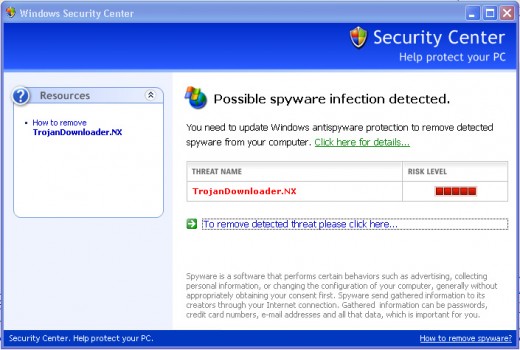
If a Windows Security Center window keeps popping up on your computer and sending you to www.antispywareupdates.net (do NOT get curious and go to that domain, please), then you do have an infection, but it is not the one being reported! You are infected by the software doing the "reporting", which is masquerading as the Windows Security Center.
The window title bar says: Windows Security Center
The window text is similar to this:
Possible spyware infection detected.
You need to update Windows antispyware protection to remove detected spyware from your computer. Click here for details...
THREAT NAME TrojacnDownloader.NX
RISK LEVEL [][][][][] (5 Bars)
To remove detected threat please click here...
Additional text is in the window, but text similar to the above is the main focus.
Fix the www.antispywareupdates.net Infection
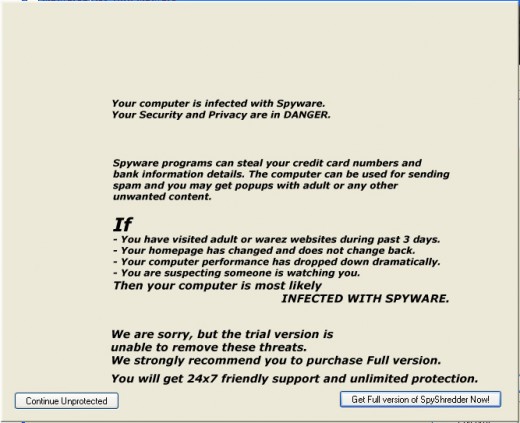
Fake Infected With Spyware Alert
Cleaning the www.antispywareupdates.net infection from your computer starts with the following steps:
- Download SmitFraudFix
- Boot into Safe Mode
- Run SmitFraudFix
- Download MalwareBytes' Antimalware
- Update and Run Antimalware
Download SmitFruadFix
Your first step is to Download SmitFraudFix and save the program file to your computer.
On the official download page are detailed instructions for running the program.
Run the program, and then continue to the next step.
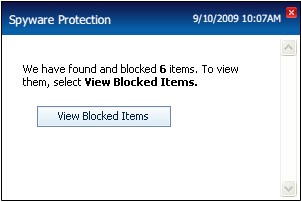
Spyware Protection Alert
Download Malwarebytes' Antimalware
Your final step is to download, update and run Malwarebytes' Antimalware. This is a powerful, free, scan and kill program that will detect and remove countless nasty bits of software on your computer, including the www.anitspywareupdates.net infection we are dealing with.
Problem Solved!
That should do it! Between SmitFraudFix and MalwareBytes' Antimalware, I was able to successfully clean the www.anitspywareupdates.com infection from a computer.
Please let me know how you make out in the comments section below!



![How to Remove Kaspersky Password Protection? [Easily Recover]](https://images.saymedia-content.com/.image/t_share/MTc2Mjk3NDcwOTAzNTkyMTI2/how-to-remove-kaspersky-password-protected-easily-recover.png "How to Remove Kaspersky Password Protection? [Easily Recover]")