Hosting Your Own Website From Home

Hosting Websites with DSL or Satellite
Have you thought about hosting your own website at home versus use another hosting service?
Basically, even if you buy the domain name with goDaddy, it doesn't mean that you have to use their hosting services to make your website live. You can do it yourself from home for free.
Below are the steps to hosting your website or blog at home. Just follow the simple steps and you'll be doing it all on your own in no time.
Steps for Web Hosting with Microsoft XP and Vista
1. First you need to make sure you have the original Windows OS Disk.
2. Go to Control Panel, and Add/Remove Programs
3. On the left hand side, choose Add Components
4. Choose Internet Information Services
5. Install this component
6. It will add a folder called Inetpub, under that folder, you will find wwwroot. This is where you want to load your web pages.
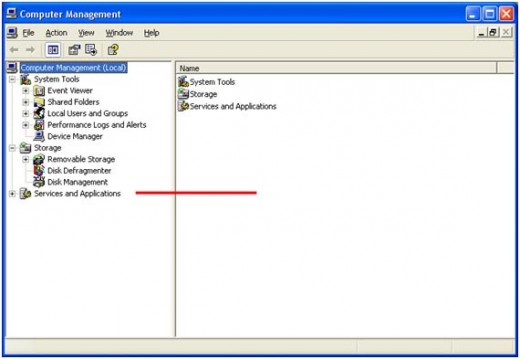
7. After IIS (Internet Information Services) is installed, you want to right click on "My Computer", and select "Manage"
8. Expand Services and Applications
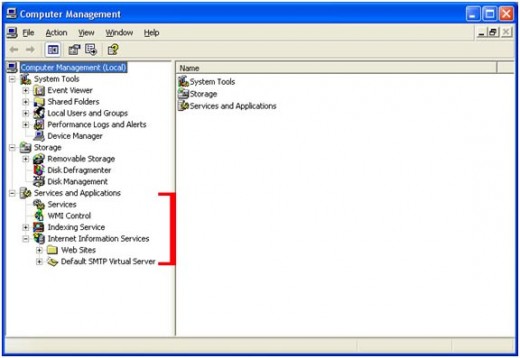
9. Expand Internet Information Services
10. Expand Web sites
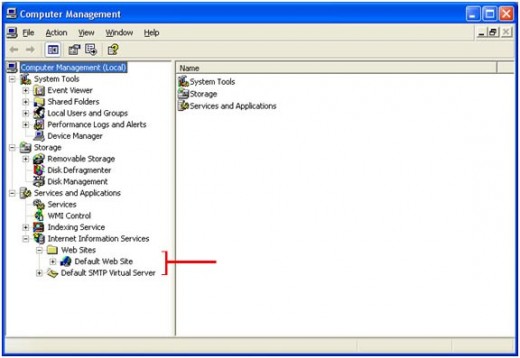
11. Right click on "Default Web site" and select "Properties"
12. Under the Documents tab, this will control your default page extension. For example, if you type in http://www.yourdomain.com/, you want the default page to display. Microsoft's default page is default.htm or default.html, you can have what you want. I use index.htm or index.html. Either is fine.
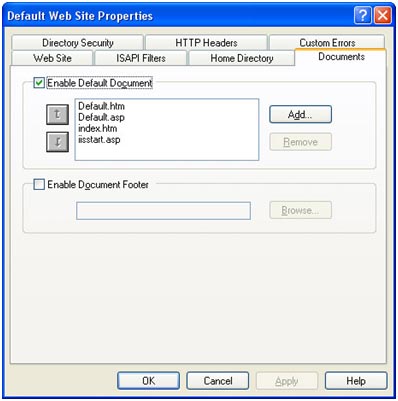
13. After this, you really don't have to make any other changes, until you get more familiar with IIS
14. After IIS is set-up load a sample Index.htm or default.htm, etc in the c:\inetpub\wwwroot
15. You should be able to pull up your browser, and type http://localhost/ or http://127.0.0.1/ and the page you placed under c:\inetpub\wwwroot\ should display in the browser. You can build a sample web page with notepad, just to get started.
16. If you have images, you should create another folder within c:\inetpub\wwwroot\images, and place your images there. Basically, you want to organize your web site content in separate folders under wwwroot
17. Once your computer is set-up, you will want to register a domain name, I use godaddy.com.
18. The key to all of this working is the IP address that your Internet provider provides you. This IP is dynamic, meaning, it could change often. My IP changes maybe once a year.
19. Basically, when someone types in your http://www.yourdomain.com/, you want it to point to the IP that your Internet provider has assigned to your internet connection.
20. You can do this automatically, by using a services like http://www.no-ip.com/, which you can purchase your domain from, and pay them a yearly fee. Basically, if you purchase your domain from http://www.no-ip.com/, they will provide you some software to load on your computer, which will automatically detect your IP Address, and keep your domain name in sync with your dynamic IP Address.
21. Or, you can purchase your domain name from godaddy.com, at a cheaper rate, and you manage the IP with godaddy's console that will allow you to maintain your dynamic IP Address. I use godaddy.com, for a couple of reasons. First, the domain name is cheaper per year to renew, and my Dynamic IP address doesn't change enough for me to have it detected automatically, and pay the extra cost.
22. I believe there might be some other sources out there, that could be Free for the dynamic IP. You would probably need to google this.
23. Once you figure out how your going to manage and keep up with your possible changing IP Address, you should be able to access http://www.yourdomain.com/ from your computer.
24. Once you get familiar with setting up and hosting your web site with standard HTML, I would suggest moving to the next step with dynamic web pages with either php, ColdFusion, asp, Perl, etc. I use ColdFusion, and have been building web sites for over 15 years, and have used a little bit of all, but I have been using Adobe's ColdFusion for about 12-13 years.
- Indian Motorcycle Online Portal - GeorgiaBagger.com
Indian Motorcycle Portal for Product Reviews, Motorcycle Events, Indian Motorcycle Forum,Indian motorcycle classifieds, Indian Motorcycle Service Manuals, Indian motorcycle history, Indian Motorcycle Riders Group Registry,Indian Motorcycle News