create your own

How To Check Your HubPage or Web Page Backlinks

71
rate or flag this page

By stormyweather


My Blog Used In Examples


So You're Online - Now What?

You've got a website, you've got a blog, maybe you've written a HubPage or a Squidoo Page.

Or maybe you're doing all of the above. Bottom line is you're online and you're monitoring your visitors daily noticing every rise and fall in your statistics.

New To The Web?

If you are new to the web, you may not know there are a couple of free tools that you could also be using to check on how your web pages are doing. This hub describes one, and this hub talks about another.

An Example

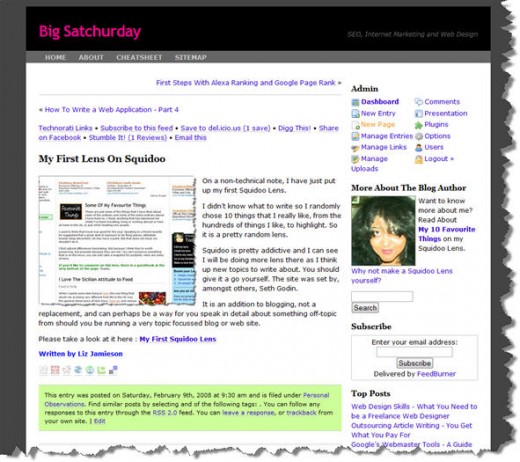
I am using a blog that I started 4 or 5 months ago as an example.

Using Yahoo! Site Explorer

It's good to know how many of your site's web pages are indexed (known to) the search engnes, and who is linking to your webpage.

Your popularity and traffic will be directly proportional to the number of quality incoming links that you have. And that in turn is influenced by the numberof pages the search engines have indexed on your site.

This is why it is better to a large site with hundreds of pages, over a small site with only 7 or 8 pages.

Step By Step Instructions for Using Yahoo! Site Explorer

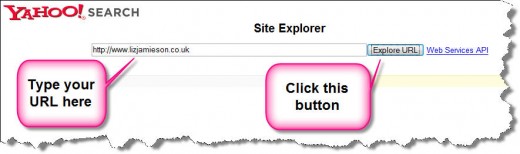
  1. To check this go to Yahoo! Site Explorer
  2. Type in the URL of your HubPage, or web page
  3. Click on the Explore URL button
  4. See the image below for an illustration

How To Use Yahoo! Site Explorer
See How Many Pages Are Indexed

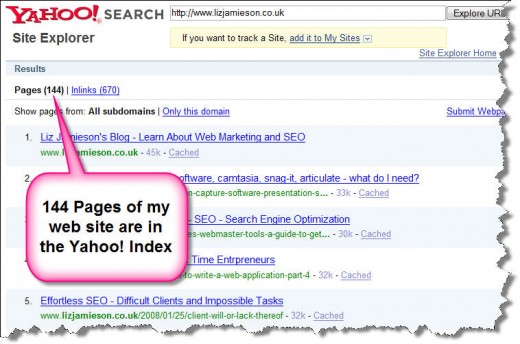
Yahoo! gives a better idea than Google does (unless you sign up for a Google Webmaster Account), of how many pages on your site are known to the search engines (indexed).

Yahoo! is pretty thorough and this pink bubble below shows you that 144 pages of my web site are known to the Yahoo! Index. Now if your site only has 10 pages in total, the search engines can never index more than 10 pages. Make sense? That's why you need a large web site.

Number of Pages in Index
Now Count Your Backlinks

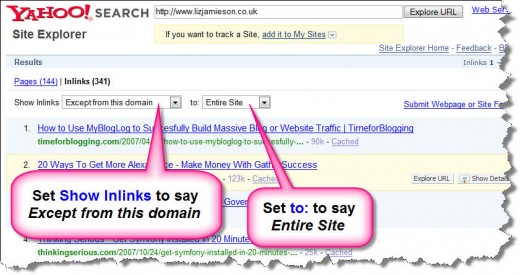
Next,click on the link called Inlinks. This gives you all the sites that link to your site. But select values from the drop-down boxes to allow you to

  1. not count backlinks from within your own site (i.e. internal site links)
  2. count all backlinks into any part of your site (not just to the home page)

How to do this is shown in the image below. Select Except this domain and Entire site from the drop-down boxes.

My site only has 341 backlinks - I'd better start working on improving that particular statistic!

Find your backlinks

11,300 Indexed Pages
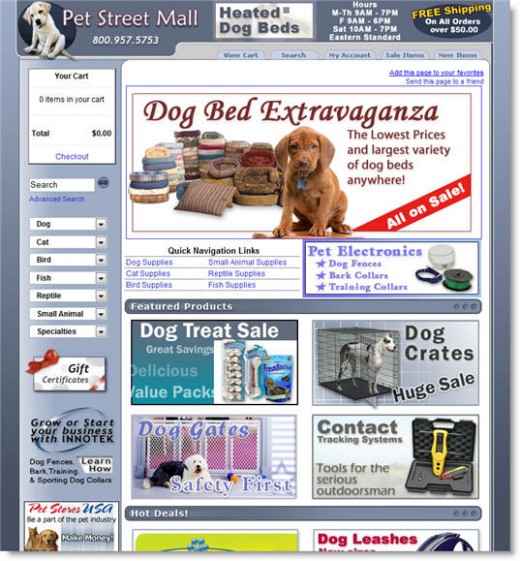
A very successful site with lots of product pages

Conclusions

For a successful web site, you need

  1. stunning original content
  2. loads of pages

the rest will follow, but you can't get big success without a large site.

Take a look at a successful example here (a random web site that I found by typing pet beds into Google) : http://www.petstreetmall.com/

They have

  1. 11,300 pages indexed
  2. 22,100 links coming in from other web sites.

Comments

RSS for comments on this Hub

vreccc profile image

vreccc  says:
2 years ago

Stormy,

Nice hub. This is really valuable information.

I posted one that can also help you do this kind of research on other sites easier. The hub is here:

http://hubpages.com/hub/SEO-Optimization-and-Keywo

The hub introduces a tool called seoquake which actually uses data from Yahoo site explorer.

Jonathan

stormyweather profile image

stormyweather  says:
2 years ago

Hi Jonathan - Thanks for your comment. Your hub is really quite something. Well done.

Rik Ravado profile image

Rik Ravado  says:
2 years ago

Yes - I found this very useful and well presented.

But you say "can't get big success without a large site." - if you write a Hub isn't this a small part of a large site? Or are you saying a successful site needs to be big if it is 'stand alone' - ie has its own domain name?

Good hub anyway!

stormyweather profile image

stormyweather  says:
2 years ago

Hi Rik

Thanks - I hope it was useful. But you bring up a very interesting question, and to address it in full, I'd have to do another hubpage or blog post or something.

But briefly: a large web presence is needed for most web sites to draw visitors. And having subsidiary pages like hubs and squidoo pages are part of that funnelling process.

Unless you have a truly amazing gimmick, I can't think of many successful small (as in just a handful of pages), web sites. It stands to reason that backlinks are very important, and unless you can present a unique, ground-breaking idea in 5 pages that remains so over time, or you sell something like an e-book or online course (with a big pre-launch marketing drive), and you spend lots on pay per click or joint venture marketing, you won't have anything online for your visitors to re-visit unless there is changing, new and quality content.

One such site does spring to mind - www.milliondollarhomepage.com. It has (today) adverts (links out) to 3066 companies on a single page.

In total it consists of only 13 pages but has generated 51,000+ backlinks as of today.

Now that's just not comparable with a typical small business web site of the standard home, about us, contact us, services, faq and portfolio pages.

Raven King profile image

Raven King  says:
2 years ago

Thanks for the information.

stormyweather profile image

stormyweather  says:
2 years ago

No - thank you for visiting!

Rik Ravado profile image

Rik Ravado  says:
2 years ago

Liz - This makes sense - if you have a small blog or site then you can compensate to some extent by using larger sites like HubPages and linking both ways. I'm new to Hubs and blogs but I'm finding it much easier to draw traffic to my Hubs than to my own blog.

I appreciate your experience but also your ability to communicate clearly without too much geek-speak - well done!

russellhub profile image

russellhub  says:
2 years ago

Thanks for the introduction to Yahoo site explorer. I found out that my best inlinks were from the BBC news web site. Leaving comments on news stories is an excellent ways of getting quality links

Holly D Irwin  says:
2 years ago

Simple, clear and informative. Everyone can use the info. Thanks

stormyweather profile image

stormyweather  says:
2 years ago

Thank you Holly. It is short and sweet - the opposite of my hub about web design skills http://hubpages.com/hub/How-To-Get-Started-With-HT which is really quite long. Please check it out - I *think* it is quite readable.

Sheila Martin profile image

Sheila Martin  says:
2 years ago

Thanks for this, Stormy.

And I hope you DO do another hub, to comment on Rik's question.

Best,

Sheila

stormyweather profile image

stormyweather  says:
2 years ago

Thanks for commenting Shelia - I hope you found it useful but do please check my other hubs. I will do another one for Rik's question when I have finished the one I am working on the moment.

Best Stormy

gbgbusiness profile image

gbgbusiness  says:
2 years ago

Thank's I needed that!

stormyweather profile image

stormyweather  says:
2 years ago

No problem! Check this one too (unless you already know about it.) Unbelievably useful.

http://hubpages.com/hub/Why-Is-This-HubPage-So-Pop

SirDent profile image

SirDent  says:
2 years ago

Great hub with lots of information. Thanks for sharing.

sligobay profile image

sligobay  says:
2 years ago

You have helped me greatly. Thanks.

AndyBaker profile image

AndyBaker  says:
2 years ago

Some good info in there. There is also software avaliable (both free, paid, online and offline) that can do the heavy lifting for you here. I won't mention any as that seems a bit too spammy but a quick Google search should prove helpful.

stormyweather profile image

stormyweather  says:
2 years ago

Hi Andy. I don't mind a bit of spammy behaviour if it helps people. Post your links here by all means.

Fred Brod  says:
13 months ago

So good hub page! Its very good to know how to find back links for our website. You finely explained the procedure. Through this hub you successfully brought the importance of back links to the reader of the web page. Thanks for the explanation.

Sexy jonty profile image

Sexy jonty  says:
2 months ago

Thanks for this wonderful help ......

stormyweather .....

I will keep visiting your hubs ......

Submit a Comment

Members and Guests

Sign in or sign up and post using a hubpages account.


optional


  • No HTML is allowed in comments, but URLs will be hyperlinked
  • Comments are not for promoting your hubs or other sites

working