ArtsAutosBooksBusinessEducationEntertainmentFamilyFashionFoodGamesGenderHealthHolidaysHomeHubPagesPersonal FinancePetsPoliticsReligionSportsTechnologyTravel

How To Draw A Dolphin Step By Step

Updated on February 20, 2011

Starting Shape For Your Dolphin Drawing

With any drawing, always start off with a simple shape.

Drawing A Dolphin

Dolphins are not my first choice of drawing subjects to draw, but like the rose drawing tutorial I thought I'd give it a go and try to make it as easy as possible to follow the exact process of drawing a dolphin in this easy step by step drawing guide.

Dolphins have that knack of not having that much detail anyway so all you have to concern yourself over is the shape of all of the important parts like the head, mouth and eyes, as well as the dorsal fin and the tail, so that as a whole the correct proportions apply for your dolphin drawing.

To start we draw a simple curve body shape like the one in the image to the right, the curve at the back is just to make a mark for the dolphins body and this will be the central line that all of the rest of the dolphins main features will be attatched to as well as the underside of the opposite spine curve.

Lightly Sketch In The Fins And Eye
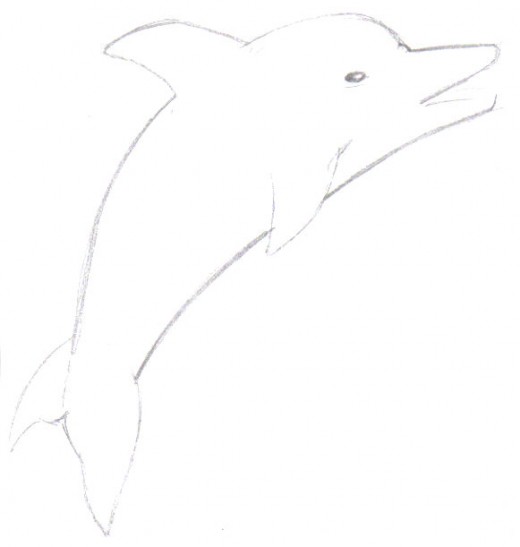
A loose and light dolphin sketch of the main features.

Drawing Lightly To Get An Idea Of Your Dolphin

 Drawing lightly is very important when your drawing confidence is low, it is always a good idea to sketch around the details of the fins, the tail and the eye and beak mouth lightly so that you can make up your mind whether the drawing sketch looks okay to continue to the next step.

The light sketch hardly shows up here, but you can see some of the ways it has changed in the following drawing below.

Darken The Pencil Lines On The Dolphin
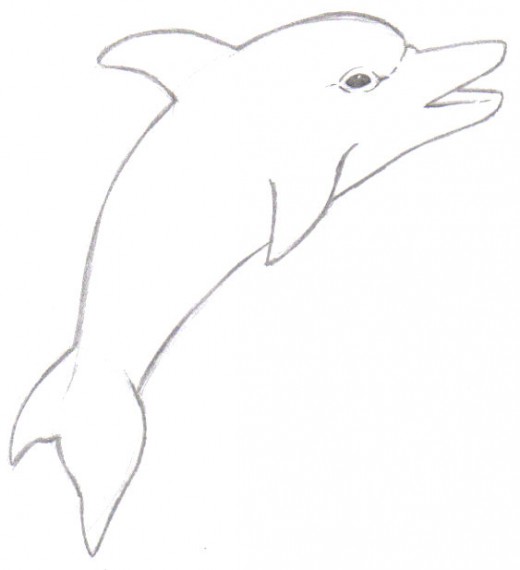
The lines have been darkened with a 2b pencil.

Clean Up And Darken The Dolphin Drawings Pencil Lines

 Darkening the pencil lines always makes the drawing look much cleaner and straight forward and so we progress on from the light pencil sketch above with a more confident approach to our dolphin drawing.

As there are no specific details, drawing a dolphin is easier than say a tiger, as the design is simple and smooth.

Shade The Dolphins Back, Fins And Beak
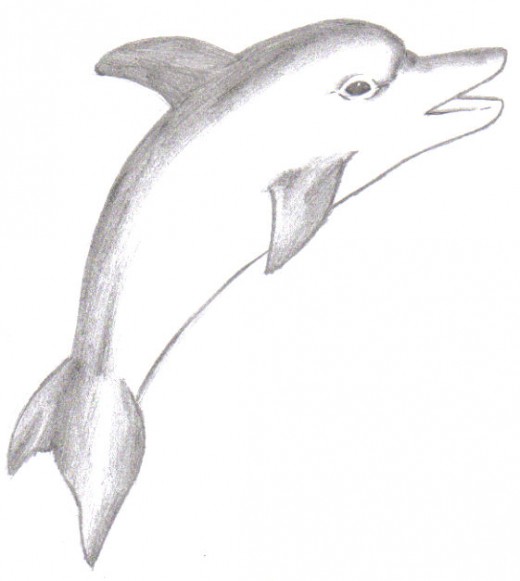
The dolphin looks almost finished, but from here you could add colour or really sketch in that detail.

Dark Pencil Shading On The Back Of The Dolphin

 Shading anything just requires, finding the light source, but on this occasion the dark areas are simply part of the dolphins skin colour, but still we need to add some kind of light source, so this does fine, but only on the back, the fins, the tail and the top of the beak like mouth, the rest remains white as it should be.

There you go, a simple dolphin drawing tutorial, nothing should be hard to draw, as simple sketches done in steps can make a good drawing, always remember that!
working

This website uses cookies

As a user in the EEA, your approval is needed on a few things. To provide a better website experience, hubpages.com uses cookies (and other similar technologies) and may collect, process, and share personal data. Please choose which areas of our service you consent to our doing so.

For more information on managing or withdrawing consents and how we handle data, visit our Privacy Policy at: https://corp.maven.io/privacy-policy

Show Details
Necessary
HubPages Device IDThis is used to identify particular browsers or devices when the access the service, and is used for security reasons.
LoginThis is necessary to sign in to the HubPages Service.
Google RecaptchaThis is used to prevent bots and spam. (Privacy Policy)
AkismetThis is used to detect comment spam. (Privacy Policy)
HubPages Google AnalyticsThis is used to provide data on traffic to our website, all personally identifyable data is anonymized. (Privacy Policy)
HubPages Traffic PixelThis is used to collect data on traffic to articles and other pages on our site. Unless you are signed in to a HubPages account, all personally identifiable information is anonymized.
Amazon Web ServicesThis is a cloud services platform that we used to host our service. (Privacy Policy)
CloudflareThis is a cloud CDN service that we use to efficiently deliver files required for our service to operate such as javascript, cascading style sheets, images, and videos. (Privacy Policy)
Google Hosted LibrariesJavascript software libraries such as jQuery are loaded at endpoints on the googleapis.com or gstatic.com domains, for performance and efficiency reasons. (Privacy Policy)
Features
Google Custom SearchThis is feature allows you to search the site. (Privacy Policy)
Google MapsSome articles have Google Maps embedded in them. (Privacy Policy)
Google ChartsThis is used to display charts and graphs on articles and the author center. (Privacy Policy)
Google AdSense Host APIThis service allows you to sign up for or associate a Google AdSense account with HubPages, so that you can earn money from ads on your articles. No data is shared unless you engage with this feature. (Privacy Policy)
Google YouTubeSome articles have YouTube videos embedded in them. (Privacy Policy)
VimeoSome articles have Vimeo videos embedded in them. (Privacy Policy)
PaypalThis is used for a registered author who enrolls in the HubPages Earnings program and requests to be paid via PayPal. No data is shared with Paypal unless you engage with this feature. (Privacy Policy)
Facebook LoginYou can use this to streamline signing up for, or signing in to your Hubpages account. No data is shared with Facebook unless you engage with this feature. (Privacy Policy)
MavenThis supports the Maven widget and search functionality. (Privacy Policy)
Marketing
Google AdSenseThis is an ad network. (Privacy Policy)
Google DoubleClickGoogle provides ad serving technology and runs an ad network. (Privacy Policy)
Index ExchangeThis is an ad network. (Privacy Policy)
SovrnThis is an ad network. (Privacy Policy)
Facebook AdsThis is an ad network. (Privacy Policy)
Amazon Unified Ad MarketplaceThis is an ad network. (Privacy Policy)
AppNexusThis is an ad network. (Privacy Policy)
OpenxThis is an ad network. (Privacy Policy)
Rubicon ProjectThis is an ad network. (Privacy Policy)
TripleLiftThis is an ad network. (Privacy Policy)
Say MediaWe partner with Say Media to deliver ad campaigns on our sites. (Privacy Policy)
Remarketing PixelsWe may use remarketing pixels from advertising networks such as Google AdWords, Bing Ads, and Facebook in order to advertise the HubPages Service to people that have visited our sites.
Conversion Tracking PixelsWe may use conversion tracking pixels from advertising networks such as Google AdWords, Bing Ads, and Facebook in order to identify when an advertisement has successfully resulted in the desired action, such as signing up for the HubPages Service or publishing an article on the HubPages Service.
Statistics
Author Google AnalyticsThis is used to provide traffic data and reports to the authors of articles on the HubPages Service. (Privacy Policy)
ComscoreComScore is a media measurement and analytics company providing marketing data and analytics to enterprises, media and advertising agencies, and publishers. Non-consent will result in ComScore only processing obfuscated personal data. (Privacy Policy)
Amazon Tracking PixelSome articles display amazon products as part of the Amazon Affiliate program, this pixel provides traffic statistics for those products (Privacy Policy)
ClickscoThis is a data management platform studying reader behavior (Privacy Policy)