- HubPages»
- Technology»
- Internet & the Web»
- Viruses, Spyware & Internet Security
How To Remove Koobface Virus

Koobface is the latest virus that has attacked the social networking phenomenon. Top social networking websites like facebook and myspace are the places where this thing has done nothing but mischief.
The virus originated in early December and is reported to have infected several computers using the facbook platform. Although such a virus has been reported earlier in myspace but this new thing is using different methods to seek into the users PC and spread malware into the computer.
What Is Koobface?
Although famous as virus, the Koobface is actually a worm. A worm is a malware that sneaks into your computer and replicates itself throughout the PC. The difference between a virus and a worm is that, virus attaches it self to the file whereas a worm actually replaces it. A worm can even send automated emails to other PC's trying to infect them using yours.
So Koobface is a worm and attacks a computer by downloading some .exe files into your computer. The main thing is to identify the threat at this point before it is too late.
Possible Koobface emails
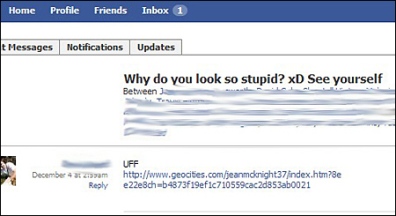
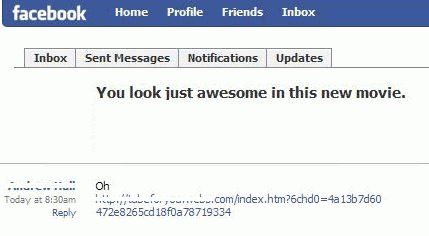
How Koobface Infects a Computer?
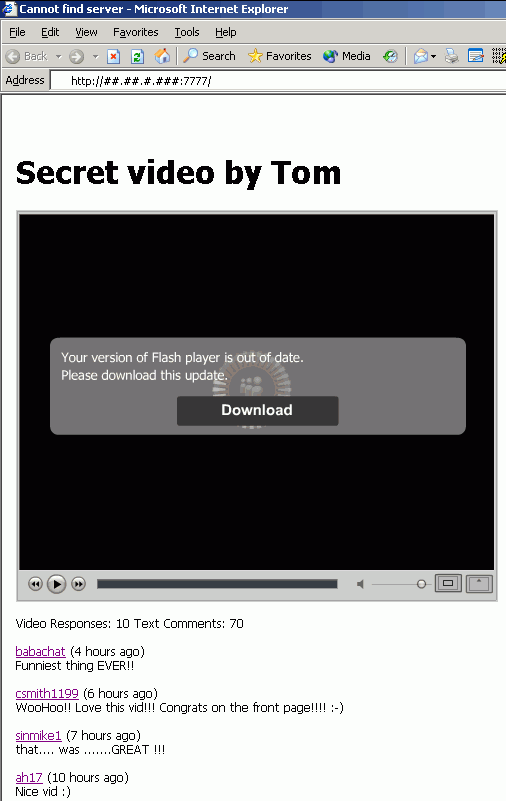
Basically if you are using facebook you should watch for automated email messages that display either an insulting message or something very tempting about you. Messages like, "you look funny in this video" or "you look so stupid in this pic" can be used to persuade someone to click on the link attached, this called 'Social Engineering'. Once the user clicks on them it takes you to a video which doesn't play and they ask you to download certain codecs which can be a 'flash_player.exe' file.
If this file is downloaded, your computer becomes open to Koobface malware. It downloads a file 'tinyproxy.exe' which hijacks your PC. It can even alter search results from Google, Yahoo etc and redirect you to websites selling malicious softwares.
How To Remove Koobface Automatically?
Here I will discuss two method of removing Koobface. First lets discuss the automatic method. The facebook security page has posted about this but there is no genuine way of removing this malware. They have only asked people to change their password in order to protect user security.
The best automatic method to remove this thing is of course to get a good malware remover which can automatically detect and remove it. If you have already bought a good spyware you can find the removal instructions from the support page. But it can be removed automatically if your software is updated.
The major problem is that the Koobface worm is constantly changing itself, so make sure you have the latest version of the mlaware installed.
If you don't have a anti-malware software, you can download one here. It has been so far the best free spyware remover that I have found.
How To Remove Koobface Manually?
Although it is highly recommended that Koobface or any other parasite should be removed using an automated software but still if you want to do it manually here is the procedure but before attempting anything, make sure you backup your computer:
Using The Add\Remove Program Tool:
This is not a 100% removal method because most of the malware don't really appear in the list but if they are you can do this:
- Go to Add\Remove utility.
- Look up for the Koobface malware to remove and uninstall it.
But it is noted that Koobface restores it self on rebooting. So here is a better method:
By Removing Registry Files
Here are the steps:
- Search for "koobface" in Mycomputer using find utility.
- Note down Koobface file path somewhere.
- Press Ctrl+Alt+Del to open 'Task Manager'
- End the "Koobface" processes.
The following processes must be ended:
- %SYSTEMROOT%\bolivar28.exe
- che07.exe
- bolivar28.exe
- %WinDir%\system32\nScan\ekrn.exe
- %WinDir%\system32\nScan\ecls.exe
- %WinDir%\system32\splm\ncsjapi32.exe
- %WinDir%\bolivar28.exe
- C:\Windows\fbtre6.exe
Now you need to change 'Registry Files', here is what to do:
- Type 'regedit' in Run and press Enter.
- The Registry Editor will appear, locate the above mentioned process files and delete them.
- Locate "Koobface" registry entries and delete them, they are as the follows:
- HKEY_LOCAL_MACHINE\SOFTWARE\Microsoft\Active Setup\Installed Components\Intelli Mouse Pro Version 2.0B\StubPath: "%WinDir% \System32\splm\ncsjapi32.exe"
- HKEY_USERS\Software\Microsoft\Windows\CurrentVersion\RunOnce\*Intelli Mouse Pro Version 2.0B*: "%WinDir% \System32\splm\ncsjapi32.exe"
- HKEY_USERS\Software\Microsoft\Windows\CurrentVersion\Run\Intelli Mouse Pro Version 2.0B: "%WinDir% \System32\splm\ncsjapi32.exe"
- HKEY_USERS\Software\Microsoft\Windows\CurrentVersion\Explorer\Advanced\Hidden: "2"
- HKEY_LOCAL_MACHINE\SOFTWARE\Microsoft\Windows\CurrentVersion\RunOnce\*Intelli Mouse Pro Version 2.0B*: "%WinDir% \System32\splm\ncsjapi32.exe"
- HKEY_USERS\Software\Microsoft\Windows\nScan32\ExecuteDate: "14\8\2008"
- HKEY_LOCAL_MACHINE\SOFTWARE\Microsoft\Windows\Current Version\Run\"systray" = "c:\windows\mstre6.exe"
- HKEY_LOCAL_MACHINE\SOFTWARE\Microsoft\Windows\Current Version\Run\"systray" = "C:\Windows\fbtre6.exe"
- HKEY_CURRENT_USER\AppEvents\Schemes\Apps\Explorer\Navigating
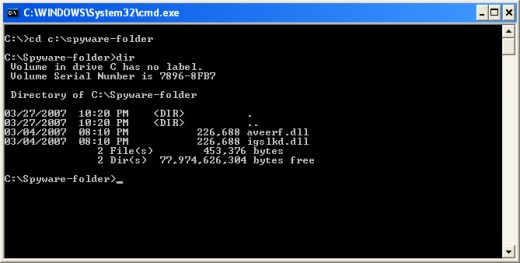
Now you have to unregister dll file as follows:
- Go to start and type in 'cmd' to open comman prompt.
- First locate the following dll files using 'dir' command.
- %WinDir%\system32\nScan\ekrnEmon.dll
- %WinDir%\system32\nScan\ekrnScan.dll
- %WinDir%\system32\nScan\ekrnEpfw.dll
- %WinDir%\system32\nScan\ekrnAmon.dll
- %WinDir%\system32\splm\lmfunit32.dll
- %WinDir%\system32\splm\mcaserv32.dll
- %WinDir%\system32\splm\kbdsapi.dll
- Now change the current directory using 'cd' command leave a space after 'cd' and then the path of dll file, which you have located above. Press enter after this.
- Now unregister dll file by typing "directory path+'regsvr32/u'+dll file name". Press enter, the file will be unregistered.
I would once again recommend that you do it automatically since there is risk of damaging the computer as important files may be deleted or changed.