How To Turn A Gmail Account Into A MP3 Player

70Make Your Own Free MP3 Player
How To Turn A Gmail Account Into A MP3 Player
Yes you can quickly and easily turn a Gmail account into a great MP3 player that you can use any time you want to to play your music on your computer and save all that space on your computer.
So I bet your wondering how do I turn a Gmail Account into a MP3 Player. Well its quick easy and if you follow the very easy to understand instructions here you can do it quickly and easily.
1. I would suggest creating a new or a few new Gmail accounts to turn into MP3 players. Just create the account or accounts and be sure you keep track of the user names and passwords of your new account or accounts.
2. When you download a new song you like or a friend sends you a song you like go into the account you are using as a MP3 Player and upload the file and send it to yourself. See photo example of this below. And there you have your free MP3 player with lots of great storage space. And by using this method you are saving all that space on your computers harddrive.
You will see the below in your email once you send the music file to yourself.
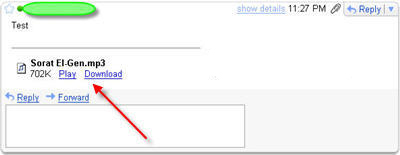
When you click play the below player will pop up and play your file.
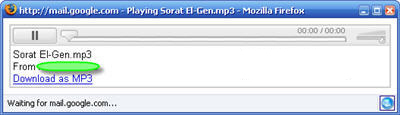
Yes Its That Easy To Create A MP3 Player
Yes it is that easy to create a free MP3 Player from a Gmail account.
You can use the subject field to put the title of the song and the artist so you can later use the search feature and find the song you want to play quickly.
You can even share the created MP3 player accounts among your family and friends and they can download your music and upload music they want to share with you. I myself have created several MP3 Player accounts this way and some of them are over 6 months old and still work perfectly.
Let me know what you think about the ideal in the comment section below and if you really like it vote thumbs up and click on the little share it green button and Digg this page if you will please. I will be back with some other quick and easy ideals for you to use.
This Hub Page Is A Original Work. Do Not Copy Or Post Any Where Else

And Here Is More Great Information About Gmail

Gmail And GSpace Go Together To Give You Online Storage For Free
Gspace is a free Firefox Extension that you can use to create virtual drives from Gmail Accounts quickly from your Firefox Browser. One great thing about GSpace is as soon as you have the Firefox Add on installed you can just go to it click on it and a on screen interface will open up allowing you to manage as many Gmail Accounts as you want and remember each Gmail account has 2 GB of online storage. And Gspace has File Transfers to manage Files , Player Mode to listen to your saved music , and Photo Mode to manage your saved photos , With Gspace there is no reason to store anything on your computer. You can use Gmail Accounts to store everything and keep your computers hard drive free of clutter.
Post Your Comments Below About Turning A Gmail Account Into A Free MP3 Player
PrintShare it! — Rate it: up down flag this hub
Feel Free To Post Your Comments Here. Do you have any quick and easy ideals post them here.
I never would have thunk it, who would have? its so easy too, very nice work.....jimmy
Thanks for the comments guys. It does work great. I have like 16 accounts created now for just this purpose and have freed up a lot of space on my computers hard drive.
great idea!
Great i wonder if will work on all regular mp3's.
Yes it will work on all regular MP3 files. Never had a problem yet.
nice idea...im using my gmail as file hoster :)
Yes Gmail will work great for a file host except they will not let you email or store .exe files. But other types of files are great.
nice..creative and Google can afford the storage space!
thnx
MD
Smart move, Guv ;)
Some More GMail Tips Etc For Everyone
In case anyone has not yet figured this out you can do the same thing by converting G Mail Accounts to File Servers. And it works great. Another Thing You May Not Know If you signed up for hank1952@gmail.com you also have the email address hank1952@googlemail.com though they don't tell you that.
Just try to email yourself at your googlemail address and you will see it does work. You can also create and use a lot of other email addresses from your account by using the + sign.
Example hank1952+235@gmail.com hank1952+deerhunter@gmail.com hank1952+beachbum@gmail.com Will all be delivered to hank1952@gmail.com
And if hank1952@gmail.com is you I am sorry. I was only using it as a example address.
And if anyone else knows some great Gmail Tips or Tricks feel free to post them here in the comment section of this Hub Page.
Thanks
Your welcome Cyber-World. And if anyone else has tips , tricks or etc to post about Gmail feel free to post them here in the comment section.
What a great idea dude...thanks for sharing.
Your very welcome Mate
I really like gmail. It is amazing that people still use hotmail and the like. I am always amazed at how restrictive it is compared to gmail. I try to switch people whenever possible, but some people have had their hotmail accounts for years...
Gmail is great. Thanks for your comment. It is appreciated. Thanks.
Since some months, I can't play on line mp3 files, I can only download and play after that.
Can anyone see how to fix it?
Nice Thinking. But you should still backup your music onto your hard drive, one day you don't even know their server might crash, or get stolen. Just so you know
Thank you! Great to know it =)
But how do you know what teh url is to embed it into a blog?
only problem i have run into is a 25MB file size limit.
Pure genius. Thanks for the advice


Benson Yeung says:
13 months ago
shall try this one out.
thanks.