How do i save youtube videos on my computer

59
rate or flag this page

By creativeMind


Tutorial on how to save youtube videos on my computer

We will use a free tool known as save2pclight .

save2pc Light is a free tool that downloads videos from Youtube or Google Video and saves it as Avi or Mpeg or Flv file to your computer. You can download High Quality videos and High Definition videos from YouTube. using this free tool.

You can download it from here :

http://www.save2pc.com/files/save2pc_light_setup.exe

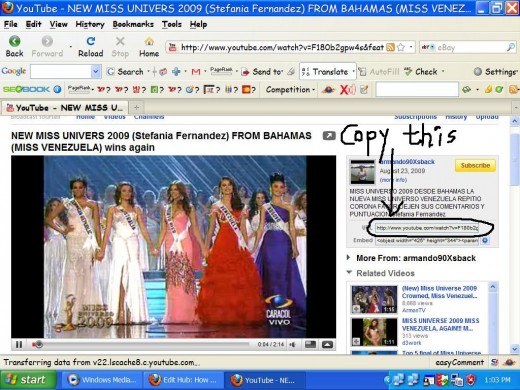
Once you have downloaded install save2PC in your computer.After installing go to YouTube.com. Navigate to the video page you want to download.


Now at the right corner you can see the link of video. Copy that link .

Note the link in picture.
  • Now open save2PC.
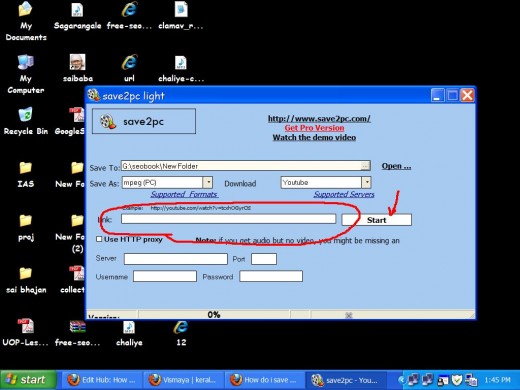
  • Paste the URL copied to link text box (refer figure below) and click start
  • Video will be downloaded.
  • The progress if download will be displayed at bottom of save2pc
  • After download completes you can view the video.
  • We have successfully completed downloading.
Get latest updates delivered to your email

Print   —   Rate it:  up  down  flag this hub

Please leave your valuable comments here :

RSS for comments on this Hub

cgull8m profile image

cgull8m  says:
4 months ago

Nice Hub, very easy to use. I just save the YouTube videos in the YouTube site itself in my favorites and in playlists. It is my online video storage option :) But some videos are taken down the above method will be very useful.

creativeMind profile image

creativeMind  says:
4 months ago

ok..saving online is fine.. but there are people using broadband connection having night unlimited plans. for them saving offline is good idea.

thanks cgull8m for your valuable comment.

Kevin Peter profile image

Kevin Peter  says:
4 months ago

Is there any option to bulk download ? I have a bunch of youtube links with my Computer ,I want to download these to my harddisk .what is the option for bulk download?

Isabel_Belicia profile image

Isabel_Belicia  says:
4 months ago

very informative-thanks

Helen Cater profile image

Helen Cater  says:
4 months ago

I needed to do this for some research on my hub and found this very useful. Thanks again for another great hub.

nirudyogi  says:
3 months ago

VDownloader is a computer software that helps you download and save videos from the Internet. Download videos from YouTube, MySpace, iFilm, DailyMotion, Metacafe and much more. You can also convert videos using VDownloader. VDownloader comes packed with features you cannot afford to miss. VDownloader will help you keep those great video clips you always wanted to keep. Get it from here http://vdownloader.com/

nirudyogi profile image

nirudyogi  says:
3 months ago

VDownloader is a computer software that helps you download and save videos from the Internet. Download videos from YouTube, MySpace, iFilm, DailyMotion, Metacafe and much more. You can also convert videos using VDownloader. VDownloader comes packed with features you cannot afford to miss. VDownloader will help you keep those great video clips you always wanted to keep. Get it from here http://vdownloader.com/ I guess its best solution

Lucey Knight profile image

Lucey Knight  says:
2 months ago

Thank you for sharing some valuable information that helped me learn something new.

Philent profile image

Philent  says:
2 months ago

Thanks; this is very useful!

Submit a Comment

Members and Guests

Sign in or sign up and post using a hubpages account.


optional


  • No HTML is allowed in comments, but URLs will be hyperlinked
  • Comments are not for promoting your hubs or other sites

working