How to Configure IP Address on Windows XP?

By using ipconfig, you can see the IP address of your PC in Windows XP. This IP address is configured by any person. If you want to use Internet, you must have to configure IP address. Moreover, if you want to share some files or want to copy some files from other PC into your office or campus LAN, you must have to configure the IP address. It's a very easy way. In this page, you will find the ways to configure the IP address in Windows XP. Just keep reading...
IP address can be configured by two ways. The are:
- Manually configuration
- Dynamic configuration
Manual Configuration
In manual configuration, you have to assign all the IP address manually. To configure IP address manually, follow the following steps:
- Click on Start menu.
- Now go to Control Panel.
- From the control Panel, go to Network Connections.
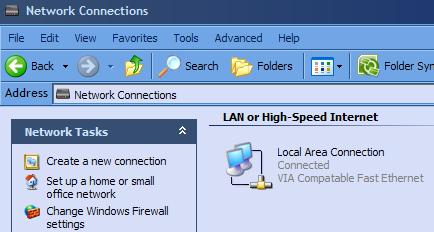
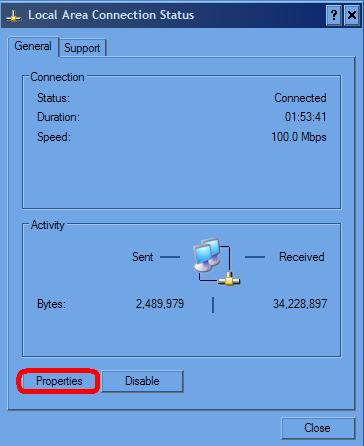
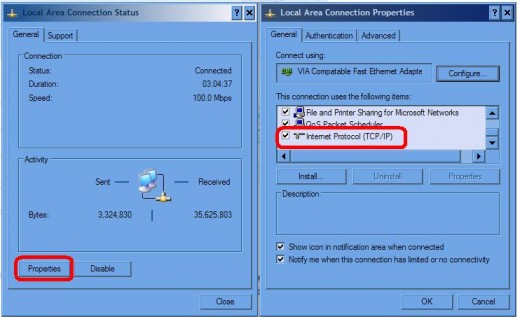
- From the Network Connections window, you will see Local Area Connection. Double click on that icon or click right mouse and go to the properties. Now, you will see the following figure and click on Properties of that window.
- After clicking Properties options, another Local Area Connection Properties window will be opened. This will looks like the follwoing figure:
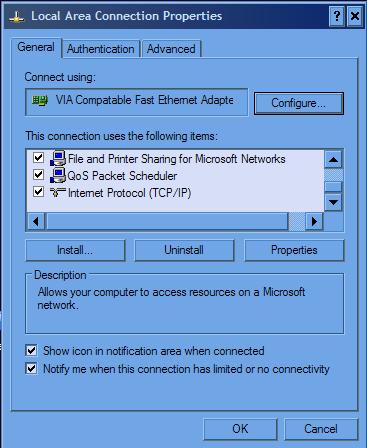
- Form the Local Area Connection Properties window select Internet Protocol (TCP/IP) and double click on it.
After double clicking, you will find Internet Protocol (TCP/IP) Properties. It looks like the following figure:
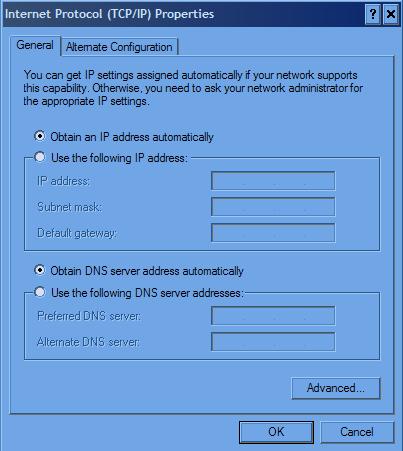
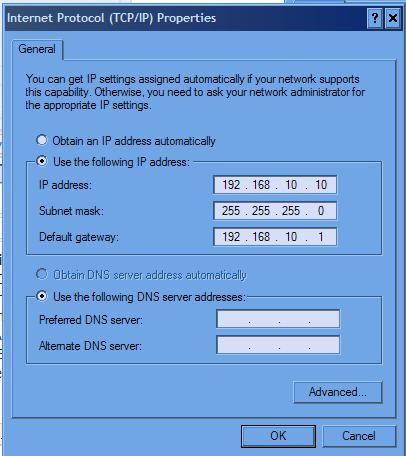
- Now, select Use the following IP address and put the IP address, Subnet mask and Default gateway which will be provided by the Internet connection provider or the IP address of your office or campus LAN. For example, my PC is connected to my campus LAN. The IP may be 192.168.10.10, Subnet mask may be 255.255.255.0 and Default gateway may be 192.168.10.1. So, I have to all these information like the following figure:
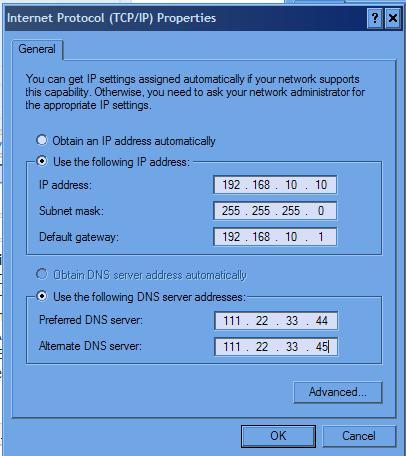
- Now put Preferred DNS server and Alternate DNS server address by selecting Use the following DNS server addresses option. For example, Preferred DNS server address is 111.22.33.44 and Alternate DNS server address is 111.22.33.45. So, put the in the address field. If you put them, then it may look like the following figure:
- At last, click on OK and finished configuring the IP address.
After doing all these steps, check whether you successfully configured the IP address. For this, go to Start, then click on Run, type cmd and hit Enter. Now a black window will be open and write ipconfig /all and hit Enter. Now check whether all the IP related information matches properly. If not, please correct them by configuring the above steps again.
So, by following the above steps you can configure IP address manually.
Dynamic configuration
Dyanamic configuration is very easy to configure. Remember, dynamic configuration is only possible if you have a DHCP server. If there is a DHCP server, IP address can be configured dynamically by following the steps:
- Click on Start menu.
- Now go to Control Panel.
- From the control Panel, go to Network Connections.
- Double click on Local Area Connection and select Properties and then double click on Internet Protocol (TCP/IP).
- Form the Internet Protocol (TCP/IP) Properties window, select Obtain an IP address automatically. Later select Obtain DNS server address automatically.
- At last, click on OK and finished configuring your computer's IP address.
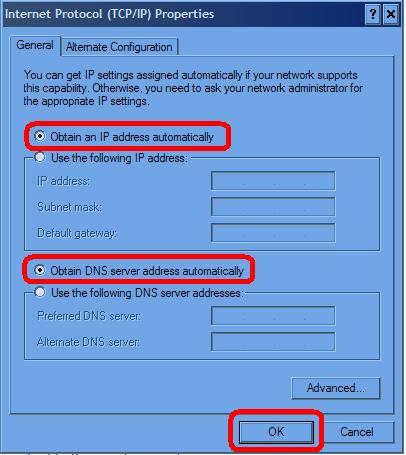
By following the above steps, you can easily configure IP address dynamically.
© Written by rancidTaste
If you are enjoyed this post, please consider to leave a comment at the comment section of this page or Subscribe to rancidTaste's RSS feed to get new pages which will be delivered to your feed reader. You can also read more hubs by rancidTaste.
Related
How to Speed Up Internet Connection with Google DNS
How to assign IP Address to the client & server computer?
Surplus Auctions - How To Get A Cheap Used Laptop For Personal Use Or Re-Selling

How to Format Hard Drive and Install Windows Operating System
How to Share an Internet Connection on LAN (Windows 5)
![How to Remove Kaspersky Password Protection? [Easily Recover]](https://images.saymedia-content.com/.image/t_share/MTc2Mjk3NDcwOTAzNTkyMTI2/how-to-remove-kaspersky-password-protected-easily-recover.png "How to Remove Kaspersky Password Protection? [Easily Recover]")