How to Fix the Problem "Task Manager is being disabled by your administrator"?

There are some types of viruses or Trojans which disable the task manager. If you are affected by this type of viruses or Trojans then when you press Ctrl+Alt+Delete keys togetehr, you will see an error message like Task Manager is being disabled by your administrator. You can easily fix this type of problem. This page contains information related to fix the viruses or Trojans and remove the message Task Manager is being disabled by your administrator.
Steps to fix the problem "Task Manager is being disabled by your administrator"
Follow the following steps to fix the problem "Task Manager is being disabled by your administrator":
- Click on Start menu and then click on Run.
- Edit gpedit.msc in the Run prompt and hit Enter key of your keyboard.
- After the following steps, Group Policy window will be opened. Form there, select User Configuration.
- Under "User Configuration", click on Administrative Templates.
- Now click on System and then click on Ctrl+Alt+Delete options.
- From the right side window of Group Policy, double-click on Remove Task Manager.
- Now, set the option Remove Task Manager option as Disabled.
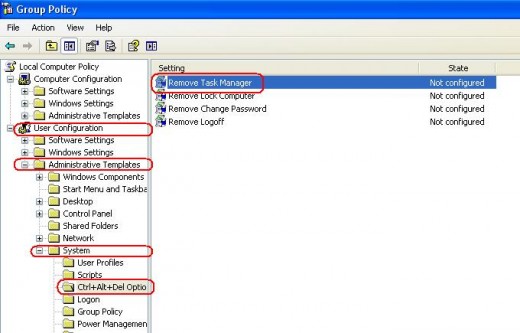
By following the above steps, you can easily solve the problem Task Manager is being disabled by your administrator.
© Written by rancidTaste
If you are enjoyed this post, please consider to give a thumbs up and leave a comment. You may Subscribe to rancidTaste's RSS feed to get new pages which will be delivered to your feed reader. You can also read more hubs by rancidTaste.