How to Open Cdr, Cmx, Ai files without buying Illustrator or Corel Draw.

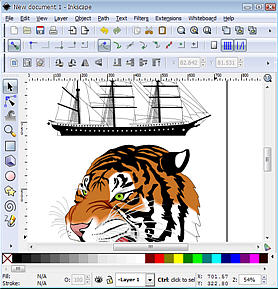
Using Inkscape - Open Source Software.
Inkscape is one of the best Vector Drawing programs available today and the fact that it is free does not detract from the quality of this program in any way. Inkscape is by far my favourite Illustration program.I am happy to say that the latest Beta release of Inkscape,allows you to open CDR files Corel Draw versions 7 to 14, Cmx - Corel Presentation files and Ai - Adobe Illustrator Files.
The latest Pre Release version 0.47-development is almost ready for final release. The download file is called 'Inkscape-0.47pre1-1.win32.exe' It is very stable and comes in the form of a self installing .exe file. You can download the file Here.
It is a good idea check http://www.inkscape.org and download the final release is when it is ready
Install the program from the exe file first. Launch the program and when it opens up you can then Import a Corel Draw file. File > Import from the main menu.
Note: As this is a Beta release I suggest you IMPORT, rather than Open a file, just in case you corrupt the original file by accidentally saving over the top.
I successfully opened a Corel Draw file, saved it as an EPS file and then opened it in Adobe Illustrator, with no loss of data!
Not every file opened with all the colors, especially complex files with a mix of Bitmaps, shadows and Vector Drawing, but they all opened and allowed me to edit them, which is the main thing, and none of the Vector line work was lost at all.
Even though this is a pre-release version, I have found it to be quite stable and it must be closely approaching its final release date. Having said that it is still BETA software, so be a little bit forgiving if it crashes....oh and by the way it's free anyway.
This is a big deal for me , because I have been using Corel Draw for many years and have a huge amount of Corel Draw file, but lately I prefer to work in Inkscape, now I can access those files and all that Clip art without opening Corel Draw.......HAPPY DAYS.
I have written a new Hub about using the exiting new filters in this new release of Inkscape. You must read it, these new features are truly amazing.
If you want to learn more about Inkscape visit my dedicated website www.Inkscapetutorials.net for free training and download information.