How to make a cool mashup without server-side scripting

Requirements
Resources :
- A domain address
Costs about $10. You can buy one here. - Hosting server
You do not have to spend any money for this one. Sign up for a Google Appengine account to get free hosting service which can serve about 5 million visitors a month.
Knowledge of :
- HTML
- Simple Javascript
Access to :
- Yahoo pipes ( http://pipes.yahoo.com )
A Yahoo ID is sufficient to have access to Pipes. - Amazon Product API ( http://affiliate-program.amazon.com/ )
Sign up as an Amazon Affiliate, if you are not already one. This is a great way to make money from Amazon.
What this mashup does
Looking at the above requirements, you might have guessed that we are making something with Amazon.com
Amazon Product Advertising API gives you a lot of operation, and the purpose of this hub is not to educate you about all of those. Here, we learn how to perform only one operation. Once you know this, it is trivial to learn to use the rest of the operations.
This mashup fetches a list of all the books that were written by an author, that are available on Amazon.com
Determining the Amazon API Operation
The following link will give you access to the list of operations you can perform using the Amazon API :http://docs.amazonwebservices.com/AWSECommerceService/latest/DG/
As we have to list all books written by a particular author, it is necessary that we search the Amazon database. For this reason, we choose to use the operation called ItemSearch
The operation can take several parameters, but we shall use only the following two parameters for this mashup :
- Author : The value of this will be input by the user.
- SearchIndex : This will always be Books, so that we list all the books.
Why use Yahoo Pipes
If you are asking, why is it that we need Yahoo Pipes, the simple answer is, so that we do not have to write any server-side code.
You can see that calling the Amazon APIs means that you have to request a URL with a querystring. In the absence of Yahoo Pipes, this would mean, your server has to do a cURL or wget to fetch the results from that request. Yahoo Pipes makes the necessary request, and returns the results in the form of JSON, allowing callbacks, so that client-side Javascript can do everything for you.
The advantage is that, you are saving on the bandwidth of your hosting service, and your Javascript code is going to be very simple.
Integrating with Yahoo Pipes
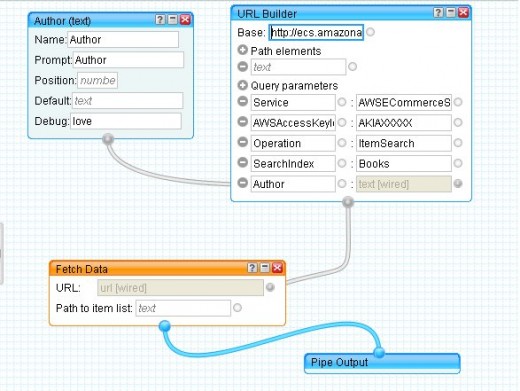
Follow these steps in sequence to build your Yahoo Pipe :
- Create a new pipe
- Click on User Inputs category, and select Text Input
- Set the properties of the newly added Text Input to the following, and leave the rest of the properties unchanged.
Name = Author
Prompt = Author - Click on Url, and select URL Builder
- Set the properties of the newly added URL Builder to the following,
Base = http://ecs.amazonaws.com/onca/xml?Service=AWSECommerceService&Operation=ItemSearch&SearchIndex=Books&AWSAccessKeyId=XXX&Author=XXX
(Paste the entire URL)
AWSAccessKeyId = [ Your access key id ]
Author = Connect the Text Input we created in the previous step to the URL Builder's Author. - Click on Sources, and select Fetch Data.
- Connect URL Builder's output to the Fetch Data box's URL.
- Connect the Fetch Data's output to the Pipe Output.
The final pipe should look like this
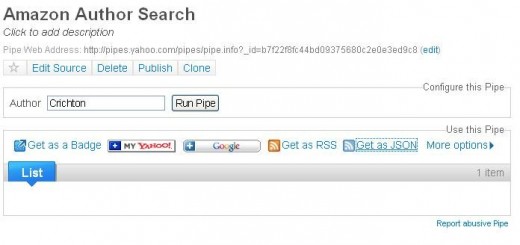
The Run Screen
Creating a HTML interface
Once your Yahoo Pipe is ready, save it, and then Run it. Right click on the "Get as JSON" and copy the link location.
The link location could be something like this : http://pipes.yahoo.com/pipes/pipe.run?Author=Crichton&_id=b7f22f8fc44bd09375680c2e0e3ed9c8&_render=json
Append the following to the above link :
&_callback=showBooks
This is to make a JSON callback. showBooks is a Javascript function that should be defined in your HTML page.
Enter the following content in your HTML page, to make the JSON request :
<html>
<head>
  <script>
      function showBooks(obj){

      }
  </script>
</head>
<body>
  <div id="booksContainer"></div>
  <script src="http://pipes.yahoo.com/pipes/pipe.run?...">
  </script>
</body>
</html>
Of course, in the src, you will be putting in your pipe's URL. So this is sufficient to make the JSON request. Now your showBooks function should be able to parse the JSON and render the results.
Well, this is how you print the Title of a book :
obj is the object that is passed to the showBooks function.
obj.value.items[0].Items.Item[x].ItemAttributes.Title
So, that is it. Loop through obj.value.items[0].Items.Item.length and add the title of each book to the booksContainer DIV element.
Conclusion
So, you just learnt about Amazon API and Yahoo Pipes and how both can work together. The prototype we created here is very rough indeed. You might have felt it is a long read, but the stuff is so simple and easy, that when you are doing it, it can be completed very quickly.
But now that you know how to use them, you can put in all your creativity to make tons of stuff with these technologies.
Some parting ideas :
- A natural language search interface for Amazon
- An interface that lists the topsellers from every category on Amazon
- Product comparison service
Related Reading
- Creating a simple HTTP server (in-depth node.js series)
Running a simple HTTP server from your own machine is very easy. Here is a tutorial that will get you started