How to set a password to any Windows program?

Do you want to restrict any Windows program? Do you want to protect any executable file. Probably, you heard about folder password-protection. But, you can also protect any executable file or program on Windows by setting a password. To learn, how to apply rectification or how to password-protect to any Windows program or executable file, just keep reading...
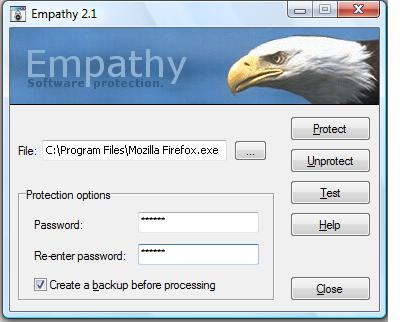
For establishing a password to any executable file, you may use Empathy. It's a special utility program. But the program is really amazing. It allows you to set a password to any Windows executable file or the programs. It sets the password in such a way that when any user want to open the program, it simply asks the password to run the .EXE file. If you failed to provide the correct password, then all's are wrong and useless. You can't access the executable until you open the program to run.
This program runs on Windows NT 3.51, Windows NT 4, Windows 2000, Windows XP, Windows Server 2003, Windows Vista, Windows 95, Windows 98 and Windows Me. Moreover, there is a great feature of this software. This software has the protection capability to copy them to other public location and it doesn't rely on any type of oper5ating system.
This type of program is often used at university or several places to restrict the execution of several executable file. For example, you are a university lecture. Everyday, you see some of the boys come to the classroom and start browsing by using Firefox. Firefox is an executable program. You can easily restrict by using this great program.
To download this great software, click the link.
In this way, by using Empathy, you can easily put restriction or password-protect to any executable file or the programs.
© Written by rancidTaste
If you are enjoyed this post, please consider to give a thumbs up and leave a comment. You may Subscribe to rancidTaste's RSS feed to get new pages which will be delivered to your feed reader. You can also read more hubs by rancidTaste.
Want to express your knowledge and ideas, click here to join Hubpages.
It's simple, just like 1-2-3
![How to Remove Kaspersky Password Protection? [Easily Recover]](https://images.saymedia-content.com/.image/t_share/MTc2Mjk3NDcwOTAzNTkyMTI2/how-to-remove-kaspersky-password-protected-easily-recover.png "How to Remove Kaspersky Password Protection? [Easily Recover]")