Neck Pain and Headaches from computer use.

Neck pain associated with computers and texting.
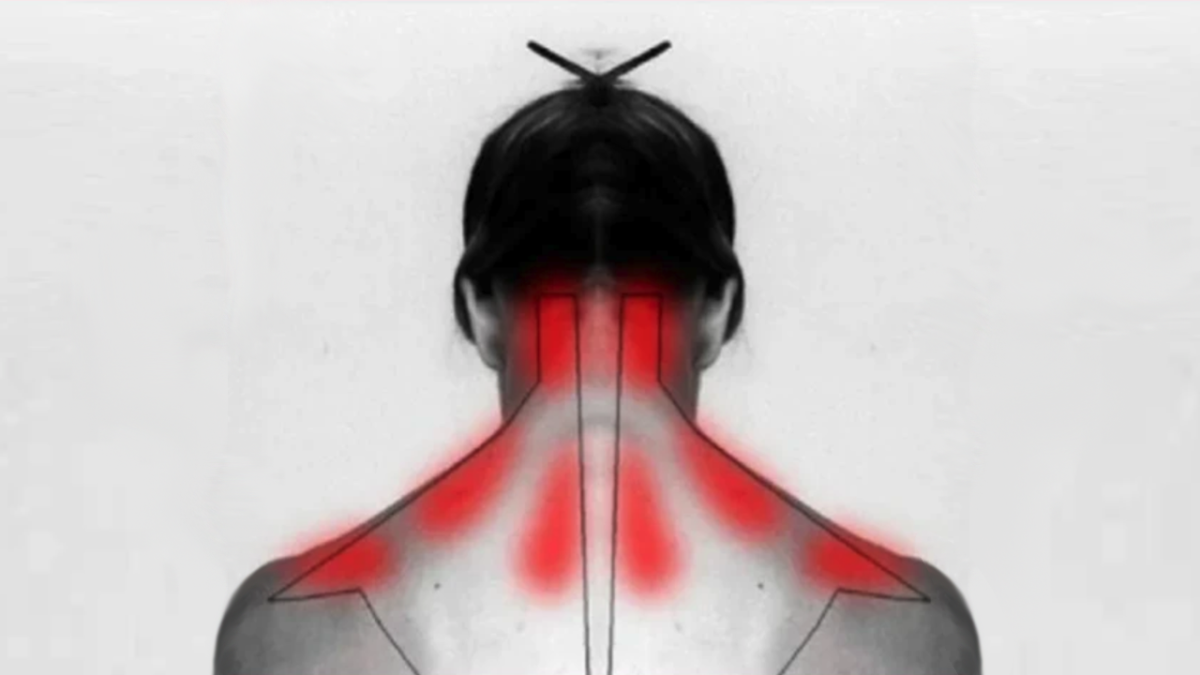
Quite often patients present with non traumatic neck pain (cervicalgia) that can be attributed to their computer usage and more recently to texting.. These patients may complain of frequent muscle spasms in the neck and midback, sharp cervical or thoracic pain, and or radiating pain down the arm. Additional symptoms may include shoulder, elbow or hand pain, numbness, or weakness. Neck pain can become debilitating and cause extreme discomfort, decreased strength and eventual arthritis.
In order to reduce neck pain it is important to identify the primary cause rather than just giving a diagnosis. Diagnosing neck pain without removing the irritant leads to future flare ups and degeneration. A preventative treatment plan must be incorporated with pain management otherwise symptomatic care is temporary.
Signs of neck pain due to computer use or texting
- Pain in the neck
- Pain in the upper back
- Fatigue in Neck Muscles
- Muscles spasms in the Neck
- Pain,Tingling, Numbness down the arm
- Weakness of the Shoulder, arm or hand
- Headaches
Physical changes noted from computer use
- Head forward Posture
- Hunchback
- Rounded Shoulders
- Raised shoulder on one side
- Tilted or rotated head
- One arm appears longer
What happens when you work on a computer
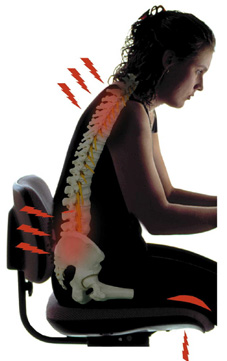
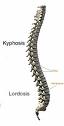
The distribution of weight down our spine and legs is a delicate and important balance. Our heads are very heavy and if our neck is not in the right position a tremendous stress is put on the muscles and joints. When seated in front of a computer we first reduce the normal curve of our lower back ( lordosis) because of the rotation of the pelvic bones and sacrum.
This lordosis is what makes the curve in your lower back and in your neck. The upper back curves the opposite way and is called a kyphosis. When one lordosis is reduced the other must make up for it in order to maintain the balance of the body. The same holds true is one is increased, the other must decrease.
The computer user often finds that their head drifts forward towards the screen. This is due in part by the fatigue of the muscles of the neck but also by the shortening of the pectoral muscles. The pect muscles lie in your chest and are responsible for bringing your upper arm forward and internally rotating the humerus.
A little example of the pects at work
Put your right pointer finger on the J key and your left on the F key. Notice the forward movement of your arm and the internal rotation of the arm, elbow and hands. The main stabilizer of this position is the pect muscles. Imagine how strong and short they become after hours upon hours of this posture. Add to this the movements of the mouse and you can see how your dominant side has to rely on these pect muscles for gross movements while using the computer.
- Shortened pects cause the shoulders to roll forward
- This along with muscle fatigue cause head forward movement
- The result is strain on the neck
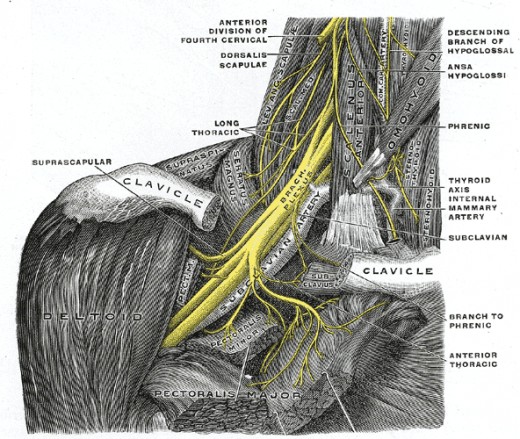
As the shoulders roll forward and the neck juts out the stress is transferred to the lower neck and upper back. This area contains a complex network of nerves that go to your arm and hands. This is called the Brachial Plexus.
Irritation of the tissue surrounding these nerves will cause neurological symptoms as well as local pain. Many neurological dysfunctions aren't reported and often aren't noticed by the patient but found on examination.
- Reduced strength in arm and hand
- Changes in sensation
- Changes in reflexes
It is this irritation to the brachial plexus that leads to a misdiagnosis of carpal tunnel, tendinitis, bursitis and other secondary conditions. Once again, treating a symptom or secondary condition does not fix a problem and often leads to a worsening condition.
Why would this give me headaches?
There are three different types of loose vertebrae in your spine in addition to your sacrum and coccyx : cervical, thoracic and lumbar. Each has different features and orientations that are specific to its function. Only the cervical vertebrae have arteries running through them called vertebral arteries.
These arteries supply blood to your brain along with the arteries in the front of your neck. They run through little holes in the vertebrae and much like the nerves mentioned above , are susceptible to irritation. If the neck is not in its proper alignment these vessels are compromised and the brain gets a decreased blood flow which in turn causes
So How Do You Correct This?
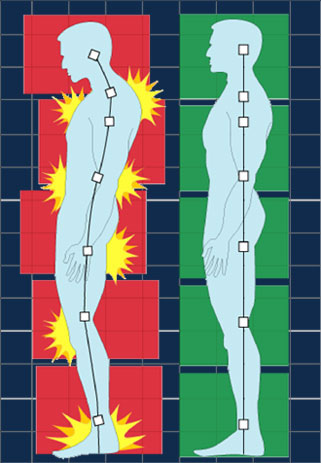
The first step is to become aware of posture. Not just yours, but everyone's. The ear should be lined up with the shoulder and if a line was drawn down the side of the body when standing it would transect: Ear-Shoulder-hip-behind knee-ankle. Any variation to the line will cause problems.
Get someone to take a picture of you from the side when standing up. Use this picture to note where your ear is in relation to your shoulder. Tape this picture on your monitor to remind yourself of how you were, and how you want to be.
Start taking note of other around you. Look at their posture. You will start to notice head forward posture and rounded shoulders. You will become aware of rounded upper backs and uneven shoulders. By noticing these imbalances in others you will become self conscious about your own body and that is a key step.
Step 2 Stretch your pects, strengthen your back
Remember your pects flex your arm and rotate your shoulder in. To stretch these muscles do the opposite. Much like a yawning pose, bring your arms back and point your thumbs up and back as far as you can. This stretches your pects and also by squeezing your back muscles will build strength.
Remember the old tv shows that featured women learning to walk with books on their heads? This is a great exercise which can be done mentally. Pretend that you aways have a balloon on your head. You want to keep pressing up on the balloon by straightening your back and neck. If you keep this thought in your mind you will begin sitting upright naturally within weeks. You will appear stronger, healthier and even taller!
Stuff to help you
There are three items that I recommend to people to help them reduce the stress to their neck from computer use.
- Posture Pump
- Wireless Mouse
- Ergonomic Chair
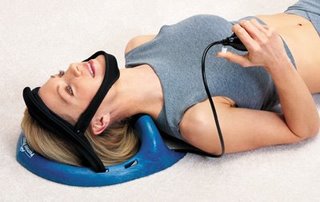
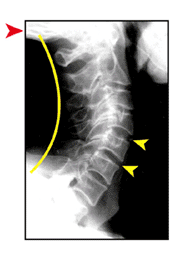
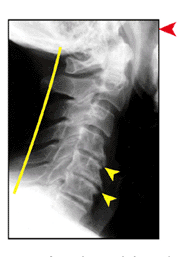
Posture Pump is by far the best device
When the neck loses its curve it is called hypolordosis. If the curve reverse and goes forward it is called anterolisthesis. When the curve is decreased the joint becomes irritated degenerates. When it starts to degenerate the area becomes acidic and calcium is deposited around the joint. This is arthritis. Osteoarthritis has many names; degenerative joint disease, degenerative disk disease, spondylosis. All of these conditions imply an irritated, degenerating condition.
The failure of traditional medicine to identify and prevent arthritis is my biggest concern and my largest peeve.
Every patient that presents with an altered cervical curve or signs of arthritis is prescribed a treatment utilizing a Posture Pump. This device features an air bladder and neck support that restores the curve to the neck. This device can be used at home for 12 minutes a day and yields amazing results after repeated use for several weeks.
There are doctors offering what is called decompression therapy to people and charging thousands of dollars. They have to charge the patient because the FDA found that these tables are no different than ordinary traction tables already in use. The Posture Pump costs 1/10 of what these clinics are charging and you can do it at home.
Please visit Posture Pumps Website for information.Ebay has the posture pumps for less than most providers can buy them for so grab one there.
Go wireless.
A wireless mouse affords you more freedom in your placement of the mouse and pad. When my arm or hand get tired I just use the mouse at a different height by adding books under the pad. This decreases the repetitive stress by changing the movement of some muscles.
Change your chair or lose it all together
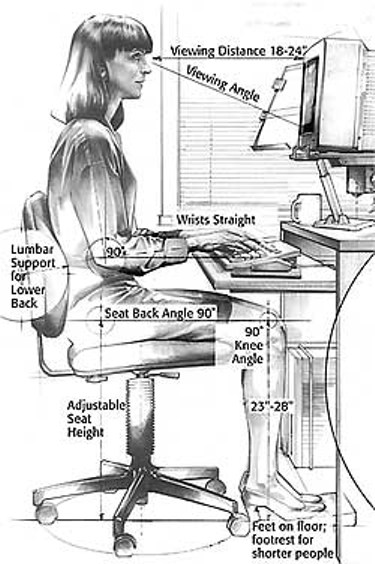
I have an admission to make: I don't use a chair at home. My computer sits on top of a cedar chest and I sit on the floor. I am constantly shifting around from sitting to laying. I feel that this keeps my blood flowing and changes up my muscles. I understand that this would be odd in an office setting, so I use and recommend an ergonomic chair. Just because a chair is advertised as ergonomic doesn't mean that it always is good for you.
You either want complete back support or none at all. If you go for support buy a chair that has a lumbar support built in. This will prevent you from slouching forward and decreasing that lumbar curve we spoke about earlier. The other option is to get a kneeling backless chair. These force you to sit up straight by using your back muscles instead of relying on an artificial support.
Dr. David DeFries is a practicing chiropractor in Upper Chichester Pennsylvania.
- Aston Boothwyn, PA Chiropractor :: Dr. David DeFries D.C. :: Dr. David DeFries
Call Aston, PA chiropractor Dr. David DeFries at 610-494-0412. See how our quality chiropractic care and laser medicine can help you with back pain, neck pain, auto accidents, sciatica, and more.