Sample HTML Program and Resulting Web Page

Here’s a sample web page and the HTML Markup behind it.
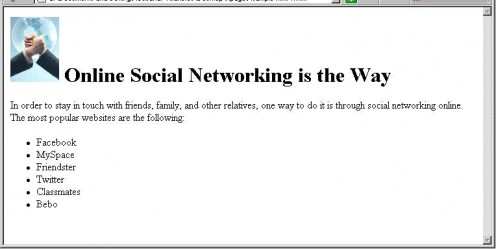
The above page contains different components such as image (picture), heading, paragraph, and a list of bulleted items. Notice that the heading size is big and in bold.
To view the HTML source program behind it, you can either click File then View Source or right-click on the page and select View Source.
Below is the HTML Markup or source you’ll see:
<html>
<head>
<title>Online Social Networking</title>
</head>
<body>
<h1><img src=”social_networking.jpg” width=”75” height=”100” Alt=”Social Networking” align=”middle” hspace=”5”>Online Social Networking is the Way
</h1>
<p>In order to stay in touch with friends, family, and other relatives, one way to do it is through social networking online. Among most popular websites are the following:”
</p>
<ul>
<li>Facebook</li>
<li>MySpace</li>
<li>Friendster</li>
<li>Twitter</li>
<li>Classmates</li>
<li>Bebo</li>
</ul>
</body>
</html>
The text inside the less-than and greater-than signs (< >) is the HTML markup. In the above example, the <p>…</p> markup identifies the text as a paragraph while the <li>…</li> markup identifies each item in the bullet list. HTML almost always uses beginning and ending markups, also called tags.
Readings:
Beginning HTML, XHTML, CSS, and JavaScript (Wrox Programmer to Programmer), Web Design Training in JavaScript, HTML, CSS. Video Based Training on 3 DVDs, Building iPhone Apps with HTML, CSS, and JavaScript: Making App Store Apps Without Objective-C or Cocoa, Beginning Smartphone Web Development: Building Javascript, CSS, HTML and Ajax-Based Applications for iPhone, Android, Palm Pre, Blackberry, Windows Mobile and Nokia S60, Developing Hybrid Applications for the iPhone: Using HTML, CSS, and JavaScript to Build Dynamic Apps for the iPhone, Web Standards Programmer's Reference : HTML, CSS, JavaScript, Perl, Python, and PHP, Kilian Valkhof, Creating Vista Gadgets: Using HTML, CSS and JavaScript with Examples in RSS, Ajax, ActiveX (COM) and Silverlight