Setup a WordPress Blog to Promote your Articles

Setup a WordPress Blog to Market your Articles
Recently I was reviewing WordPress theme sites and decided along the way to setup a new blog for the sole purpose of pointing at my various pieces of writing which are not on my own websites or blogs. Currently all my articles happen to be hosted at HubPages but I think this would work for articles hosted anywhere.
Why set up a another blog you might say - there is a RSS fee for your latest hubs you can use after all. Several reasons really:
- some of my favourite sites for promoting hubpages ban the domain, probably because of the idiot minority, now I can use a link from my blog rather than the dreaded link with "hubpages.com" in it
- it's actually bit quicker to link to the blog rather than my actual page - mainly because I already have the affiliate tracking code in my blog link. more sites mentioning my sites must be good - I think - I have no idea actually - it can't hurt anyway - it's the basis for the whole "bum marketing" approach of submitting tons of aritcles to directories in the hope that they will link back to you.
- I wanted to start developing an on-line resume of my work so
- a) I won't fortget I've written it (believe me it's happened before in the offline world) and
- b) I can use it as a portfolio or CV in the future.
- I little bit of extra revenue. I expect, oh OK hope, that the cost of the domain, will be paid for by the Adsense revenue, well you can buy hope can't you!
- Web Hosting by HostGator
One of the best hosting companies on the Internet - for less than $5/month
Setup a Domain and Hosting
If this is your very first website or blog you need some hosting, a home for your blog. I use Dreamhost because I like their price and their ease of use - more on that later. Dreamhost is in the US, which I am not, but they are a lot cheaper than anything I can get locally, and to be honest the service is no worse i.e. non-existent!
There are 2 distinct things you need to get onilne with your own blog with your own domain name:
- You need to register your domain name e.g. MyNewDomain.com - this should cost you under US$10 a year
- You need to buy some disk space and other services for your domain - that's called a hosting package this will cost you between US$6-US$8 / month.
Note that if you are going to develop a LOT of sites then you really should consider a re-seller package, or upgrade later, with a reseller if one site starts getting a lot of traffic it doesn't affect the rest of your sites.
Install WordPress
OK you have your domain and your hosting now we are nearly ready to rock and roll as they say!
With cpanel which HostGator uses you go to "Fantastico" and then select WordPress to install the program automatically.
- Official WordPress Plugin's List
All the official plugin's - search on category or name
Check the url in the browser it will be something like MyNewDomain.com/wp-admin - you need to bookmark it because this is where you will come back regularly to manage your blog.
Now How to customise your WordPress install.
- Add another user - the user who will post for you: I prefer "lissie" to do the posting - personal taste really.
- Change the permalink structure (in English that is the url your post will have) from the main admin panel (Options/Permalinks) to get pretty links I am just using the /%postname%/ - because my content tends to be timeless I really don't want to emphasis the dates of the posts
- I turned off comments for posts (Options/Discussions) - I don't' want discussions on this blog - I want the discussions to be back at HubPages where the actual article is - by turning the comments off it stops me having to deal with spam comments too.
- Install the All-In-One-SEO plugin which does - SEO optimisation oddly enough. You get additional options to re-write your title and short description which can be handy too. Installing a plugin is pretty much the same as installing a theme - you just put it in the plugin directory rather than the theme directory. Then go to Plugins menu and activate it after activation you will have a All-In-One-SEO menu under Options.
Now you need a theme: you could stay with the default but it's pretty boring - so you might as well play with the theme now! I described how to change a theme in the previous hub in this group so Iwon't repeat it here.
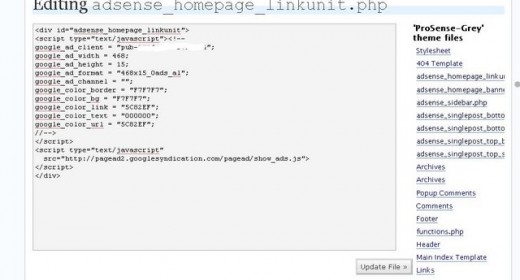
I decided to use a Adsense optimised theme in the hope of gettings some revenue from it, in my example I am using ProSenseGrey from doshdosh. To setup ProSense it comes with a dummy adsense ID which causes it to display public service ads - you need to add in your own adsense ID - the same one as you use on HubPages if you've forgotten what it is - it will be in the format of pub-1234567890123456 or similar!
From the main Admin panel go to presentation/theme editor and edit every file which is called adsense.... to replace with your Adsense ID, make sure you save after every file and that you do all 7. Note if you are using a dfiferent theme the names of the files will be different but the principal will remain the same!
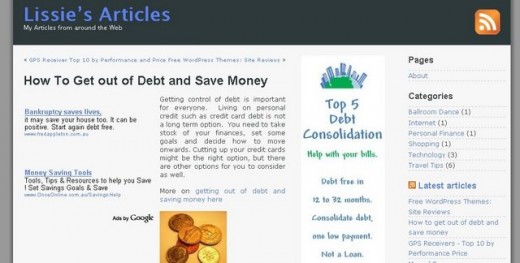
If you've installed your adsense ID correctly and then addeda post you should get a page looking like this i.e. will relevant ads
Tidying up the Theme
There are 2 sidebars pre-loaded in theme I've left the first one alone, which is the adsense block, but I changed the second one under Presentation/Widgets:
- got rid of the archive - again not emphasising the published date a
- added in a couple of RSS feeds from HubPages mainly to keep the blog "fresh" with new content if I don't add to it for a few weeks.
- added the About page and the categories
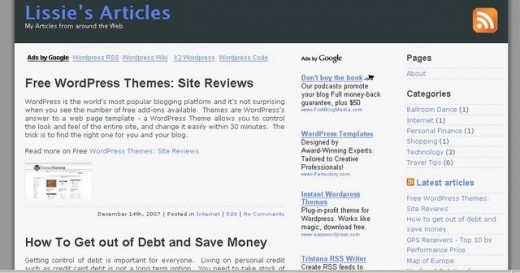
- Promotional Blog
The blog I created using the above process.
Add your posts
Time travel is great - it doesn't fool google but at least any reader will think the blog has been around for a few months if you backdate your posts.
Now it's time to actually do some work -
For each HubPage or article I want to promote
- I write a brief brief teaser to it
- include a link with my affiliate url in it
- add a picture, I think they make blogs look much more appealing, which also has my affiiliate link in it.
The post is a rewrite not a copy from the hub - I don't want to penalised for duplicate content by Google. I back date the posts to near the date I published them - I don't suppose it really matters but I kinda made sense to me.
Summary
That's it you are up and running with your own self-hosted WordPress blog! It's not really difficult and the WordPress help site is good - but I thought it might be handy to some if I stepped through the whole process?
Love to hear your feedback, especially if you use this hub to get your blog up and running! I'll try to help if you get stuck - leave a comment!