- HubPages»
- Technology»
- Computers & Software»
- Operating Systems»
- Windows
How to stop automatic windows update download

See The Picture For an idea of how to
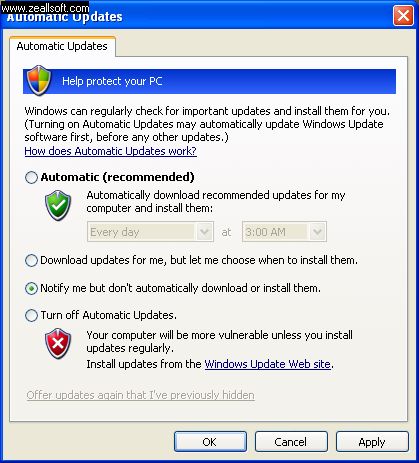
When you connect your system to the Internet many a times there appears an yellow icon at bottom right corner of your windows task bar.
This is meant to download any new updates to windows automatically. This option is a recommended one as it keeps your system software updated.
Some times it is troublesome if the Internet signal strength is weak. This automatic update runs spontaneously decreasing your net browsing speeds. So if you wish to turnoff the function follow the steps as below.
Step-1: Click on Start button to the left lower corner
Step-2: Then click on control panel.
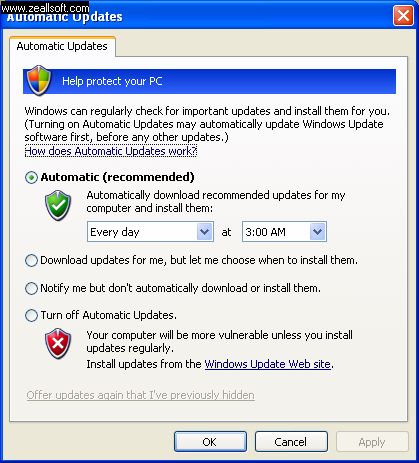
Step-3: GO to Automatic updates icon and click on it.
Step-4: You will have 3 options to choose as
a) Automatic updates
b) Turn off automatic
c) Notify about updates but don't automatically download them.
If you don't wish automatic update option. Option 'c' might be better. This notifies you about the and on clicking the icon icon on task bar, updating starts. And the option b) to turn off is not recommended in terms of security of your system. Because windows updates also enhances system security.