create your own

The Basics of Internet Banking using CIMB Clicks

76
rate or flag this page

By cheahyuniq

Introduction

Internet banking is one service that all banks must provide today. In today's world many people use the internet. It is inevitable that internet banking be developed. However, there are still many who are apprehensive about using internet banking due to security reasons or being just paranoid. I'll show you the basics of internet banking using CIMB Clicks as an example. I hope this article will help make internet banking not as daunting as you think.

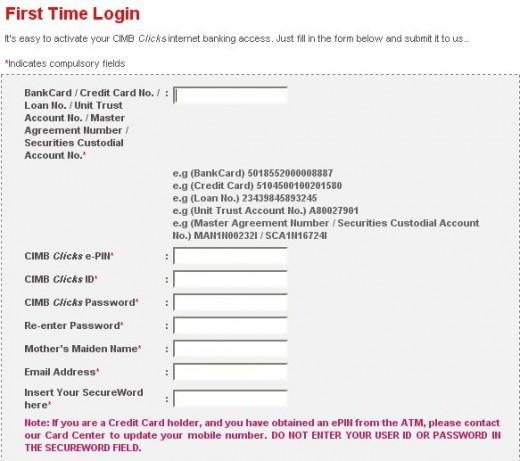
First Time Login

Go to a CIMB Autoteller Machine (ATM). Request for an Internet e-PIN. You need to key in your mobile phone number. With the Internet e-PIN, you can start to create your internet banking account. You will also need to have either your Bank Card No., Credit Card No., or a Loan No. Go to First Time Login Page to create your internet banking account. Make sure your browser shows secure status (lock icon).
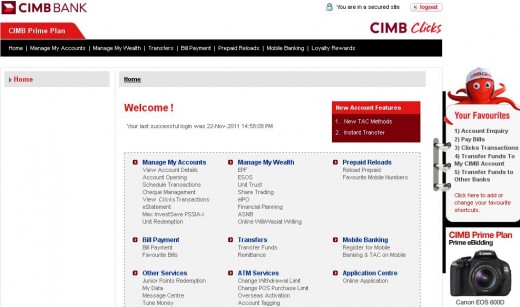
Login Page

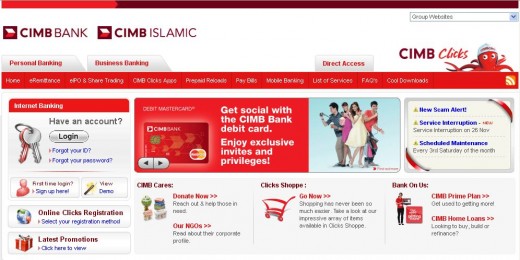
Below is the Login Page. You will be able to see the many services available on the left. The basic internet banking will be:

  • Account Enquiry
  • Transfer Funds
  • Pay Bills

The above services will save you lots of time. You need not drive out to the nearest bank or ATM to perform the transactions. All you need is a PC and a connection to the internet.
Account Enquiry

When you click this, you will see a summary of the accounts you have with the bank. Your account numbers, type of account and account balance will be displayed here. Clicking on the account number, you can view transaction history for a particular period you choose.

Transfer Funds

Here you can transfer funds between your savings account and current account or vice versa. Or you can transfer funds to your account in other banks. You may also transfer funds to other people's account. You will need to request for a TAC code which will be sent to your mobile phone as an SMS. Before you confirm the transfer, you will get to view the transaction details such as beneficiary name and account number. If the beneficiary name is someone you don't know, abort the transfer.

Pay Bills

You can pay bills for most of the popular merchants using internet banking.  You will need to have the bill number or account number handy. Again, you have to request for TAC as a security measure.

Add to Favorites

If you have to frequently perform a transaction, you may want to add it to your favorites. TAC request is a one-time-deal. So for future transactions, you don't need to request for TAC.

Print   —   Rate it:  up  down  flag this hub

Comments

RSS for comments on this Hub

Glory Khaw  says:
6 months ago

Hey YuNiq, this is a very helpful tips, I am amazed to see much of your articles.

cheahyuniq profile image

cheahyuniq  says:
6 months ago

Hope you will be convinced to hop on the internet banking band wagon.

tika  says:
5 months ago

how to get the internet e-pin?

cheahyuniq profile image

cheahyuniq  says:
5 months ago

Tika, you will need to go to a CIMB ATM machine. At the ATM machine, insert your ATM card and enter your existing ATM PIN. Select "Others", then select "Internet e-PIN ". Key in 6-digit e-PIN of your choice. It must be different from your present ATM card PIN. Confirm e-PIN by keying the same 6-digit number again. If e-PIN creation is successful, the ATM will display the message "Internet e-PIN accepted"

nadhariah  says:
4 months ago

i can't login cimbcliks since two month through office's computer..itn't hv related with server problem ?

cheahyuniq profile image

cheahyuniq  says:
3 months ago

Nadhariah, it'd be best to check with your IT guys at your office to see if the site is blocked.

ila  says:
3 months ago

i want to know how can we confirmed that certain website are secure?

and what function that cimb mobile banking and what other function of mobile banking cimb provide?

iena  says:
3 months ago

Is this CIMB Clicks internet banking is safe and secure?

let say, if have some lost with our money, is it CIMB will recovered it?or have any guaranteed for this internet banking?

anna  says:
3 months ago

Nice article for hubpages. thanks for sharing

Edmund  says:
3 months ago

Hi,today i check my balance like usual i find out i lost few hundred from my saving acc. Can some one guide me how to do?

cheahyuniq profile image

cheahyuniq  says:
3 months ago

Ila: Before you submit any personal information through a website, make sure that the address begins with https:// and not http://. Also find the padlock icon - make sure it is locked. As for mobile banking, I am not well-versed. I will check with the bank.

Iena: If you find any discrepancy, check your account transaction history. You could know dates and the amount debited or credited. Have this information on hand before you talk to the bank staff. With regards to guarantee, I will need to check with the bank.

Edmund: Please see my response to Ila. Hope you are able rectify the issue.

nick  says:
2 months ago

It doesn't seem possible to transfer from current to savings account, but the other way round is ok

kash  says:
5 weeks ago

cimb clicks link is broken pls fix this problem ASAP,thx

sam  says:
5 weeks ago

i cant click since yesterday what happen man?

cheahyuniq profile image

cheahyuniq  says:
5 weeks ago

Nick:

Transfer from current to savings is possible.

Kash:

The logon link is https://www.cimbclicks.com.my/ibk/

Sam:

Can't click? Sites do get into trouble once in a while. Can be frustrating, especially when it's urgent. I understand. Try during office hours. Avoid transactions at night.

knockoutpink  says:
4 weeks ago

thanks..your information was so helpful..

Submit a Comment

Members and Guests

Sign in or sign up and post using a hubpages account.


optional


  • No HTML is allowed in comments, but URLs will be hyperlinked
  • Comments are not for promoting your hubs or other sites

working