TweetDeck: A Simple and Organized way to Experience Twitter

69Twitter Rises- Now How Do We Handle It?
The popularity of Twitter has skyrocketed in recent months. PC Mag has picked up on twitter's rising popularity, and compete.com reports that Twitter is now the third most popular social network site.
If you're on Twitter (which you probably are if you're reading this article), then you know just how hard it is to keep up with everything. Between people's @replies to you, direct messages, comments and (hopefully) hundreds or even thousands of followers, tracking it all is a daunting task.
Enter TweetDeck, a simple organizational tool that allows you to keep track of anything and everything on Twitter that you want. Oh and I also use tweetdeck. Come follow me and see how I use it.
Which platform do you use to help organize Twitter?
See results without votingAll About TweetDeck
TweetDeck (sometimes spelled Tweet Deck) is a free software program that helps you organize Twitter (and facebook!). Here are some of the features of the latest version of tweetdeck:
- View all tweets in real time
- Use columns to organize twitter and set up key features
- Create groups to quickly and easily follow a particular set of friends/followers
- Update your facebook status and follow facebook friends
- Follow your @replies and direct messages (huge plus!)
- Follow active tweets about a particular topic using the search function
- Easily share short videos and photos using 12seconds and twitpic
- Watch stocks using Stocktwits
- Easy URL shortening service (since you have to have >140 characters per tweet)
- Post tweets to multiple twitter accounts (NEW FEATURE)
Keep in mind this is the short list of what TweetDeck can do.
TweetDeck Tutorial
Take a look at the pictures and text below to see the power and potential TweetDeck has to transform your Twitter experience:
TweetDeck Basic Layout
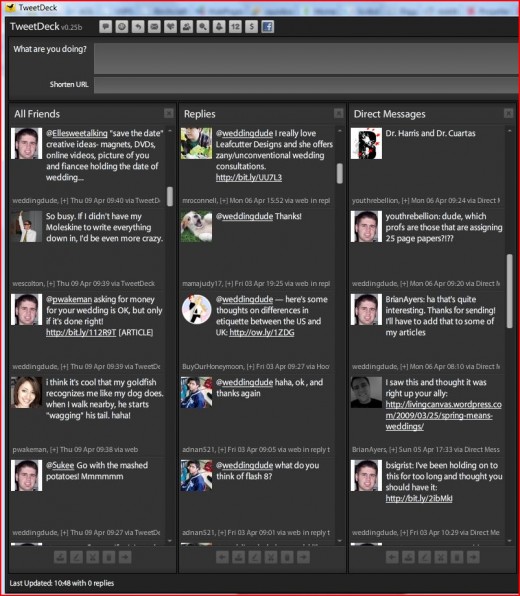
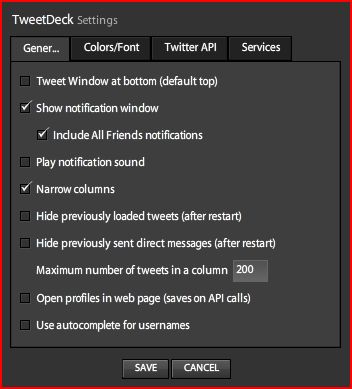
TweetDeck Settings (click to enlarge)
Tweetdeck reply area (click to enlarge)

It is important to know the buttons on the top of the layout. This is the lifeblood of tweetdeck.
With those buttons you can add columns for:
- All friends
- @replies
- Direct messages
- Favorites
- Groups
- Twitter Search
- Twitscoup
- 12seconds
- Stock twits
- Facebook status updates
How to Maximize TweetDeck for your Business or Personal Use
Everyone is shouting about how Twitter is the next big thing, and I don't doubt that. However, having twitter, using twitter properly and maximizing twitter are three completely different things. Here are ways you can maximize twitter using tweetdeck:
Example 1:
If you are in the running shoe business, create columns for several different keyword searches. Column suggestions could be: "running shoes", "need new shoes", "nice new shows" or "(insert your business name here)".
Begin interacting with your twitter audience by interacting with them regularly. But don't be a pushy salesperson. Nothing turns people off more than you forcing your website into every tweet or always pushing a sale. Be helpful and be a resource, not a burden or a snake oil salesman.
Create several "groups" of followers to help organize everything. One group of followers could be co-workers, business partners or shoe manufacturing resources. Another group could be people who need new shoes or those who show interest in your products. And don't forget a group of your friends and family so you can keep up with their tweets too!
Example 2:
If you aren't in a business, but want to use twitter for personal reasons, TweetDeck can help you too. Using a similar model as above, create different columns that actively search for tweets that have to do with whatever you want. Hobbies, interests, locations, etc. are all good ideas.
Then, create groups based on how you want to categorize the above. One group could be for people interested in basketball, another could be for people who frequently travel to Hawaii and another could be for people who love weddings. Be creative.
Not only does TweetDeck allow you to do all this, it also allows you to update facebook so you can keep in touch with your facebook friends as well. Let's face it, TweetDeck has transformed Twitter.
Other Hubs on Twitter and TweetDeck
- How to Use Twitter for Business
Twitter can be used for many different reasons. While most users sign up to keep in touch with family, friends, coworkers or others, you can actually use Twitter for business in ways you never would have... - Desktop Twitter Applications
If you have been using Twitter for awhile, you may have heard of the desktop application called TweetDeck. TweetDeck is the most popular third party application for Twitter. Once installed, it allows you... - What is a Twitter Hash Tag?
If you have used Twitter, you may have heard about hash tags. Chances are you have definitely seen them. A particular word may be preceded by the numerical symbol. This indicates that word is a hash...
Flutter: The New Twitter- FleetDeck Not Included
Tweetdeck in the News
- TweetDeck links in retweets, Twitter lists, mapsCNET13 hours ago
An update to the desktop Twitter app, TweetDeck expands to support a LinkedIn column, old and new retweet styles, and Twitter lists, among other additions.
- The New TweetDeck Goes List Crazy And Adds Maps To GeoTweetsTechCrunch17 hours ago
Streamreaders just keep getting better and better. A new version of TweetDeck is rolling out today with some major improvements, including support for Lists, Retweets, maps for geo-tagged messages, and LinkedIn streams. TweetDeck has already been downloaded more than 10 million times, and its active user base is in the low millions so this is a significant update. As soon as Twitter launched ...
- Worth the Wait: New Version of TweetDeck Features Lists, Geolocation and LinkedIn SupportReadWriteWeb13 hours ago
TweetDeck , the most popular third-party Twitter client on the market today, just got a major update . TweetDeck now features support for Twitter lists and Twitter's new geolocation feature, as well as a LinkedIn column and optional support for Twitter's new retweet function. Users who prefer to use old-style retweets can still use these as well. For now, TweetDeck geolocation feature doesn't ...
- TweetDeck Updates with Support for Lists, LinkedIn, and Geolocation [Downloads]Lifehacker13 hours ago
Windows/Mac/Linux: Popular desktop Twitter client TweetDeck just released an update boasting support for a few of Twitter's new features—including lists, geolocation, and retweets—along...
PrintShare it! — Rate it: up down flag this hub
Comments
Hey Sweetiepie, thanks for reading.
I'm surprised you feel that way about tweetdeck. I felt like it made things easier, not harder, since it incorporates twitter and facebook.
Oh and I totally understand about social networking sites taking too much time. They are an endless pit of time-zappers.
WeddingConsultant, good information for the Twitter-inclined. This Hub caught my eye because I've recently given Twitter a try but ended up closing the account. I thought it was worth seeing if "Tweetdeck" would have made things any different. This Hub does an effective job of explaining Tweetdeck. (The world of Twitter, however, does continue to elude me. :) )
The world of twitter is confusingly simple. It's like google- there's a lot of punch packed in a very simplistic looking website.
I wasn't a huge fan of twitter until tweetdeck, actually. The thought of keeping up with more than, say, 20 or 30 tweets was daunting.
Twitter is good for promoting hubs, though, as long as you aren't spammy (which I know you aren't).
Okay I must confess, I did not sign up for tweetdeck, so maybe it is great. I am sure so many love it, but the way I use twitter is sort of basic. I log in when I feel like it, and if I see something interesting in the top tweets I look at those.
I didn't even know you're on twitter- can you post your profile? I'll follow you!
Following you :)
I found this very informative thanks. I have been a member on twitter for over a year now and it's recent increase in popularity is nothing short of amazing. While I have not used tweetdeck, I had noticed many do. I have been using the twitter application on my facebook so that my tweet status updates are simultaneously uploaded from twitter to FB, but tweekdeck sounds much better. I can keep up with friends updates by using it and increase my network reach from a business perspective! Thanks again for the info and tutorial about how to maximise tweetdeck.
Glad you found it helpful, Shaye. I bet you'd get some good use out of it on twitter. Let us know when you reach those 10,000 followers.
Thanks for the hub Wedding Consultant.
Is it possible to manage various Twitter accounts on tweetdeck?
Hub was created just for you TravelMonkey.
And unfortunately it's not possible to manage several twitter accounts on tweetdeck right now. BUT, they listen to requests, and that request has been made of the tweetdeck developers a lot lately, so I think it's only a matter of time.
If you're looking for some good twitter tools, you should check this out: http://createbusinessgrowth.com/marketing/50-fabul
Splitweet is the program you want to check out on that page- it allows you to manage more than one twitter account at once. I haven't tried it, though, so let me know if you like it.
Twitter Error Screens I'm Tired of Seeing

Twitter Error Screen I Wish I Saw More of
TweetDeck Blog
- As Promised - A Very Special TweetDeck Delivery
A while ago we promised you that the next release of TweetDeck would be something very special. Well we have tweaked it and polished it and coated it with a sprinkling of TweetDeck magic... - 17 hours ago
- Coming Soon: Bring Your LinkedIn Network to TweetDeck
With the addition of Facebook and MySpace, TweetDeck has gradually gone from being just a great Twitter client to now being a true browser for the real-time web. With the addition of... - 8 days ago
- TweetDeck for iPhone - now with added Awesome
Good news everyone, after some initial problems, the updated TweetDeck app for the iPhone is available now from the AppStore.Here's a rundown of some of the great new features we have for... - 3 weeks ago
- List-en very carefully, here's what's new with us
There are lots of very interesting things happening in the world of TweetDeck at the moment. Here's a quick update on some of the biggies... Getting listed As Twitter start to roll out... - 5 weeks ago
- The Real-Time Web at your fingertips
We love getting your feedback. The ideas which you give us and the requests for changes or new features in TweetDeck really give us a buzz. Especially when we think we can really... - 2 months ago
- Introducing the TweetDeck Directory
The first question we all faced when we were new to Twitter was who to follow. For some of us it wasn’t such a hard decision as many of our friends and co-workers were already... - 3 months ago


SweetiePie says:
8 months ago
Tweetdeck sounds great, but I am not sure how soon I will sign up for it. I have signed up for a large number of social networking sites at the present moment, and those take up a great deal of time if I even bother to log in every other week for each one. With twitter I just check the top twits when I log in.