Using graphic organizers to facilitate learning

Definition of Graphic Organizers
- Graphic organizers are visual and spatial displays designed to facilitate the teaching and learning of textual material (Ellington, 2006).
- They help students structure their learning, visualize the way information is presented in lectures and organized in texts, map out stories to improve comprehension, and see the relationships among vocabulary and concepts (Smith, 2007).
- Graphic organizers connect important words or statements to diagrams, show a process, or present a sequence. Students often have difficulty reading and understanding information in textbooks and other expository texts, which are sometimes poorly organized (Smith, 2007).
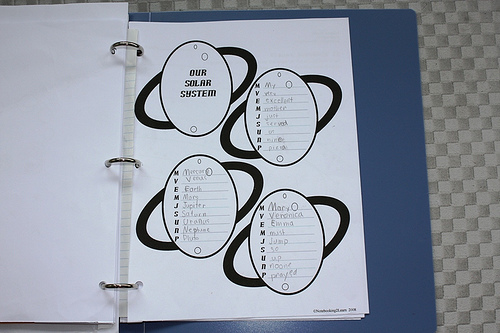
- Graphic organizers come in many different forms, including maps, pictures, graphs, charts, diagrams and photographs (Smith, 2007).
- They serve as great study guides, and can be used for presenting new information or reviewing content (Smith, 2007).
What the Research Says
- The use of graphic organizers has been proven to help students with learning disabilities to gain knowledge more effectively and efficiently (Ellington, 2006).
- Visual displays can be successfully implemented at several phases of the instructional cycle, and as both advance and post-organizers (Hall & Strangman, 2002).
- Successful learning outcomes are contingent in certain variables, including grade level, point of implementation, instructional context, and ease of implementation (Hall & Strangman, 2002).
- A computer-based system can be successfully used to instruct students how to develop concept maps. However, knowledge-mapping scores (determined by comparison to expert maps) were significantly improved for individuals working individually to elaborate maps while collaborative approaches may be less effective. (Hall & Strangman, 2002).
Tips for Implementation
- You should develop a version with all the information, serving as an answer key. Prepare one for students with missing information that you want them to focus on (Smith, 2007).
- Select material that is difficult for students to understand or that is poorly organized, and divide the chapter into sections (Smith, 2007).
- Construct an outline from the material (Smith, 2007).
- Select a format for the organizer that matches the structure of the information and can include diagrams that sequence, compare and contrast, or classify. It should be clear and easy to follow, and should fit on the page (Smith, 2007).
- Once they have been completed, discuss and correct them. Make sure to verbalize relationships between the concepts represented within the organizer, providing opportunities for student input (Hall & Strangman, 2002).
- Use software programs to create graphic organizers. Some programs can transform web content into an outline for students to study from or use to write reports (Smith, 2007).
Examples of Implementation in Inclusion Settings
- Graphic organizers work well when students are assigned to cooperative learning groups (Smith, 2007).
- The use of a computer software application that allows students to create graphic organizers can help foster reading comprehension in an inclusion classroom if other teacher tools and training are not available. Students needs can be met by a combination of teacher assistance in creating a graphic organizer in the most appropriate format (Hall & Strangman, 2002).
Keep in Mind
- Students can create their own organizers as they become more comfortable and they understand content better (Smith, 2007).
- There are a variety of graphic organizers that can be used, and one isn't necessarily better than another (Ellington, 2006).
- The same graphic organizer can be used for multiple subjects (Ellington, 2006).
- Without teacher instruction on how to use them, graphic organizers may not be effective learning tools (Hall & Strangman, 2002).
Resources
Ellington, L. (2006). Graphic Organizers. Update on LD, 3. Retrieved April 14, 2008, from http://www.valrc.org.
Hall, T., & Strangman, N. (2002). Graphic organizers. Wakefield, MA: National Center on Accessing the General Curriculum. Retrieved April 14, 2008 from http://www.cast.org/publications/ncac/ncac_go.html.
Smith, D.D. (2007) Introduction to Special Education: Making a Difference (6th ed.). Boston: Pearson.
Graphic Organizer Program Links
- Graphic organizer software available - Canadian Glacier Inventory Project
Canadian Glacier Inventory Project - Graphic organizer software available - Graphic Organizer Software and the Sunshine State Standards.
- Think Technology: Graphic Organizers
- Graphic.org - Graphic organizers concept mapping mind mapping inspiration software kidspiration
The Graphic Organizer is the premier web site for information about graphic organizers concept maps and visual tools. - Home | inspiration.com