XP Antivirus
93XP Antivirus 2008
XP Antivirus in Action
The consequences of XP antivirus can be described by this message, which with minor alterations appear on Yahoo! Answers daily:
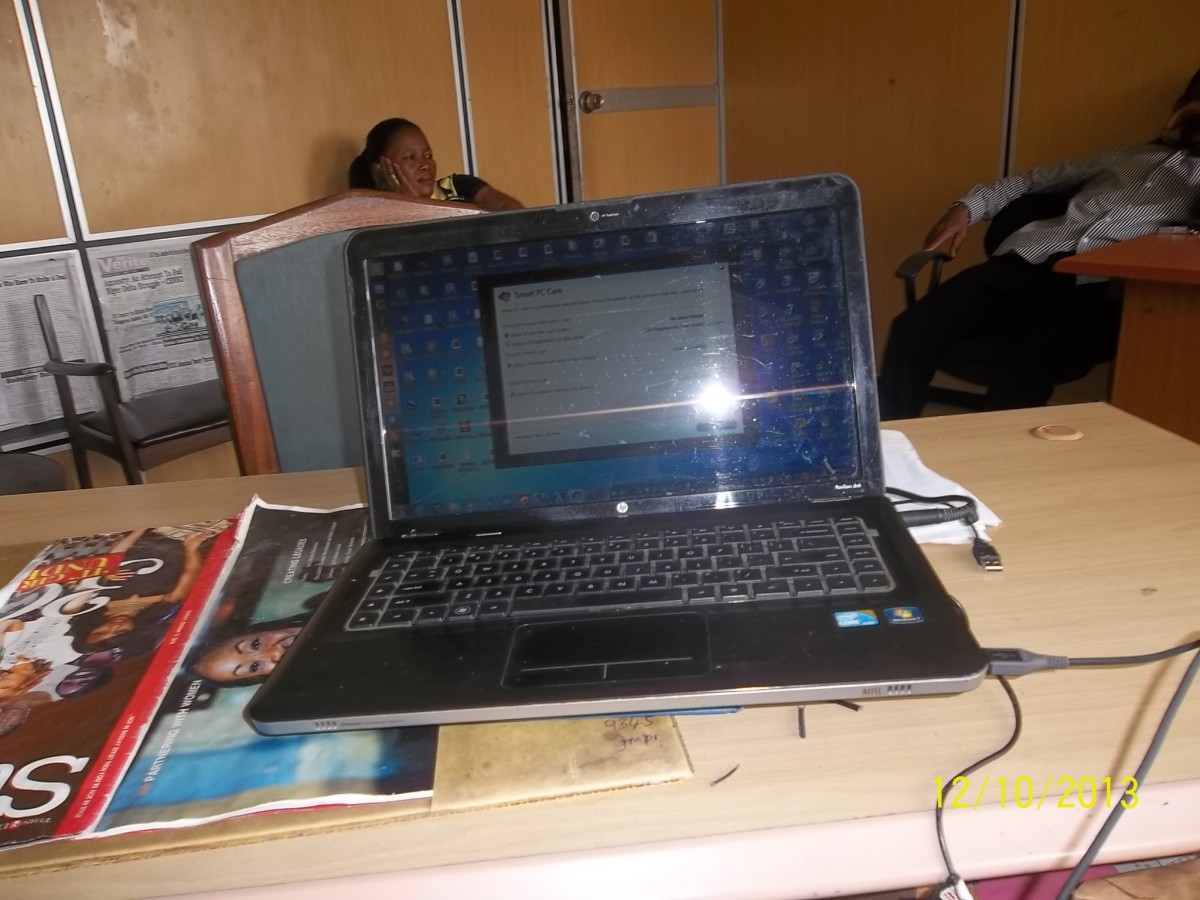
On my new laptop, I was on youtube when all these windows started popping up, telling me that I had a malicious spyware virus. So, I downloaded the virus scanner that windows recommended, and ran it twice. Then it said my computer needed to be restarted for it to take affect. So, I restarted it, and now since then there are no icons on my desktop when i turn on my computer, and there is no start button, no tool bar or anything! It won't even let me click Alt+Ctrl+Del
It is a desperate cry for help by lots of computer users worldwide.
XP antivirus is an example of the new generation of malware that is so smart that easily fools even advanced PC users and Internet surfers.
- XP anti virus doesn't install itself - it is downloaded and installed by user deliberately;
- It doesn't stop having messed up Windows settings, but fools the user into purchasing new software allegedly recommended by Microsoft Windows;
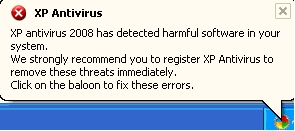
- It uses Windows-like colors, icons, logos, acts like a legit Windows application, integrates with Windows Security Center messages in the form of tooltips, notification area baloons and call-outs. It sits in tray area totally imitating Windows Help Center behavior.
XP Antivirus: Update 2008
The new XP antivirus 2008, that hit the World Wide Web computers in March, is a major update to its predecessor. By calling it "major update" I mean that XP anti virus became more violent, more resilient, more immune to removal attempts, more "intelligent"; now it's recovering itself after being removed via Add and Remove Programs option in Windows Control Panel.
XP antivirus was aggresively promoted by spamming blogs and forums - which clearly indicated it's not an application you'd want to pay for. It's impossible to imagine avast! or AVG getting web exposure using black hat methods like brutal spamming.
Currently XP antivirus is constantly changing its domains, so there are many sites where it sells itself. Sadly, the "sales pages" of this rogue security software look quite professional - and buyers fall for graphics and promises of "secure web surfing".
This year's XP antivirus is more colourful, too, and features same interface as many legitimate antispyware software tools. It's totally understandable why even senior computer users install this rogue antivirus blindly believing to be protected and secure, while in reality they leave the gates of their computer wide open for a new flood of malware to come in and take control of the PC.
XP antivirus 2008 behaves differently on different computers depending on at what stage of installation it's been caught, but generally the appearance of XP antivirus pop-ups can end in:
- desktop icons and folders messed up or disappeared;
- Start button and taskbar disappeared;
- user's settings corrupted;
- desktop background wallpaper changed;
- annoying screensaver you've never seen;
- disabled Task Manager;
- Windows Clock appearance changed;
- Windows unable to boot;
- Internet Explorer not working.
XP Antivirus may degrade the desktop color scheme to 8 bit instead of 32 bit pattern. This malware also displays fake Blue Screen Of Death (commonly known as BSOD) using Sysinternals software. Additionally, the desktop may look as if Windows were restarting.
It is important to add to the above said that XP antivirus 2008 is targeted at all Windows versions, not just XP. So users of Windows 2000 or 98 cannot feel them unreachable for this malware.
Now, as you've learnt a bit about XP antivirus, it's time to catch it and wipe out from the hard drive. Look below for instructions on how to get rid of XP antivirus both manually or with the help of special removal tools.
XP Antivirus Manual Removal Procedure
Removing XP antivirus can be a tedious task if you blindly count on the power of conventional antivirus software. It is reported that the following antivirus and antispyware programs never detect XP antivirus files:
- Norton (any year's version);
- McAfee (Plus, Enterprise, etc. versions);
- Protector Plus 2008
- Lavasoft Ad-Aware 2007
- SpyBot Search & Destroy 1.5x
As you see, a solid protection by any of this security suites is not an obstacle on the way of XP antivirus to your PC. Partially this can be accounted for the nature of this malware which is not a virus by its nature.
Before following the steps, unregister 2 DLL files placed in your system by XP antivirus:
- shlwapi.dll
- wininet.dll
How to unregister DLL files? That's easy.
Go to Start-->Run
Type in the box "cmd" without quotes and hit Enter.
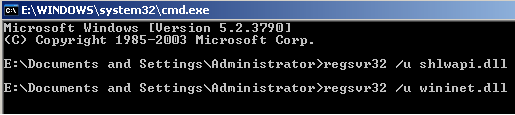
A black dos-like window will open. Type in the following commands:
- regsvr32 /u shlwapi.dll (hit enter);
- regsvr32 /u wininet.dll (again, hit enter).
Below is a screenshot to help you.
Removing XP antivirus DLL's
5 Steps to Remove XP Antivirus
After you've successully unregistered 2 DLL libraries belonging to XP antivirus, it's time to get the pest completely wiped out.
The first step to remove XP antivirus is same as for any other program - via Control Panel, Add and Remove Programs.
However, this will remove only some files, so DO NOT restart Windows after you've completed this step.
Second step involves removal of Registry entries.
Click Start-->Run, type in regedit and hit Enter.
The Windows Registry Editor will open. Find the following key in the left pane:
HKEY_USERS\Software\XP antivirus
Right-click on it, select Delete. (Be careful to remove this key only; do not touch others or you risk making your system unbootable or malfunctioning!)
Third step will require the use of Task Manager. You'll have to end two processes related to XP antivirus 2008.
Go to the Processes tab in Task Manager, find and end the following processes:
* XPAntivirus.exe
* XPAntivirusUpdate.exe
* vav.exe
* xpa.exe
* xpa2008.exe
(Don't worry if some files are missing in your Task Manager; different variations of XP antivirus can be using not all of the above files).
Fourth step: remove the following folder:
C:\Documents and Settings\All Users\Start Menu\Programs\XP antivirus\
Do not be concerned if the folder is not there. If it doesn't exist, simply move on to the next step.
Step five is a bit time-consuming because you'll have to remove a dozen of files related to XP antivirus. You can locate them via Search option in Windows Explorer, or you can find the folder in C:\Program Files\XPAntivirus and try to remove its contents. However, not all of the files will be there, so the use of Search is required anyway.
Here's a list of XP antivirus files that must be deleted:
* xpa.exe
* xpa2008.exe
* XPAntivirus.exe
* XPAntivirusUpdate.exe
* XP antivirus
* XPAntivirus.lnk
* Uninstall XPAntivirus.lnk
* XPAntivirus on the Web.lnk
* XPAntivirus.url
* XP Antivirus 2008.lnk
* Uninstall XP Antivirus 2008.lnk
Automatic Removal of Windows XP Antivirus 2008
If you feel uncomfortable locating XP antivirus files and registry entries or are just afraid of making harm to your computer, there are several tools that can help to get rid of XP antivirus completely.
Malwarebyte's offers a tool that will remove XP antivirus and lots of its clones and imitators, as well as a bunch of other rogue security software programs.
The free version of Malwarebyte's Anti-malware lacks real-time protection, but it is a fully functional scanner to detect and remove malicious pests.
Or, there's another free tool to remove XP antivirus 2008 and similar rogue software. Rogue Remover will get rid of many fake antivirus and antispyware programs.
A few Words about SpyHunter 3
If you took some time to search the Web for guides on "how to remove fake XP antivirus", you might have noted that most recommended guides recommend SpyHunter as an ultimate automatic remover of this malware.
There seems to be quite an agressive marketing going on for this antispyware, which in turn makes me conclude that some day we may face yet another rogue security program attacking our computers. Well, that's just a guess.
However, I can't find another explanation as to why reputable forums are so pleased to recommend SpyHunter to the victims of XP antivirus and its various imitations.
Is SpyHunter that good at removing malware?
Adware Report once tested SpyHunter only to find out the program had poor performance, even poorer detection rates, and absolutely mediocre malware removal capabilities. A couple of years passed by, but I've never seen SpyHunter 3 included in any antispyware tests. There's quite a bunch of anti spyware products these days, sure, but I can easily name a dozen or two of most popular, reputable, trusted programs widely used by millions of PC owners worldwide. But, honestly, never before did I hear about SpyHunter's outstanding antispyware performance.
Promotional tactics used to advertise SpyHunter 3 are rather unethical and remind of flashing pop-ups, annoying "online scanners" and banners. Among 12 feedback replies at antivirus.about.com regarding SpyHunter, there's not a single positive opinion expressed.
Webuser.co.uk rated SpyHunter 2 stars out of 5 - less than most average-performing counterparts.
Would you like to pay $30 for, err, dubious software, risking to lose your money while getting nothing in return? I guess not.
There's not a single reason to use the software you never heard about, especially since there are few, yet reliable programs proven to remove instances of XP antivirus infection and protect computers from reoccurence.
There are reports that SpyHunter tends to display fake infections in its scan results, or marks safe files as infected to scare the user with "dangerous threats found in the system" and urge to pay for the license. This is a shady marketing trick, in the least, but it has nothing to do with enhanced trojan viruses detection or spyware removal.
Antivirus XP 2008 Mutation
It appears that the case with Antivirus XP 2008 is a bit different from XP Antivirus 2008. Though very similar in names, the former uses different file-naming patterns, adding random figures. To indentify if your PC is infected with Antivirus XP 2008, load up the Windows Search and type in the following query:
lphc*.exe
or
rhc*.exe
where * plays the role of a wildcard, helping to search all filenames with the exact beginning.
If you discover at least ONE file that matches the query above, it is a 99,99% sign that your PC is contaminated with a variation of Antivirus XP. The removal procedure for it will be slightly different, but unless there are enough reported cases of infection, I will not create a separate hubpage for it to describe the concrete steps.
Remove XP Antivirus with a-squared Anti-malware
- a-squared Anti-Malware v4 - XP Antivirus Removal
Remove Trojans, Dialers, Keyloggers, Worms, Spyware. Get rid of XP antivirus 2008/2009 and its variations (like Vista Antivirus, XPAntivirus, Antivirus XP, XP Antivirus Protection, Windows Antivirus 2008) instantly and prevent future infections!
- Max Spyware Detector
Max Secure Spyware Detector is a complete solution for individuals, professionals and home users. The software is specially designed to scan, detect, delete and recover spyware with an option of quick and full scan. Heurisctic scanner!
Update: Antivirus 2009
Antivirus 2009 is part of the big XP antivirus family.
There's a little trick that allows to remove Antivirus 2009 (also known as AV 2009 or Micro AV 2009). a-squared anti-malware is needed to perform the removal process (you can download it above).
1. When a-squared anti-malware is installed and updated, restart Windows.
2. Open Task Manager. Under the Processes tab, find Explorer.exe service and stop it by clicking on End Process button.
3. The desktop should disappear. No icons, no taskbar should be visible. a-squared anti-malware window is the only thing you can see.
4. Run the Scan. Depending on the size of the hard drive, the operation can take about an hour to complete. Be patient. a-squared anti-malware will display names of detected infections in real-time. Antivirus 2009 will be removed among other pests.
5. When the scan is finished, press ALT-CTRL-DEL, choose Shutdown/Restart.
PrintShare it! — Rate it: up down flag this hub
Comments
Excellent knowledge to know for people like myself who make a living online.
What an important hub to many users. Great information!
Very clear and systematic. Masterfully presented. Well done!
Great article! Thanks so much.
Susan
Really? hard to believe.i heard this news times from many friends playing on a tall dating site ___Tallmingle.com___,i did not believe, i think that they are know nothing but dating and love.i am wrong.
XP antivirus is a crap
I've seen it or a version of it. I had the same problem trying to remove it. Gave up and installed Ubuntu instead. Windows... it's a love / hate relationship for both the good and the bad.
Truly appreciate folks like you who aim to inform, teach and prevent others from making the same mistake. Great article!!!
Well done. Very useful tech advice. Keep it up!
I have Norton and others have suggested that McAfee is better. I wonder if either one is better for XP Antivirus and also overall which is better.
For most people and businesses, There's no good reason to buy or use windows. Get Mac ! (Peace of mind and freedom from viruses is phenom!!!)... Develop whatever's needed in freeware. It's way beyond wonderful.
I HAVE DONE THIS THREE TIMES AND IT DOESN'T WORK. ANY HELP!!
Seems like you have done good study on this. Thank you for sharing. I need to Bookmark this Hub for future reference.
Thanks all for positive feedback ;)
Jasmine, what's not working? Files cannot be deleted, or the XP antivirus crap recovers after restart?
JamesAlan, unfortunately, neither Norton nor McAfee happened to kill XP antivirus (if only they didn't change their signature definitions). Malwarebyte's or SuperAntiSpyware do a better job when it comes to XP antivirus removal. What's even better, both programs are available for free.
When I tried to Unregister the two command I get an error message
"wininet.dll was loaded, but the dllUnregisteredServer entry point was not found.
This file cannot be registered"
similar message for the other command
Also, Did not find a file in Add/Remove Programs to uninstall (first step)
Also could not find a file (registry) in HKEYS_USER/Software/XP AntiVires (Second Step)
I Do have a file (or registry) HKEYS_USER/Software/XP Engine. Do they have a new name for it?
Than You
It appears malwarebytes solved the problem (for now). I was having alot of trouble downloading it because the XP Antivirus would block the down load. Must of caught it sleeping and got the download after about 6 to 8 tries.
Thanks and good luck with you HUBS
Hi Kevin,
glad to hear Malwarebytes was able to solve your XP antivirus trouble.
Probably you had to deal with some newer version of the infection, which tends to grow into more aggressive malware.
Thanks for all the valuable information great hub by the way...
hey charlemont, i got this same problem, i deleted all those files an then some, but i seem to keep getting this one virus-my antivir keeps it from infecting but i keep getting the blue screen where it tells me my computer may be infected with spyware or viruses. the virus is VBS Agent 1002--it has something to do with malware
i have the same problems.
When I tried to Unregister the two command I get an error message
"wininet.dll was loaded, but the dllUnregisteredServer entry point was not found.
This file cannot be registered"
similar message for the other command
Also, Did not find a file in Add/Remove Programs to uninstall (first step)
Also could not find a file (registry) in HKEYS_USER/Software/XP AntiVires (Second Step)
I Do have a file (or registry) HKEYS_USER/Software/XP Engine. Do they have a new name for it?
also i windows swearch the two dll files and i can delete everything except from the system32 folder.
what do i do!?!?!?!
Hi Nicky7380. First do a scan with avira (that's a cool antivirus) in Safe Mode. To get into it, restart PC and hit F8 continuously until a long menu appears where you should select Safe Mode (with networking, because it has same interface as normal Windows, though screen resolution will be different).
Then, get Malwarebytes, update and do a scan with it.
Hello allec,
yes this malware is very smart and keeps changing all the time. I suggest that you get Malwarebytes as well, and have it scan the PC after signature updates.
To be able to delete stubborn files, you can use Unlocker - a free little software, that is handy for many occasions, not just those caused by malware.
I have the xp virus in my system tray and its installed an alert message on my desktop stating i have viruses and to use the program to delete them. I cannot find any references to xp antivirus in my processes but when i hit properties on the icon (its also installed on my desktop) it gives me this file name "C:\program Files\rhc3b5j0en11" Is this a new identity for it does anybody happen to know?? if so any tips on getting rid of it
Hi Dom,
this may be a modification of XP antivirus. "rhc3b5j0en11" doesn't look like a valid applications - no program would name its directory like this.
Have you tried Malwarebyte's or SuperAntiSpyware?
Hi there, no i tried spyhunter and registry cleaner as both stated that they could deal with this. The only symptons i have are the desktop message and occasionally the virus scanning my hard drive and telling me i have around 3000 issues which is a worry. I can still use the internet ok. I may try malwarebytes but im wondering if it will touch this as it doesnt seem to be similar to the other xp virus reports i have found. Its really frustrating though!!
Hmm... Dom, there are lots of registry cleaners on the market, and some of them are very much like the scam you're dealing with. Registry cleaners cannot help to remove viruses and spyware, unfortunately.
So, try Malwarebytes - which a good program, free and 100% safe to use. Then you can run an online scanner - I've got a hub on them.
If that doesn't help (s*it happens, as we all know), I'd like to have a look at your Task Manager's processes tab. I believe you can disable unnecessary processes via msconfig tool (start-->run-->msconfig), in its startup tab. Leave just your antivirus programs ON, restart, and do full system scans.
Thanks for your help on this...
I am going to try malwarebytes now. Just noticed in the task manager a number of references to pphc7b5j0en11(and various similar processes ending with j0en11). When i end these proceses it seems to top scanning and the icon disappears from my system tray, desktop warning stays though...?
Dom,
try the trick with msconfig. Those services in Task Manager sure belong to malware. If you restart and log in Safe Mode (F8 key), there should be less services in Task Manager, and hopefully malware well be caught "sleeping".
Tell us if malwarebytes helped you.
Malware is on the case right now scanning......ill give you an update when its done its bit. Heres a good description of whats happened to my laptop, seems someone else has the same exact issue as me with the joke bluescreen virus alert message... i run mcafee and its given me the same message as this guy is getting..
Quote
"Hey I got a virus that Mcafee keeps telling me it is a "joke-bluescreen.c" virus and I keep getting pop-ups for "antivirus xp 2008" Mcafee keeps saying it removes it but it does not and when I try to remove it from my programs it says it has removed it but it is still there. My desktop screen is blue with the message to download their software to get rid of it. I try to do a system restore but it has canceled out all of my back up dates. Anybody have any advice? "
Sod it!!OK, i ran the malware scan and it found around 20 viruses, mainly trojans. I removed them and have restarted but its not been able to shift it. I have the bluescreen and xp scan running still.... I have rebooted in safe mode now, any chance you could give me another option?
Dom, don't panic ;) cases when malware cannot be fought with simple steps is relatively rare to come across. So just a bit of patience, and you'll work it out.
BTW, what's the name of the Registry Cleaner you used? There's a chance it added up to your troubles.
Currently it looks like you're having not just XP antivirus alone, but is is installed together with another nasty that's responsible for blue screen.
So follow this steps now:
1. Download SpyBot Search & Destroy, install it. UNCHECK the tea timer while making the configuration. Download SuperAntiSpyware and install it as well. Get each program updated - do not run scans yet, just update the definitions.
2. You will have to run a series of scans again, this time staying offline. Either unplug the network cable, or disable the Internet from the Windows tray area (righ-click on the network icon and select "disable").
3. Reboot, log in Safe Mode and run each security program (except for SpyBot). That's where it's gonna take a lot of time. Make sure that Malwarebytes is configured to run a full scan (not a quick one),
4. Open Task Manager (it's gonna look huge under Safe Mode's screen resolution), and END the process starting with:
lphcp***.exe
There may be other similar processes - end them as well.
5. Go to:
C:\Documents and Settings\<user_name>\Local Settings\Temp
and delete ALL files from there (CTRL+A, then SHIFT+DEL)
IF Windows tells you that some files cannote be deleted because they're hidden, go to Tools-->Folder Options-->View
Check the radio button "Show hidden files and folders"
Uncheck the box "Hide extensions for known file types"
Uncheck "Hide protected operating system files"
Press the Apply button and then the OK button.
6. Go to: C:\windows\system32
find and remove the following files:
phcp***.bmp
lphcp***.exe (that's the process you disabled in Task Manager, remember?)
blphcp***.scr
7. Run SpyBot S&D now.
Restart and log in normally.
Since Malwarebytes removes a bunch of nasties, your PC should be recovering gradually by now. The thing is that XP antivirus wasn't the only pest (as I thought at first), so the healing process is somewhat painful.
Because you'll be working offline, you may want to copy this text into Notepad and save somewhere as .txt file for reference.
NOTE: When running security programs, keep ALL windows closed, even notepad.
Thanks so much for this. I will go through the steps and report back in. What local time are you on as im in the uk (its just after midday), not sure if its convenient for you to keep helping me but its much appreciated...
I'm just 2 hours ahead of you ;)
Hi there, im still having issues with this. It was all going well until malwarebytes destroyed the spybot program and i had to fully reboot to download it again before running it in safe mode. Cant believe how stubborn this thing is, each of the removal programs has identified some nasty stuff and gotten rid of it but this still remains :-(
Oh and also, the virus doent appear to be running in the processes when its in safe mode, i cant find it at all until its fully booted up if thats an indication of anything......
It's very good that virus doesn't appear in Task Manager when in Safe Mode. This means you should be able to remove the files manually.
Load up Windows Search function and look for the following:
*phcp*.*
Type in exactly as above and click "search". Wait until the search is complete, and remove all files it finds. There should not be any system file amongst them.
So did you manage to complete Malwarebyte's scan in safe mode? And superantispyware? You should be able to do it. Also, remember about removing temp files I spoke about above.
Look up there: (start-->run--> type in "regedit" without quotes and hit enter).
HKEY_LOCAL_MACHINE\SOFTWARE\Microsoft\Windows\CurrentVersion\Run
Make up a screenshot of the righ pane (when RUN is selected) and upload it to somewhere.
Hi and yeah i did manage to run through the two scans, malwarebytes and superantispyware in safe mode. I then opened the task manager and it showed very few processs running like you suggested. It didnt have any of the 0e11.exe files though. I also closed one of these in fully booted mode afterwards and it closed the window showing my scan results from xp antivirus. Just completed the search in windows in "all files" searching *phcp** and its returned nothing...I appreciate you hanging in here with me :-)
Hmm... stubborn XP antivirus still trying to outsmart both of us? No chance!
Like I told earlier, and as you see yourself, there was a lot more than just single virus. When they come in number, they can make things pretty bad.
Do you see that blue screen in fully booted (normal) mode?
Is there anything in the tray area that used to be there before all antimalware scans?
Are there any redirects in Internet Explorer, pop-ups, toolbars you never installed?
So for now the Task Manager shows suspicious processes only when in normal mode, right? That's a step forward ;)
Try limiting the search query to *phc*.* - note the dot preceding the last asterix.
Still I'd like to have a look at your registry snapshot, because it can reveal some paths. Just hit "print screen" key, save as bmp or png or gif, and send it to my email: charlemont[at]elitemail.org
For example, my screnshot from
HKEY_LOCAL_MACHINE\SOFTWARE\Microsoft\Windows\CurrentVersion\Run
looks like this:
http://i51.photobucket.com/albums/f379/Attentex/Re
BTW, while you're not going to bed yet, download HJT:
http://download.bleepingcomputer.com/hijackthis/Hi
Keep it somewhere because it's very likely to be needed.
Hi Again, yes the blue screen is only in fully booted mode. The tray did have some malware and superv icons in but presently nothing like that, just what im used too seing there. As for nternet explorer browser, nothing new there either as far as i can tell. Its worth mentioning though that through the regedit process in run i found what i believe are the temp files? They were in a folder in "local user" that corraleted with the file name in the properties window when i right click on the desktop icon for xp antivirus. i nuked them!!, approx 15 files and rebooted. They are not there now but the symptons are consistent still
As for the screen shot, no problem, can you just remind me of the view you want in the shot, its regedit - local user -?? Ill get this over to your mail address as soon as i hear back. Ill also download HJT in the meantime
Apologies if this is frustrating for you, its such a pain i know! ;-)
Cheers
Dom
Hi there, i found 8 x files with the last search you suggested *php*.* . I was trying to delete them but it just allows me to extract. Possibly if i extract to my desktop and then try and uninstall?
Next time you'll be able to help your friends should they encounter similar troubles ;)
Absence of suspicious icons in the tray area means we're proceeding slowly, but steadily. Good!
*php* files are safe for your PC. I was talking about "phc", though ;) Well, don't bother with it now. We'll look into your registry, msconfig, and see what else malicious is there. Seems like malware is being torn into pieces!
As to the Registry, it's HKEY_Local_Machine
Well, the HKEY_Local_User usually gives similar results, but I suspect that the malware is present system-wide, not account-wide.
Don, I've received the image. But it's not exactly what I need ;) Pls unfold the SOFTWARE, then unfold MICROSOFT, then WINDOWS, then CURRENT VERSION, and finally highlight the RUN folder. That's when the right part of the registry editor will show processes and paths.
Sorry, it was phc i meant, not php. The files i found under phc look suspicious and there is several of them...screenshot on the way btw..
OK, while you're making screenshots, run that *phc*.* search again and make a screenshot of its results as well. You may safely limit the searched drives to C: (if that's where Windows is installed) to speed up the process.
And get ready to run HJT. It's fun, absolutely!
and look at my time on the right corner. before it was military time. then i rebooteed and now its normal time...but it still looks different. it doesnt have the am/pm part. whats up!??!?!!?
sorry you cant really read the picture
here, use this one.
C, screenshot 3 on the way
You don't need Unlocker right now - it just lists active system processes. However, since it integrates into right-mouse context menu, it is very handy when some file can't be deleted.
I've looked up through the screenshots - and honestly, couldn't find anything that would cause my suspicion. Which is good ;)
I see you're running Lavasoft Ad-Aware and AVG. Did you try Lavasoft's scan?


BeatsMe says:
17 months ago
Good thing I didn't fall for those pop-ups. Thanks for informing about those consequences.