Making use of the Amazon capsule in your hubs

The mystical Amazon hub capsule
Hubbers either love this little guy or they hate it. At an early stage I'm already seeing profits with this one, and yet, I hear others say it does nothing for them. Going on the assumption that I'm not just the lucky one, I'll share my secrets on how I use this interesting little hub tool.
By following this simple tutorial, you will find yourself able to add Amazon capsules to your site and to make the most out of a very useful tool. Just remember to use it appropriately to maximize your income. After all, what sense would it be to advertise fishing lures on a site devoted to your favorite quiche recipes?
So, equip your learning caps, snuggle down behind your mouse, and prepare to learn how to use a tool that should hopefully bring you a slow windfall of income.

Placement is everything!
I have done my own experiments, placing the capsule in various places. My best luck always seems to come from placing it at the top, to the right of my first text module. My reasoning for this? If my hub doesn't interest the reader they might bail out in the middle and never see my Amazon ad. Of course, they might see my ad and bail out on my article, but if they do I'm fine with that, as they will return later if they found my article interesting enough.
Let's take a look at Amazon's little box of wonders
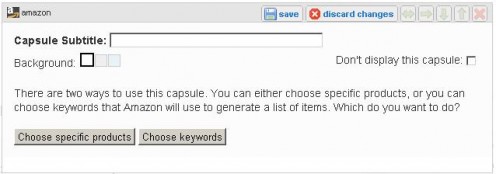
Now, you will see that you can choose specific products or you can choose keywords. As for me, I consider letting Amazon pick as a form of financial Russian roulette. Click the 'choose specific products' button and we'll see where it leads us:
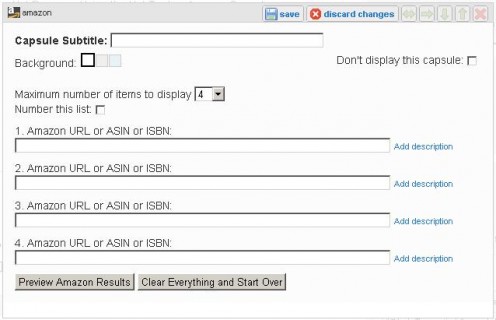
Ah … choices. The first one to make is how many items to display. I recommend no more than four. If you provide too many choices you boggle the reader with infinite decisions, or worse yet, show them how desperate you are to make a sale.
So how do you know how many to use? Well … if you are writing about a specific product, you use one to represent that product (of course). However, if you write about a broad topic, such as fly fishing, you might include several. One thing is certain – we need to know what to type in those empty white rectangles! I suppose now is as good as a time as any to discuss that.
Locating products on Amazon
Leave your hub open and start up another browser window. Go to Amazon and look for the search bar near the top of the page. Found it? Good. Now type the name of the product you are looking for in the long white rectangle key and click Go.
Pretty nifty, eh? You'll find lot of items doing this. Some will be hits and others will be misses, so you'll need to sift them through. Also, you need to look at the star ratings next to each item, if you see less than 4 stars you are probably wasting your time placing that particular item in your Amazon capsule. A low amount of stars typically signals customer dissatisfaction and it's always best not to become known as someone who recommends substandard products.
When you find a product related to your hub, remember to sniff through the 'Frequently bought together' section and the 'Customer's who bought this item also bought' sections. Within these two areas you are bound to find a few gems. After all, if they sold before, they'll probably sell again.
Did you find a few good ones? Good. Now, here's where the fun begins … If you like everything on the page and think it's all related to your product, then write down the URL (the big long HTTP name in your address bar). However, remember that it is better to *focus* your reader's attention on certain items.
Provided you are taking my advice and going with a specific item (or items) you will need to look down through for either a 10 digit ASIM number (for items that aren't published media) or an ISBN number (for items that are). Write those number down (verbatim) and return back to your hub page.
We're back to that Amazom capsule thingy
Enter in the items you wrote down in the last step, one item per line. Provided your hub is all about fishing lures, it might look like this:
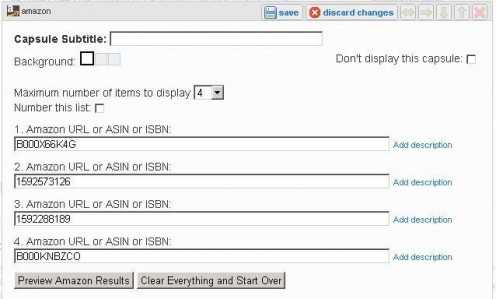
Next, click the Preview Amazon Results button. Provided you typed everything right, the pictures for your items will show up. Reasons this might backfire:
* You typed the wrong code for the item (Amazon codes need to be entered in all caps)
* The item you chose had no picture (chose another – few will buy what they can't see)
* A meteor struck Amazon central and knocked their server offline (let's pray this never happens)
Let's take a look at our preview:
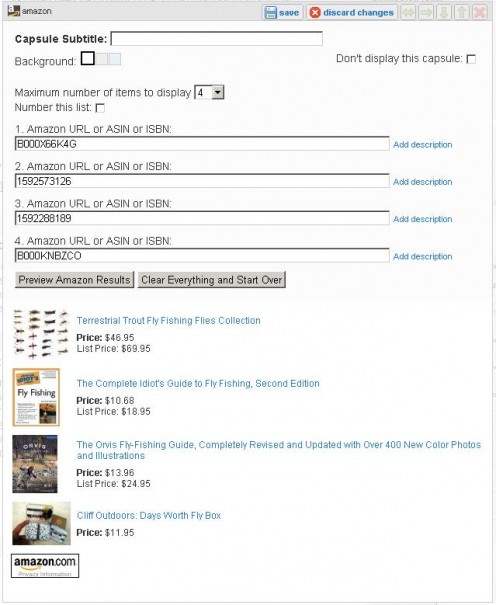
Click save to place the edited version on the page, and there you have it – a working Amazon capsule on your hub page. Not so difficult, eh? But wait, there's more! You get a set of fine steak …. um, that's not it … you get a chance to improve on what you have done.
Oh, you didn’t think that was it did you? Now sit down in that chair while ole Yoshi tells you how to do this all one better.
There's more!
Let the hub sit for about a week. Ignore it and move on. Yep, that's right … ignore it like it never esisted, regardless of the temptation to do otherwise.
Has a week passed by already? Wow! That was quick. The next step is to go into Google Analytics. You signed up for that, right? No? Well go do it already! I'll wait here until you get back, and I won't mention how I have already been sitting here a week waiting to tell you my great secret. Just run along and get that Google Analytics account working while I do a bit of fly fishing here in the pond.
You're back? Good. Let's try this again. Open up Google Analytics and look to the bottom, where it shows the traffic sources overview. Click View Report (underneath the pie chart) and look at the keywords column on the right. Click View Report under the keywords column.
You should see something at the bottom that looks close to this
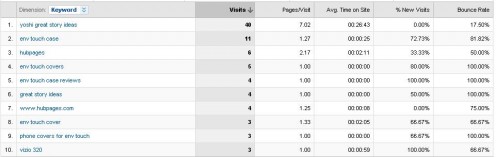
What is it, you ask. Well, that's what people typed in to hit your pages. As an example, what if you see a bunch of hits for flyfishing rods? Well, that might explain why no one bought the flies you advertised. So, what do you do?
You're getting it, I can tell. I see the eyes lighting up. That's right! You return to Amazon and look up some highly rated flyfishing rods, then place those inside of your Amazon capsule, replacing the flies that wouldn't sell. That's called 'learning from your mistakes', and thankfully you can do just that – and profit from them.
I had this exact thing happen with my LG enV touch review hub. I got mega hits, but no interest in the phone. When I checked Google Analytics, I discovered everyone was looking for phone cases – not the phones themselves.
How odd, I thought to myself. If you are looking at a phone review, then aren't you interested in buying the phone first? Well … unwilling to stand in the path of progress … I conceded and listed the phone cases.
Did they sell? You bet! Listen to the readers and they will tell you what it is they want to buy. Offer it to them and you just might make a sale, or else, you can place your head in the sand and wonder why nothing is happening for you. I prefer to profit where I can, which is why I listen intently when they speak to me.
Well, that's all I have for now
Oh! I just thought of one final tip! Try to chose reasonably priced items. At 4% profit (it increases as you sell more) you make as much selling 100 items for $1 as you do 1 item for $100, but you will find the $1 items much easier to sell.
Now, go out there and win one for the Gipper! (I always wanted to say that)