How to Hire a Professional on www.elance.com

Elance Home Page
www.elance.com
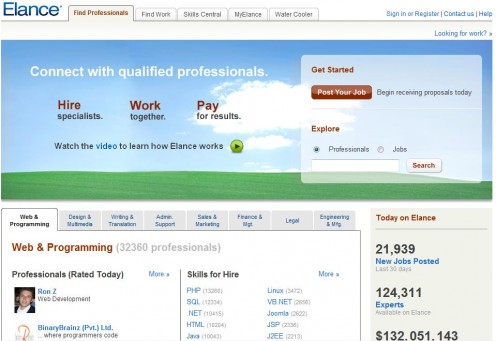
Elance, found at www.elance.com, is a world-wide community of programming, writing, legal and marketing professionals waiting to bid on jobs posted by you! Because these individuals and companies are often (though not always) overseas, you can have some excellent work done at very reasonable prices. I am personally having a pretty complicated website developed right now for just $200. I will show you how to use elance yourself.
What kind of work can they do? Personally I have used Elance for both website development and logo design. However, there are many other services which are essentially “computer based” for which you can post a job and “hire” someone. Examples of such work include:
- Website Design, Programming and Hosting
- Logo Design
- Business cards and marketing material
- Illustrations
- Cover Design
- Editing
- Proofreading
- Translation
- Typing
- Legal Writing
- Data Entry
- Medical Billing
- Medical Transcription
- Advertising
- Bookkeeping
- And much, much more.
Since 2005 Elance has arranged for more than 132 million dollars worth of business between customers and professionals. Their next customer could be you!!
So, do you want to have your own website to promote your business or hobby done professionally? Do you have any other business or personal needs that could be handled remotely by a professional overseas? You could save tons of money and get the highest quality work available by skilled professionals. Here are the steps you will need to take to get bids on whatever job you would like. I have done this myself, and I will tell you how.
To Begin: Register with Elance
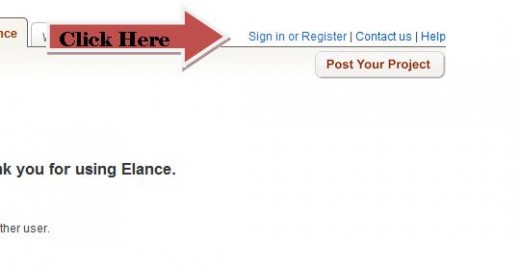
Go to www.elance.com and click on the “sign in” link in the upper right corner. Follow the steps to create an account. You will need to provide a credit card (or use Paypal) to establish an account. Elance will charge your card $10.00 which will be fully refunded in 10 days no matter what. This is just to ensure you are real, and have legitimate intentions. You do NOT have to actually use any service they offer to get your money back. It is automatically deposited back into your account in 10 days. No strings attached.
Step #1: Post a Job
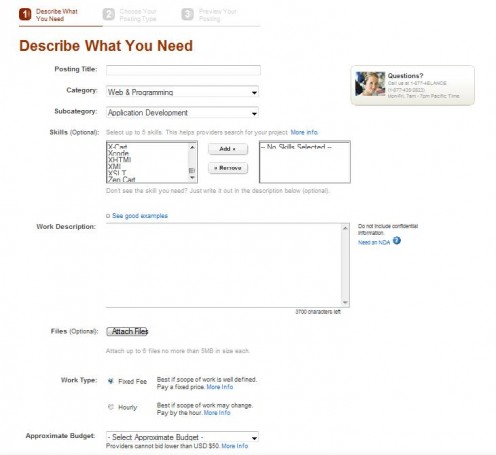
What would you like to have done? Have a website built for you? Enhance your existing website? Need a cool logo, a resume prepared, some data entry taken care of? This is how you use elance to get the job done! From the homepage simply click on the big red button that says “Post your Job”. Give your job a title (e.g. Need a personal website, or business logo, etc). Pick an appropriate category and then subcategory. Describe (optional) the skills you specifically need (feel free to skip this if you don’t know). Then describe your project.
The description is VERY important. Try to be as clear as you can about what you want. If you want a website, briefly describe it and explain how many pages you want, if you have your own domain name already, if you need hosting, etc. Will you be selling something? Will you need a shopping card added? Include as much relevant information as possible. However, this is not the time to describe the color background you want or the actual text to be included. Bidders need to basically estimate the time it will take to accomplish your requirements. So be honest and specific and you will get the best set of quotes to compare prices.
Select the “work type”. Usually this will be a fixed fee, unless you are looking to hire someone for a longer project or consulting, etc.
Then select your approximate budget...aim low!
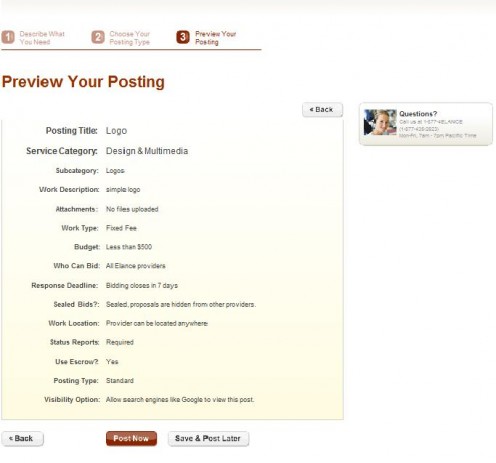
Finish by indicating your other preferences. I have shown you in the picture which preferences I have used.
Step #2: Choose Your Posting Type
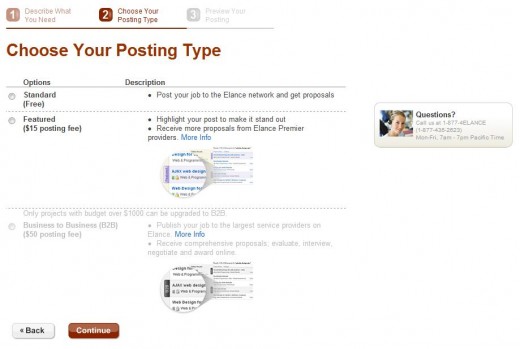
This is quick and easy. Use the standard posting method with NO fee.
This is all that I have ever used. You will get a couple dozen bids, which will be more than enough. I suppose if you have a really big project you may want to invest the few extra bucks to boost your position...but most of us won't need to do that.
Step #3: Preview Your Posting and Post
Review all your information. If everything seems okay, click “post now”. You have done it! You are really using Elance now! Within hours (sometimes within minutes) you will begin to receive emails notifying you of your bids. You will have offers from the U.S., from India, from Pakistan, and all around the world. These are all registered legitimate Elance providers.

Step #4: Reviewing Your Bids
Now comes the time to do your due diligence!
Elance will provide you with some helpful tools to organize and rank potential contractors for your job.
Star Rating - This is a ranking that goes up to 5 stars and is based solely upon client feedback. 5 is near perfect.
Elance Level - This ranking shows how far up the Elance ladder this contractor has climbed. Ranking is based on several factors including the number of jobs, amount of income, repeat customers, etc. Basically, the higher the rank (generally) the better. But don't count out the lower ranking offers either! Some new contractors may be VERY good.
Price - Elance will show their bid price, and you can choose to organize these from High to Low, or Low to High.
Notes - There is a "notes" feature for you to write down notes to yourself. Only you see these.
Decline - If you want to take a proposal completely off the table, just hit decline. They will ask you why. Price is often a reason.
Hide - Just want to remove an offer from your list - but not actually decline it yet? Choose "hide" and Elance puts it in the "hidden" tab so you can better focus on more likely offers.
I recommend asking some questions before you finally chose someone, just to get a feel for their response time and comprehension. If it is a website you are after, ask for some sample sites they have done that are actually functioning right now. Don’t just look at their “pictures” of homepage designs. You want real, functioning, authentic jobs done by them. If it is a logo you are after, ask them about their refund policy if the final image quality isn’t satisfactory. Basically, just ask something and see how they respond. Do they respond promptly (within 1 day), politely and clearly?
Step #5: Award The Project
Did you find someone you like? Then eventually you have to pull the trigger and award the project. You do not HAVE to do this. You can cancel your project if you like…and there are no fees whatsoever. To accept a bid, just select the "award" icon next to their proposal.
Once you award the project, the other bidders will be automatically notified (so you don’t have to personally explain your choice to the others). The “winner” will also be notified and they will send you a final version of your “agreement”.
When you both agree on the actual work to be performed (this should have been well clarified before now anyway) the provider will send you a notification to “release” the initial set of funds (usually half the amount) and they will begin their work.
Sit back. Relax. Let them do the rest. They will email you with any questions they may have and notify you regularly of their progress. When the project is done, you will be notified to release the final payment and your “product” will be provided to you. Remember to leave them a feedback score. Be fair. If they provided excellent service and a great product…let them know (this would be a ‘5’ on the scale of 1 to 5).
You Are Done!
That is all there is to it. So far, my experience with Elance has been good. I’m sure there are some who have had their problems (as with any business). But if you are clear, communicate well, and have reasonable expectations, I think Elance is a great way to get a fantastic product at a really good price.