- HubPages»
- Technology»
- Computers & Software»
- Operating Systems»
- Windows
rundll32.exe - Application Error – The memory could not be "read". Click on OK to terminate the program.

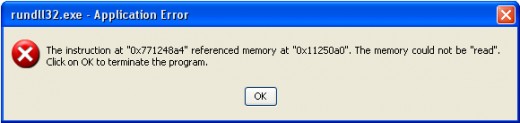
Windows operating system is corrupted due to several virus infections. One such type of common infection is rundll32.exe - Application Error. Due to virus infection, rundll32.exe or such type of .dll files are corrupted and Winodws is showing several annoying message. This page tells you the solution of the error rundll32.exe – Application Error. The instruction at “0x--------” referenced memory at “0x--------“. The memory could not be “read”. Click OK to terminate the program.
How to fix "rundll32.exe – Application Error. The instruction at “0x--------” referenced memory at “0x--------“. The memory could not be “read”. Click OK to ter
There are several methods to solve the problem "rundll32.exe – Application Error. The instruction at “0x--------” referenced memory at “0x--------“. The memory could not be “read”. Click OK to terminate the program." You may try the solutions one by one. If the first method is working, you don't need to think other methods. If you failed to solve by applying the first method then try with other methods.
Method 1: Replacing corrupted rundll32.exe
If run32dll.exe is corrupted, you will get that type of error. At first, I will tell you the easiest solution. The solution is just to replace corrupted rundll.exe file. To do this, follow the following steps:
- Insert Windows XP cd on the CD / DVD ROM / RAM of your computer.
- Click on Start menu and then click on Run.
- Type the following command in the command prompt.
expand X:\i386\rundll32.ex_ c:\windows\system32\rundll32.exe
- Hit Enter key of your keyboard.
- Restart your computer.
The above steps will replace the corrupt rundll32.exe with a fresh copy from windows installation CD/DVD.
Method 2: Using third party software to fix several registry errors
If the above methods don't work then there is another solution. This solution is very effective only if the registry has several errors or the registry values are changed by the virus infection. For this type of solution you have to use a third party software. To repair for this type of situation, follow the following steps:
- Download the software for fixing registry.
- Install the software.
- Run the software.
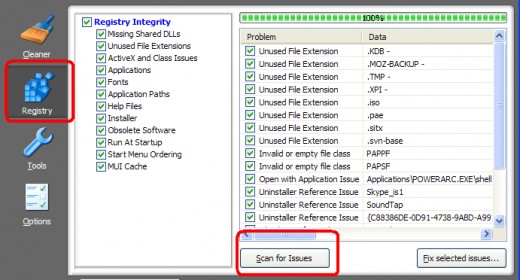
- Click on Registry tab and then click on Scan for Issues.
- After finishing scanning, click on Fix selected issues and fix all the issues.
By using and following the above steps you can easily scan and fix the registry errors and restart your computer. After restarting, you may your problem may be solved.
Method 3: Finding corrupted .dll files and replacing those .dll files
This is very tricky method. For doing this type of situation, you firstly have to find out the corrupted .dll files. This is the most hardest thing to find out the corrupted .dll files. After finding those files, you can replace those .dll files with fresh .dll files. You may collect fresh .dll files from other Windows XP operating system.
Method 4: Repairing your Windows operating system
If you are unable to fix the problem, you might repair your Window XP operating system by using Windows XP cd.
The above methods may solve the problem rundll32.exe – Application Error. The instruction at “0x--------” referenced memory at “0x--------“. The memory could not be “read”. Click OK to terminate the program. My personal experience is that most of the time by applying method 2, the problem is solved. If method 2 does not fix the problem, I apply method 1. It's rear that I apply or follow method 3 or method 4 problem. I think, you can solve the problem by applying any of the first two methods.
@Written by rancidTaste