- HubPages»
- Technology»
- Computers & Software»
- Computer Buying Guides
How to Pick Out a New Laptop that's Right for You

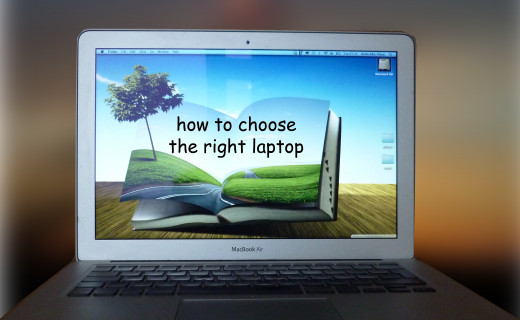
Choosing a New Laptop is Far From Simple
Laptop computers are rapidly replacing desktops, for many people they are their primary PC. With so much choice on the market right now, the task of choosing a new laptop can seem overwhelming. For people who don't keep up with all the latest technology developments the advertisements full of gigahertz, megabytes, gigabytes, SSD, SATA, and other acronyms can be overwhelming.
To chose the right laptop for you, you really need to think about where and how you will use it. No single computer will excel at all the functions. If you want something that is super portable, you will have to sacrifice some functionality. On the other hand if you really need a powerful computer that will handle more than Microsoft applications and web surfing, and want to have a large screen, you might end up with a heavier device that is not easy to carry around everyday.
What is Important in a Laptop
- The Processor (CPU): New laptops have 3rd generation Intel processors, Core i3, i5 and i7, with i3 being the least powerful,Speed is measured in GHz, the more the better.
- The Memory (RAM) You shouldn't buy anything with less than 4GB. Intensive photo-editing, or playing modern computer games will need more.
- The Hard Disk can be either SSD or SATA. SSD gives you much faster startup/wake/program loading times but doesn't come up with much capacity. SATA is slower but you should get at least 500 GB
- Graphics: most laptops come with integrated graphics, which should be Intel HD 4000. This will not affect your everyday use
- The Screen A full HD screen with a resolution of 1600x900 is nice, especially for larger devices.
A Mac or a PC?
First you have to choose whether to go for a mac or a PC? Actually most people do this automatically, you will most probably go with whatever computer you've used before.
However, just in case you are bilingual in computer operating systems, there are some decisions to be made. For example I have a PC desktop, which is really my gaming rig, but when I decided to choose a laptop I couldn't resist the lure of a macbook air.
There was a time when I was very dismissive about macs, seeing people who used them as victims of the style over function mentality, but no more. Mac computers have come a long way, and you can now be sure of getting a very solid machine. And they haven't sacrificed any of their fantastic looks in the process.
The new MacBooks Pro with Retina displays have one of the most beautiful screens known to man. The components are also great, including the newest generation Intel processors, lots of RAM and good dedicated graphics.
In my opinion Mac computers also have fantastic keyboards. This is hardly the most glamorous of components, but if you type a lot it can make a huge difference to your user experience.
In some ways, if you're not particularly attached to the windows operating system, it comes down to price. Apple products come at a premium and you often end up paying extra for the design.
When to Get a Desktop Replacement Notebook?
You need to ask yourself where you will mostly use it, and how much shoulder pain you are prepared to tolerate from a carrying around a heavy laptop.
If you mainly want to use it at home, to replace your desktop, you won't mind a big, heavy laptop. In fact the larger monitor will make work easier, and watching movies more pleasant. You will also not care very much about the battery life, since you will always be within easy reach of a socket. Big laptops are usually more powerful than slim lightweight ones, and have more ports for better connectivity.
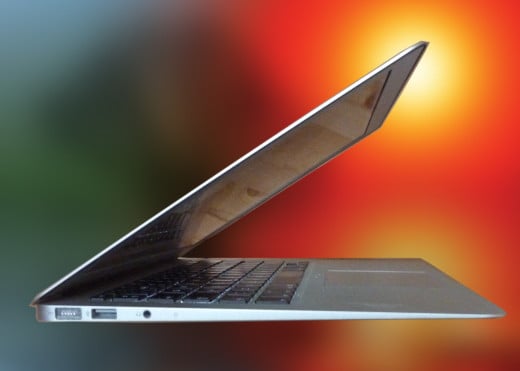
Or...Do You Really Need an Ultrabook?
On the other hand, if you travel a lot or plan to use your computer mostly away from home, then an ultrabook makes perfect sense. Ultrabooks are super thin and light, and have an extended battery life.
The ultrabook format was introduced by Intel in 2011 and there are strict specifications that a laptop must meet to qualify for the name. These include being less than 0.8" (21mm) thick, having at least 5 hours of battery life and having very fast startup.
All these properties make ultrabooks extremely portable, great if you travel a lot or use your computer mostly away from home. However that thin form does have some limitations.
Ultrabooks come with a solid state drive (SSD) rather than the traditional SATA hard drive. Although SSD drives are much faster, which accounts for the amazing startup and program loading times (which is really excellent, believe me!), they are usually very limited in capacity. Mostly they come in 128GB or 256GB, which fill up very quickly. This makes an external drive a necessity.
They also lack DVD drives, so are not the greatest entertainment computers. Although most people nowadays use services such as netflix, iTunes etc. for their movies and music so really that is not such an issue. Connectivity is usually also sacrificed on the very thin chassis, so there are fewer ports.
Ultrabooks don't come cheap, although there are now some good models out there that will not break your bank. My own macbook air is one of the more expensive examples out there, but I absolutely love it.

Can't Decide Between a Laptop and a Tablet? Get a Convertible
With the introduction of Windows 8, and touchscreens which allow you to operate without a mouse, a new form of laptop was introduced, the convertible. This is basically an ultrabook that can be converted, by twisting, folding and a variety of other ingenious mechanisms, into tablet form.
This is extremely useful if you want to watch a movie while travelling, or if you are giving a presentation to a small group, people don't have to bunch up behind your back to see your screen.
Several companies have produced convertible computers, with more joining in all the time. The Lenovo IdeaPad Yoga 13.3" is highly rated by users. The name comes from its amazing flexibility, the screen can rotate 360o around a hinge, allowing the Yoga to be converted into a tablet by folding the screen under the keyboard. It can also be used in the "tent" format.
The IdeaPad Yoga is 0.68" thick and 3.4 pounds in weight. This is very portable for a laptop but rather heavy for a tablet (the iPad has a width of 0.37" and weighs 1.4 pounds).
The least powerful (and cheapest) model comes with the newest generation core i3 processor, 4GB of RAM and a 128 GB SSD drive. This is sufficient for everyday applications such as surfing the web or using Microsoft Word or Excell. There are models with better specifications, but of course they are more expensive.
See the Lenovo Yoga in Action
How Powerful Do You Need Your Laptop to Be?
The price of a laptop is mostly determined by the components under the case. A computer with the newest generation Ivy Bridge i7 processor, 16GB of RAM and a dedicated graphics card is going to cost a lot more than one with a a core i3 CPU and dedicated graphics.
The fact is, you don't need a huge amount of power to do most of the usual tasks on your laptop. Writing an email, surfing the web, watching a movie, or writing a report in Microsoft office will work just as well on the cheaper laptop. If that is the type of work you intend to do on your portable computer than you'll be wasting your money buying a more powerful machine.
Certain applications, like photoshop, high dynamic range photo editing or playing games are a lot more demanding. They will need better processors (at least a core i5), benefit from more RAM and, most importantly, need a dedicated graphics card rather than the integrated graphics found in ultrabooks and the cheaper computers. Serious gamers really need specialised, and very expensive, gaming laptops like Alienware or Asus Republic of Gamers, although it is possible to play older or not very intensive games on machines costing less than 500 dollars.
At the same time you want to future-proof your purchase, so it is worth getting a more powerful setup than what you absolutely need now. This is not something you want to buy on an annual basis.
Related
Best Computer Operating System Software for Old Slower Computers
Why Do I Need a Laptop Cooler - Should I Have a Laptop Cooler for My Laptop
Pink Laptops: Buy A Pink Laptop

Funny “Red Green” Style Laptop Computer Cooler using Duct Tape and Coffee Cans
How to Build an Awesome 386 Computer - Part 1: The Hardware