Using the Bcc Line in Email Effectively

The Three Address Lines on Email
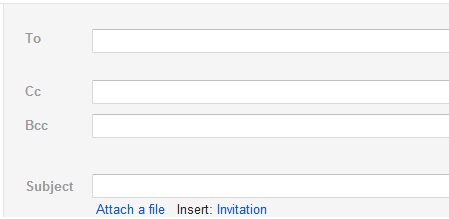
Email programs contain three lines for addresses.
The To: line is for the person or persons to whom you are sending the message.
The cc: or, on some programs it appears as Cc: stands for carbon copy is used to include someone who, for whatever reason, is receiving a copy of the email along with the intended recipient (the person in the To: line).
The bcc: or Bcc: line stands for blind carbon copy and is used to send copies to additional people WITHOUT THE INTENDED RECIPIENT OR THOSE BEING COPIED WITH A CC: KNOWING THAT THESE ADDITIONAL PEOPLE ARE RECEIVING COPIES.
Bcc Feature Is aA Great Feature for Mass Emailings
The Blind Carbon Copy or Bcc, is a nifty tool that lets you send an email to a large number of people without forcing them to scroll through three or four screens worth of addresses (or waste three or four pages of paper if they print their emails) before they get to the contents of the email.
The blind carbon copy is ideal for announcements that you send to everyone in your address book or for forwarding to everyone in your address book those great jokes that you receive in your email.
With the blind carbon copy you can send an email to ten thousand people and the only names that each recipient will see will be their name or email address in the To: line, and your name or email address in the From: line.
The names and email addresses of the other 9,999 recipients will not show because the blind carbon copy tool does not show them on the emails the other recipients receivel.

Using the Bcc Prevents Spammers From Harvesting Email Addresses When You Send to a Group
In addition to saving your recipients from having to scroll through a series of addresses to get to the message, using the blind carbon copy also prevents spammers from seeing and copying these addresses.
Of course, the people in your address book have the highest integrity and would never engage in spam mailings.
However, when they forward the great joke to everyone in their address book some of those recipients may be spammers and, if you used the To:, rather than the bcc:, line to address the copy you sent out, the spammers in your recipient's address books will now have the addresses of everyone in your address book.
When you use the blind carbon copy to send a general notice to a large number of people or to forward something to everyone in your address book you do have to put an address in the To: line. When I do this, I simply put my own address in here (you can email yourself from your own email) as it is simple and maintains everybody's privacy.
Blind Carbon Copy Feature Can Be Used for Deceptive Purposes
While the Bcc feature in emails is great for sending out announcements or forwarding an email to a large number of people, I don't know of too many other uses that are not deceptive.
When you use the Bcc line in normal email correspondence you are secretly including an additional person in the correspondence. This is dishonest as the person you are communicating with directly is assuming they are having a simple two-way correspondence with you.
Most routine email correspondence between two or more people is generally very generic and no confidences are broken and no one harmed by sender secretly allowing a third party to eavesdrop on the communication.
However, when the intended recipient (the person in the To line) or one of the others in Cc discovers that you are secretly including another party in an email they may lose some trust in you.
This is not only bad for your reputation but may also cause them to be more guarded and less open when communicating with you in the future.
- Google Docs - A Free and Versitile Office Suite Program
With Cloud based Google Docs you can have access to your documents and spreadsheets anywhere you have access to a computer and the Internet. You will never again have to worry about forgetting and leaving a thumb drive with all your files on a publi - FREE Office Suite Program Download
- Things to Consider When Creating an E-mail Address
Juvenile and off color email names may amuse your friends while you are a teenager. However, when you use an email with such a name for college, work or in other business correspondence you don't create a good impression with the recipients of your e