How to get detailed stats on traffic and increase earnings with Google Analytics



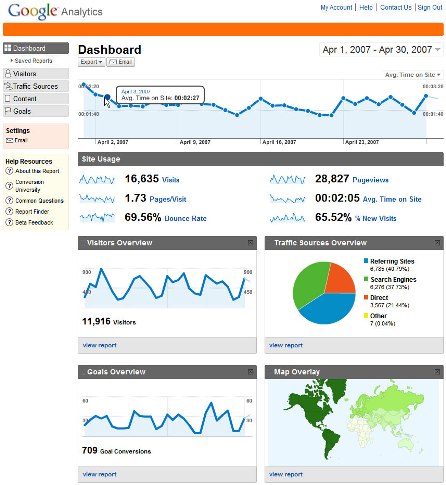
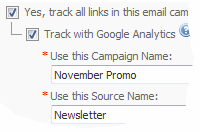
Open up the Google Analytics account via hubpages. Just go ahead and sign up for Analytics in your hubpages account's affiliate settings and paste the Google Analytics tracking code in your affiliate settings section. It is really easy to sign up with all the details provided by hubpages in the affiliate settings section.
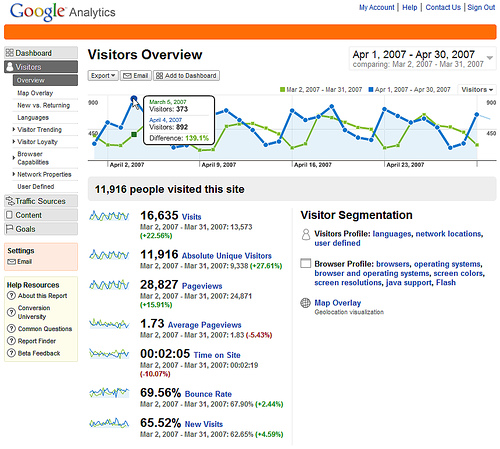
After signing up and pasting Google Analytics tracking code in your affiliate settings, not only you will start getting actual details of keywords but you will also get details of traffic sources, content sources, referring sites traffic, search engine traffic, and direct traffic. You can also start campaigns and set goals for increasing your traffic further.
You can also check which page or hub is converting a good source of income such as Adsense Revenue and you can modify that hub or write more hubs on the highest performing keywords in order to earn more from Adsense and other affiliate programs attached with hubpages.
Everything will be systematic for example when you will attach your Google Adsense account with Analytics, you can click on Adsense revenue section, analytics will also reveal adsense ads clicked, adsense page impressions, Adsense click-through rate or CTR, and adsense eCPM.
You can also check out your visitors' average time spent on your hubs and new and unique visitors and bounce rates.
In keywords section, you will be able to reveal good keywords and bad keywords for your hubs and modify accordingly to make your existing hubs or new hubs with high value keywords according to your hubs producing extra revenue for you.
In content section, you will able to see navigation summary, visitors' entrance paths, entrance keywords, site overlay, and content by title, content drilldown, top landing pages, top exiting pages, other useful things to optimize your hubs. You can also try the link website optimizer in your Analytics Account to generate good quality hubs.
Besides these really helpful and useful things Google Analytics provides, you can also save your campaigns and goals as a report in Microsoft Word or Microsoft Excel format making it really easy for you to check your hubs' daily trends and improve accordingly.
Google Analytics also provides advanced features like event tracking and advanced segments. Once you are through the basics of Analytics, you can advance further with these new features and rev up your site's visitors thereby revving up your earnings.
In the help resources of your Google Analytics account, you would be able to find a solution for common problems you might be having for example How long does it take to see report data after adding the tracking code or how to confirm that I entered tracking code perfectly in my website.
You can also attach your Analytics account with Google Adwords account and see the related details.
I hope I am able to answer your query now. If you have any more questions about Analytics or Adsense, please let me know via the comments section below. I am also providing links in the sidebar of this hub to some other hubs I have written on Adsense and Kontera for guidance on other questions relating to the same.
A brief overview on how to use Google Analytics interface. If you are new to Google Analytics or you'd like to pick up a few tips on how to use it
- Is it a breach of terms of google adsense program policies if someone clicks google ads on other hub
Hello Friends, Why I am writing this hub today? Today, I got a hub request from one of our fellow hubber and this request triggered my mind to write something which I think is very useful for us. Thanks to... - Not earning much from Kontera as you earn from Adsense. Why?
Yes, Kontera in-text ads are not working for me also. I have applied the Kontera code on my hubs for the last around 1 year and right know the balance is showing up as 18 or something dollars. I applied for... - How to make money from home using hubpages with clickbank affiliate programs
Hi friends, As you may know, bloggers, content writers or other big-hit site owners who have personal sites or blogs with good page ranks, links, keywords, and largest number of visitors are mostly people... - Google Analytics Video Tutorial 1: Setup | Internet Marketing Strategy: Conversation Marketing
This quick tutorial shows you how to set up Google Analytics. Analytics is critical to your internet marketing strategy. It lets you measure who comes to your web site, where they came from, and what they do when they get there. Those are the three b
Related

What Are Search Terms And Keywords: How Do People Find Your Content?

Google AdSense and Keywords: How Did I Get PAID This Much Money?

What Are Some Ways to Make Money with Google AdSense?

Amazon Affiliate Program Payout: Making Money With Amazon Associates
Google AdSense and Traffic: How to Make Money and Build Readership