Optimizing Firefox 3 Hacks And Tweaks

93Firefox
Previously I was using Firefox 2 and was happy with its performance. Then I downloaded the latest version on world download day. More than 60 million downloads are done till now. Earlier I used to tweak my browser to optimize it for the best performance. Now I am experimenting with the possibilities of the latest version. I am sharing them with you here. However I am a little disappointed with the extension compatibilities of the latest version. I guess I will need to re-install most of the extensions I was using with the earlier version. Its a pain considering the fact that most of those extensions do not have an updated versions for Firefox 3. I also found out what more I can do with the latest firefox, and then thensome easter eggs too! I hope these tips, tricks, hacks and tweaks will help you in optimizing the browser to suit your needs.

Optimize Firefox 3
As I was trying to tweak Firefox 3 to suit my needs, I realized that it is more cutomizable and user friendly than the previous version. I used the 'about:config' to do most of the tweaks. If you want to them please take a back up of your settings first, so that you can revert back, if you don't find the hacks and tweaks useful for you.
Firefox 3 Hacks And Tweaks
The following tweaks are obtained by typing about:config and then modifying the page. Make sure you take a back up copy just in case something goes wrong. Here are some of the hacks for the experimantally oriented.
Step one: Type about:config in the address bar and hit enter
Step two: Make the following modifications to the file by typing in the values on the respective fields to get the desired result (feel free to experiment)
1. To enable/disable Single Click Select URL of address bar
browser.urlbar.clickSelectsAll = True
browser.urlbar.clickSelectsAll = False
2. To auto Complete URL while typing in the address Bar
browser.urlbar.autoFill=True
3. To set the number of auto complete URL in the address bar
browser.urlbar.maxRichResults = #
(# indicates the number of auto complete URLs shown. The default is 12)
4. To disabler Browser Toolbar Tip
browser.chrome.toolbar_tips = False
5. To paste copied content by clicking the center button on the mouse
middlemouse.paste = True
6. To disable blinking text
browser.blink_allowed = False
7. To create a single close button to for all Firefox Opened Tabs.
browser.tabs.closeButtons = 3
8. To increase number of recently closed tabs.
browser.sessionstore.max_tabs_undo=15
9. Right click view source in your editor
view_source.editor.external=True
view_source.editor.path= Path of Editor
10. To enable fast scrolling across tabs
toolkit.scrollbox.scrollIncrement =75
11. To stop displaying website icon in address bar and on the tabs
browser.chrome.site_icons = False
12. To enable spell check in text fields
layout.spellcheckDefault = 2
13. To speed up the browser
network.http.max-connections 30 to 96
network.http.max-connections-per-server 15 to 32
network.http.max-persistent-connections-per-server 6 to 8
network.http.pipelining false to true
network.http.proxy.pipelining false to true
network.http.pipelining.maxrequests 30 to 8
network.http.pipelining.ssl false to true
network.http.proxy.pipelining false to true
14. To disable annoying browser behavior
Change the followowing values to 'false'
dom.disable_window_open_feature.titlebar
dom.disable_window_open_feature.menubar
dom.disable_window_move_resize
dom.disable_window_open_feature.toolbar
15. To show more tabs on single window
browser.tabs.tabMinWidth = 75
16. To display search results in new tab
browser.search.openintab=True.
I have used many of the above about:config hacks with Firefox 2 before and it is working for the new version as well. If some thing goes wrong after applying these changes, restore your about:config to older setting.
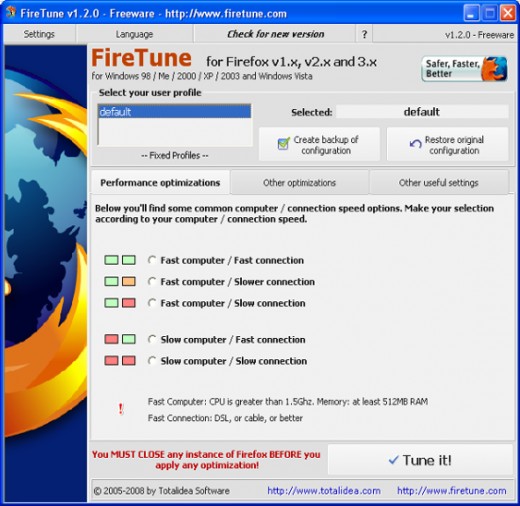
Using Software to Fine Tune Firefox 3
People will be coming out with more helpful hacks, useful tips, tweaks and tricks soon. FireTune is a simple freeware utility that will help you to fine tune Firefox 3. It is meant for tuning network related settings and is done with respect to your computer speed and Internet speed. This saves your lots of time which you would waste while doing this optimization manually. Click here to download this utility. If you feel that the changes done with Firetune are not upto the mark then you can always revert back to your original settings.
How to Easily Save All Images and Media Files
One other interesting feature I have fond in Firefox 3 is that you can easily save all media and image files. To do this first you need to click on the site identification button sitting just left to the address bar. A “Manage Information” Button will pop up. Click on it and you will see another popup with lot of options. Select the Media Option. Here you can see all the images and other media files availble in that web page. Select any or all, then click on the Save As button. This will ask you to specify a folder where it will save all the media and image files.
I am also using flashblock extension which blocks all annoying video and flash contents and help the pages to load faster. Interclue is another useful add-on I have installed, which helps me see less and know more, click less and do more, and warns me of dangerous sites.
Firefox 3 Easter Eggs
Like most of all other softwares, Firefox 3 is also carrying easter eggs!
To see the first easter egg in Firefox 3, type about:Mozilla in the address bar and hit enter. You can see the following text appear on the screen, (white text in maroon background). "Mammon slept. And the beast reborn spread over the earth and its numbers grew legion. And they proclaimed the times and sacrificed crops unto the fire, with the cunning of foxes. And they built a new world in their own image as promised by the sacred words, and spoke of the beast with their children. Mammon awoke, and lo! it was naught but a follower.
from The Book of Mozilla, 11:9 (10th Edition)"
To see the second easter egg type about:robots into the Firefox 3 address bar. The following will appear!
"Welcome Humans!
We have come to visit you in peace and with goodwill!* Robots may not injure a human being or, through inaction, allow a human being to come to harm.
* Robots have seen things you people wouldn't believe. * Robots are Your Plastic Pal Who's Fun To Be With. * Robots have shiny metal posteriors which should not be bitten.And they have a plan."
There is a button saying "Try Again". Try it!

If you liked this article give it a thumbs up. Please digg this and Stumble this as Google seems to be ignoring this hub. Don't have Firefox 3 yet? Click here to download
PrintShare it! — Rate it: up down flag this hub
Comments
Gee, I would not know if I would have time to do that. I think I am still using Firefox 2, not really sure. I just have some problems of cut and paste on some sites. Is it alright for us to copy your post here for reference?
Thank you for the tips!
-Nicki B.
That is a great information, especially for the people like me, kidding aside, more readers are really appreciate your tips.
Very useful tips - thanks !
Easter eggs are my favorite, thanks for the tips to find them.
Fantastic, and the icing on the cake is the flashblok extension tip, now I can finally got rid f hotmails flash adds that block up the controls
Bloomin Marvellous
Very useful, thanks. I am usually wary of mesing about with settings on my computer because i don't have the background knowledge but you make it sound easy.
Wow! Nice one. Thanks for sharing it.
click help and then click about youll see your version
Hey SunSeven... I did the Speed Up the Browser thing... IT WORKED!!!! Thanks!
ProCW
Super cool nice dude!Thanks for sharing! Have a nice day!
I found firefox 3 better than the earlier versions. Now I can make it even better thanks to your hacks. Again, thanks for sharing.
You are number one on HubPages today and you deserve it. I bench marked FF before I applied your hacks, going to restart now. Thanks!
I have noticed the FF3 crashes a great deal more than FF2. Do you have a solution for this annoying behavior?
Great...i liked this page , even bookmared this.
Nice! I'm looking forward to Firefox 3.
Sweet!!;)
I freakin love firefox :)
Great Hub:-) thanks for all the tips to improve firefox.
tDMg
LdsNana-AskMormon
Very nice tips. need to learn those. I have written a post about some really handy and useful addons (extensions) for firefox thought that you might want to see that http://cheatppc.blogspot.com/2008/02/ultimate-addo
This is a ton of useful information, thanks!
Really cool tips here. I'm finally getting used to the new FireFox especially after my add-ons and themes were updated for it :)
I just began using FireFox (I know, I know...WAYYYY behind the 8 ball on that one!), so I came in using the Beta & RC versions.
Can you say LOVE?
Thnx for the tweaks & hacks. They're going to make my Firefox experience even better!
Great Hub! Thanks for sharing.
Now if only FF3 would stop crashing every 1-3 hours. Even in safe mode without plug in it constantly crashes for me. I usually have 4+ tabs open and BAM cya.
Thanks SunSeven for the great tips.
Off I go to change the settings! :)
It really helped with with my speed.. Thanks for publishing so nice paper on Firefox..
Nice one - few there that I wasn't aware of before
One word: SCHWEEEET!!!
Well I decided to upgrade from FF3 to FF2, what an upgrade!
Now I stopped crashing!!.
I'll give FF3 another 3-6 months before I touch it again.
Still an awesome hub!
Thank you for all your comments friends. I am glad if you found this article useful.
Best Regards
It is very useful! Thanks for the tips!
Thanks for the information. It's been very useful for me. I'm an avid Firefox user, and even Hubbed about it back in the 2.0 days. http://hubpages.com/hub/Firefox-Setup-for-Internet
When I upgraded to 3.0, the first thing I noticed was that one of my favorite add-ons wasn't compatible. Now I have to go out and find a replacement.
I've been using firefox on mac for about 6 months. I like it much better than Internet Explorer with Windows.. Thanks for the tips!
Dear SunSeven: Thanks so much. I had never heard of Easter Eggs before. I didn't know there was a hidden, creative world beneath the surface of the software. My left brain tells me that it is text written as a placeholder for the computer language. But my right brain says that no, the software is a holding place of treasures... Like you!!!! Best Regards, Cory
Great artilce.Thanks for the tips.
Donna
Dear SunSeven,
Thank you for this very useful instructional hub. I have learnt a lot from reading it, my friend.
Actually the file you are changing is prefs.js. If you mess it up and didn't take a backup you can delete it. Firefox will create a new standard one when restarted.
Not to take anything away for the author but the "To speed up the browser" sections should not be taken lightly. If you don't understand what you are doing you could just a easily degrade performance. You really need to experiment and put the time in to get it right for your installation. Not something I would recommend except to those who are technical. The problem lies in the balance of the communications (your ISP) and the user interface which also plays a part.
Otherwise nice article!
There's no doubt that Firefox is quicker than I.E.. One thing I have to be careful of is opening up too many link windows as it can overload resources and freeze everything.
Thanks for in the info about the icon to the left of the add. window and being able to download media files from a page that way. I wasn't aware of that.
Thank you for this very useful instructional hub. I have learnt a lot from reading it, my friend.
Thanks for this! Love Firefox!
Thank you for this information
Firefox is my best browser, I use it coz its stable and professional
I found 3.01 upgrade is the best tweak you can do. I was having endless problems with 3.0 crashing, but 3.01 really helped.
As someone with comparatively little computer know-how, I've found that (even though I'm a total MAC girl) that MAC requires you to upgrade your Operating System which you can't do until you buy a new computer, and so on and so on. I've seen this happen attempting to updgrade SAFARI and FIREFOX. Frustrating. Do PCs work the same way?
Awesome tips. The easter eggs are fun. Thanks!
Cool. I use Firefox for its performance and add-ons. Beats IE miles away. Oh, love the easter eggs.Thanks for sharing.
Thank you!
FF is my favourite browser,but this 3.0 ver. keeps crashing all the time!
Even with one window and tab opened.Update of some great addons are late.UnPlug doesn't work and many others....
Keep doing good job!
Heh... I LOVE how FF3 gives you a warning about how you're about to f up Firefox xD "I'll be careful, I promise!"
I also use the firefox. And I´m also having problems with the extensions...great hub
Thanks for your article, I switched to Firefox from IE7...I don't have anymore freezes and it made my website better for some reason, not sure why, but it cleaned up a lot of background screens which were previously showing with IE7......
Good article. Tweaking aboud:config settings is now part of Firefox user routine, although we never know what to change.
We have to be selective about what we change in about:config. Most "how to turn Firefox faster" articles around the internet suggest changes to config which reduce memory usage to improve overall performance. But it have an opposite effect. Using less RAM increases the use of virtual memory, which is a place in your hard drive used like memory. Once RAM is much faster than hard drive, it's a bad idea stop using it in favor of much slower hard drive.
When I found that you did not fall into this trap, it was a good surprise.
Great tips! I haven't been really happy with FF3 either. In fact, I still run FF2 on one of my machines. Maybe I will try some of these hacks in FF3 and be happier.
I use Firefox but I don`t know which one I use. It just says Firefox. Anyhow, I likeyour tips. Thanks.
Great hub. thanks for the tips. U did so great.
Nice Tips on the browser speed tweaking
Most articles like these invariably end up using more virtual memory instead of RAM, however when I saw that you didn't fall in that pitfall, it made reading this very good! Thanks
I updated to Firefox 3 and lost all my bookmarks, or can't find them hehe. Anyway managed to sort it out in the end, luckily I had a backup. Anyway thanks for the tips!
This is a masterpiece work.This is made clear by your perfect hub score.Keep up the good work.
my sistrcasey isanis
Fantastic tips!!!
Good tips for browser. I will try it.
Just came back to let you know that these tweaks are great!
Thank you so much, my friend!
*grins*
Exceptional Hub! I think the information was just what I was looking for. I appreciate your time & efforts.
marketingmergenow
appreciate this ... these tips are great ... i wonder if it works on FF3 portable ... trying it out soon!
NICE HUB
a fox with feathers...wow...good tips...
good tips, i'll try it..
Great hub. Never used Firefox. I use IE7 and Chrome and I'm happy. But maybe I'll try Firefox.
Great info. Thank you for sharing it.
Cheers
Great stuff!
As a vetran Firefox user I love to get under the hood and tweak my browser. Your tips though are going to take me a while to get trhough. There are lots and they all seem to be great, I know this becasue I have done the Firefox speedup and it has worked well.
Thanks for the tips
Good tips. My favorite tip not mentioned here is to change the address bar so that it automatically does a google search (not an "I'm feeling lucky" search) for anything that doesn't resemble a URL. That way, I no longer need a separate search box.
Thanks for the hub!
After about 3 years with Firefox I have just switched to Flock. I upgraded to Firefox 3 and found it less stable. Flock is built on the same engine, so very familiar for firefox users. You can use most of these tweaks and most Firefox addons are compatible. I believe that Flock is in the lead at the moment and it has lots of great social networking features.
Cheers
Rich
thanks for all the tips, I'm upgrading my firefox to 3.0.4 (update bar just popped up :D).
I also use the firefox. And I´m also having problems with the extensions...great hub
Thanks for all the great tips. I think I am still going ot stay with firefox2 on my main computer. But I will come back to this hub when I am ready to upgrade. Thanks.
thanks.
Thanks for the useful tips sunseven. Really got a kick at being a programmer, if only for a few delusional moments. Anyways, I came back to tell ya' that I am already benefitting from a more refined firefox experience, and I really LOVED the tip you gave about the media and image capture. OOOHHH! I could just jump right into the panel and give you a big hug for that one!! Make it a wonderful day!!
LOL! I love the Easter Eggs!
Thanks so much for the help. I really needed it.
Firefox 3 is packed with lots of cool features. It also have the capability of detecting some security issues and vulnerabilities, which firefox 2 was not able to pick out.. It also sends quick alerts on noticing vulnerability.
I have also noticed that it is faster than the previous versions. The video customization options allows you to save video files in different formats including flv, mp3 etc. However, it seems that it is less robust and stable. It crashes when loading or reloading some pages or when it encounters little error.
Great hub. I love the simplicity and readability of your format!
Thanks for sharing your knowledge. now i am going to upgrade my FireFox...:)
thanks..
Thanks for the tips. It is needed & will be very useful.
Thank you for post this information, I never thought that firefox gave us a lot of problems.But I'll do the tips.I invited you to read my hubs:http://hubpages.com/hub/Hiring-Top-Notch-Employees
Thanks for the great information was really helpful. Maybe these could help too:
1)How to Stop YouTube Videos from Automatically Playing in Firefox:
Once you install the extension, you'll notice that the videos on YouTube.com now have the play button. To install, download the extension to your hard drive, and then drag it to your Firefox Add-ons dialog.
http://www.howtogeek.com/geekers/StopAutoPlayingAl
2)The Opera browser as ’speed dial’ feature, where you can click on thumbnails of websites and be taken to those sites immediately. You can also Get the Speed Dial Feature in Firefox also.I loved having my favourite websites on the screen as pictures that I could just click with my mouse. I finally settled upon Fast Dial, speed dial for Firefox in Ubuntu Linux.
Upon installing it, Fast Dial then lives in your blank Firefox tabs. You can insert any of your favourite sites inside each of the boxes (there is space for up to 100 sites if you fiddle around with the customization options) and when you insert the URL, a thumbnail picture of the site then appears. Any of the boxes are easily editable if you want to change the URL later or update the thumbnail picture.
You can also change the background colour to anything you want. The default colour of the home screen is white but I changed mine to black. You can also change the size of the boxes, the number of the boxes….everything is customizable.
Another very nice feature is a right-click option on each Firefox tab which says “add to Fast Dial”. So if you are on a website and you decide that this should go into your Fast Dial, just right-click on the tab and choose “add to Fast Dial”. The next time you go to your Fast Dial page, you’ll see the page there.
https://addons.mozilla.org/en-US/firefox/addon/572
Great Tips! Glad I found it after many searches. Thanks for sharing. Makes the world a better place.
thanks..
Thanks for sharing such a great information. I am going to apply it now.
Hi - great info - have a question: I have loaded the newest version of FF and now I find that it takes almost a minute to load - what gives?
Good info here. I have been using FF for quite some time. I started when I was wanting to save things to my iPod so that I could review them on the plane. There are lots of great hacks to make FF a personal experiance that you need.
Great hub. Never used Firefox. I use IE7 and Chrome and I'm happy. But maybe I'll try Firefox.
yeah, evry good tips even a newbie can follow.. Great hub !!
Thanks for the write-up and some useful comment additions. When I typed: "about:config" I received a warning message saying "This might void your warranty".
The message could be concerning for the more novice user wanting to fix a FF problem. Maybe a note within the hub that explains, because your reading this Hub you do know what you’re doing, unless you start changing things not directed. Although I can't understand what warranty will be voided in the first place?
Great article. These will be really useful tips.
Its a great article dude. Thanks a million
Very useful information! Thanks for sharing it!
Thanks a lot for all the information! very usefull!
wow awesome post man thanks its really help full i will definitely subscribe to your feed
very good article...thx
PR: wait... I: wait... L: wait... LD: wait... I: wait...wait... Rank: wait... Traffic: wait... Price: wait... C: wait...
Until now I've been using IE7, but recebtly I've tried FireFox and I'm amazed with its speed (when compared with IE)...
This tips are really helpful. Thanks
Oh boy, I really started to hate FF3. Using it long time now, and finally got something that could really work for me, and who knows how many others. Thanks.
Very good tips!
FF3 is a very good browswer..I should thank you for increasing the surfing speed by your tips..
Thanks, FireFox was starting to get slow but these tips really helped.
Oh boy, I really started to hate FF3. Using it long time now, and finally got something that could really work for me, and who knows how many others. Thanks.
Wow awesome post man thanks its really help full i will definitely subscribe to your feed
Thanks, FireFox was starting to get slow but these tips really helped.
This was very useful, thanks again for help with FireFox.
thanks a lot for the great advice! I never knew about these firefox hacks! only about plugins.
Thanks so much for this, it helps tremendously:)
Thanks a lot.
I also use the firefox. And I´m also having problems with the extensions...great
Thanks a lot.
Firefox is really awesome browser! Like it very much!
thnks dude
information is very clear. good and understandable explanation. super-topics. Thank you for sharing a very nice web site.
Great tips. I'm tweeking as we speak, lol. Thanks a bunch.
Really great. You have done a great job.
Your site is very easy in terms of expression and open. I think everyone who enters your site is very gratifying, but also sharing a very nice opportunity to give ...
Good article, thanks!
Firefox is really a long term browser and play supportive role for the users
Great post.Thanks a lot.
This looks very good and well made.
Thanks for taking the time to provide us with these great tips! It is nice to know there are still some giving and caring people in this world, and you are at the top of the list in both categories!
Thanks
Just in one word ...... great
hello sites thnask you
Thanks for taking the time to provide us with these great tips! It is nice to know there are still some giving and caring people in this world, and you are at the top of the list in both categories!
very cool.thanks.
Very well written hub .....
very much informative ......
Thank you very much for your great hub, for good advice, good wishes and support. Thanks for sharing your experience with all of us.
Thanks for providing great info. I am going to check this all right now.
nice and i download this
thanks
Thanks for taking the time to provide us with these great tips! It is nice to know there are still some giving and caring people in this world, and you are at the top of the list in both categories!
Very well written hub .....
very much informative ......
Thank you very much for your great hub, for good advice, good wishes and support. Thanks for sharing your experience with all of us.
Your site is very easy in terms of expression and open. I think everyone who enters your site is very gratifying, but also sharing a very nice opportunity to give
hi..nice to know there are still some giving and caring people in this world, and you are at the top of the list in both categories!
Thanks. nice tips
very goodd...
thanks for performance
cambalkon
seriilan
cumhuriyet
ankara
Thanks for sharing. I would definitely like to test these. Hope these will be still compatible with current version.
cool text
I agree and enjoyed reading, I will make sure and bookmark this page and be back to follow you more.
thanks so much i use firefox it is so great
thanks for entry
Thx SunSeven,ur the best !
Firefox is the best browser! XD
thank you entrymsg lowe ise.
thank you very much la la la lea.
Greetings,
We found your site related to ours and we would like to partner with you by exchanging links.
Below is the information on our site.
Category: Tech
Title: Techie Talks
Description: Daily techie talks from basic to advance. This involves programming, microsoft windows hacks,microsoft windows tweaks, virus prevention, malware, spyware, security advices and almost everything that talks of computer and geek stuff.
We look forward in partnering with your site.
Kindest regards,
Allan
Campaign Manager
A lot of grownups think playing PC games hinders the students from learning. aion kinah
Optimizing Firefox 3.0 Hacks And Tweaks in the News
- Firefox 3.6 hits ice - won't show up till SpringThe Register1 second ago
New decade, newish browser Mozilla has delayed the release of Firefox 3.6 until the first quarter of 2010.… The power of collaboration within unified communications
- Firefox 3.6 Delayed, Mozilla Adjusts Road Map for Browser's FutureWired News8 hours ago
The release of Firefox 3.6, previously promised before the end of the year, has been pushed into January. This also means we'll have to wait longer for other Firefox updates. But Mozilla had better keep the pace up, or else risk losing ground to Chrome.
- Firefox 3.6 RTM delivery in Q1 perceived as delayBetaNews9 hours ago
Way back last August, the Mozilla organization's developers set their sights on November 2009 as a release timeframe for Firefox 3.6, the latest round of functionality improvements to the most popular cross-platform Web browser.


hcshi says:
2 years ago
Cool! Very useful tips. These are advanced stuff in plain English.