Optimizing Internet Explorer Tips, Tricks, Hacks And Tweaks


Internet Explorer (IE) is the one of the free web browser that ships as part of the
Windows operating system. If you search through Google, lots of tips, tricks, hacks and tweaks are available for Firefox. But there are also lots of tips, tricks, hacks and tweaks are also available for our old browser Internet Explorer. This page provides some of the great tips, tricks, hacks and tweaks for Internet Explorer. Just keep reading...
More tips of other browsers
1. Quick jumping to Web Site through IE
Just type Internet domain name in the URL Address field of Internet Explorer and hold down Ctrl + Enter keys together. This will fill in www as the machine name and TLD .com. By using this techniques, you can save your time and extra typing.
2. Full Screen / Presentation Mode IE :
Select the F11 function key to enter presentation mode or full screen mode. Again press F11 function key to toggle back or return to the previous mode.
3. Homepage setting in IE
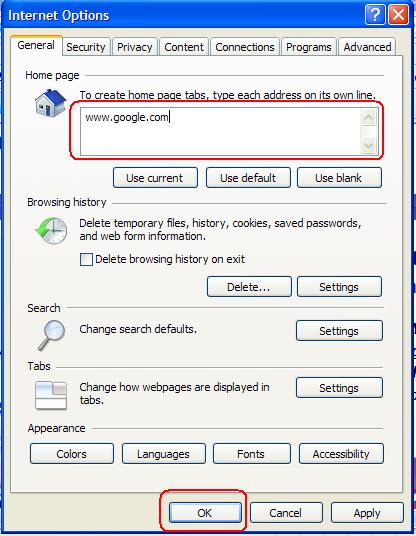
When you start IE, then home page will first starts. People configure homepage where they frequently visit. For example, you may configure IE home page for Google or for Gmail etc. For configuring it, click on TOOLS on the main menu at the top of the screen. Then click on INTERNET OPTIONS. Now, type in the address (for example: www.google.com) which you would like to set as your IE's homepage. Moreover, if you want to use the current opened page as the home page of IE then simply click Use Current and the current page will be as your IE's homepage. At last, click on the OK button to save all the settings.
4. Adding favorites in IE
Favorites allow user to save the location of a web page to make it easier to find again. By pressing CTRL + D, you can easily add your favourite page. Or,click on the Favorites button and then a drop down menu will be appeared and select Add to favorites option. And a window will be appeared. When done simply click the OK button. Later you can easily visit your saved link easily. To do so, first click the Favourites button and then click on the name of the page in the Favorites Sidebar.Within few moments, your desired page will be loaded to IE.
5. Resizing text size in IE
You can easily resize the text size of IE. To do this, hold down Ctrl key and move the mouse wheel. Now, all the text of the page will enlarge or shrink.
6. Cleaning cookies
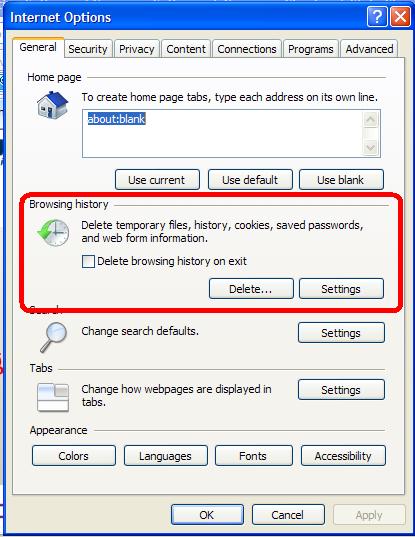
Cookies are used by some websites to enable their sites to remember something about you. To delete cookies, click on Tools at the top of the screen, then click on Internet Options and you will see a window will be appeared. Now, click on Delete form the Browsing history part.At last, you will be prompted to confirm the cookie deletion. Just simply click OK button to remove the cookies.
7. Page forwarding and back IE :
To do this, hold down Shift key and move the mouse wheel. This techniques will forward or backward the pages through the pages you would select.
8. Quick jumping to the addresses IE :
Select the Alt + D keys together and it will select the URL address field.
9. View the recently visited site addresses
By pressing F4 key, you will see a list of visiting sites which you browse recently. If you need to go any page from the list, just click on that link and you will be forwarded to that web address.
11. Cache clearing in Internet Explorer
Click on Tools at the top of the screen and click on Internet options from the drop down menu of Tools and you will see a window will be appeared. Now, click of Delete Files. Later click on Clear History button. By clicking these two options, you can clean your IE's cache. At last, click on OK button.
10. Page scrolling using mouse wheel button IE :
Push down on your mouse wheel scroll button. Now, you will go up, down, left or right of the browser content page.
12. Refreshing any page in IE
Select F5 function key and it will refresh the current page.
13. Quick Searching in IE :
In the address field of Internet Explore, type find or ? and then type the topic or keyword you want to search. At last, hit Enter key of your keyboard. This will go to MSN search engine and will provide the searched result.
14. Opening a New IE Window
Enter Ctrl + N keys all together and a new IE browser window will be appeared.
15. Open a new IE window with one clicking :
You can easily open a new IE window form a link by a single click. For this, hold down Shift key and click on the link. A new IE browser window will be appeared with that link.
16. Shortcut keys of IE
Internet Explore supports many shortcut keys. Some of the important shortcut keys are given below:
- CTRL + S: To save the current document/page
- CTRL+W: To close window of IE
- CTRL+N: To open a new browser window
- CTRL+R: To refresh any web page
- CTRL+A: To select all the contents of the opened page
- CTRL+C: To copy a selected contents form the currently opened page
- CTRL+F: To find anything such as a text or words
- CTRL+E: To search
- CTRL+D: To save a web page quickly to your favorites list
- CTRL+I: To jump to the favorites
- CTRL+P: To print the selected page
- CTRL+H: To open or view the history
- CTRL+tab: To go to the URL address field
- Alt+Spacebar+X: To maximize the window
- Alt+Spacebar+R: Tor restore the window
- Alt+Spacebar+N: To minimize the Window
- Home key: To go to the beginning of the web page
- End key: To go to the bottom of page
- Backspace key: To move back to a page
All these are the important optimizing tips, tricks, hacks and tweaks for Internet Explore. By using all of them you can optimize your IE and increase the performance of using IE.
© Written by rancidTaste
If you are enjoyed this post, please consider to leave a comment at the comment section of this page or Subscribe to rancidTaste's RSS feed to get new pages which will be delivered to your feed reader. You can also read more hubs by rancidTaste.