Is Your ISP Contorls Torrent Download?

Torrent files can be downloaded by BitTorrent software. By using torrent file, you can download high quality full length movie, several recent or old musics, pictures, software, books etc. Actually BitTorrent is a protocol that allows to download files quickly and upload parts of it at the same time. So, it absorbs enough bandwidth. That's why some ISP blocks it and save their bandwidth. If ISP block this protocol, you may be not download any torrent files.
If may find many blog posts, website users etc. free quickly ask several question. For example, How can I download torrent file? or Why bit torrent software can not download torrent file? or How can I figure out whether BitTorrent is working properly? or What is your BitTorrent Uploading rate? or What is your BitTorrent Downloading rate?or How to find which ISP is better for BitTorrent download? etc.
OK, fine... if you are looking for this type of questions, then you don't need to ask or read any article or ask to any one about the question. Please read this page and you will find everything about your query. Moreover, you may find out which ISP is best for you to use Internet and BitTorrent? Just, keep reading...
Some Tips for Your Browser
Now, scroll down the web-page and scroll until you found Start Testing button. Here, select any option (either Simple test or Detailed test) and then click on Start Testing.
One important understanding is that if your ISP blocks the BitTorrent or torrent protocol, you can't download any torrent file. Moreover, if your ISP limits the bandwidth you can't download high speed. So, to find out this type of issues, check whether your ISP throttling the torrent download.
There is one free tool for simulating BitTorrent activities. Moreover, by using this tool you can find the speed of downloading and uploading of any torrent file. The amazing thing is that you don't have to download any software to test it. This tool is implemented on a web page and that page be accessible anywhere. This program is known as aka bittorrent thortting test. It started it's journey since 2008 and is renowned like Google in today's world.
This tool is free and no need to install. You just open your browser and then go through the web address to the browser's address bar and find out the status for downloading or uploading the BitTorrent files. Now do the following to check torrent status:
At first follow the following link to use the BitTorrent checking tool:
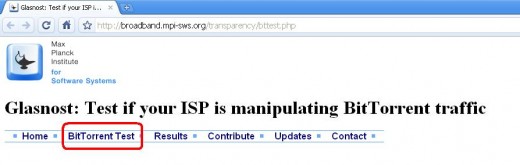
Glasnost: Test if your ISP is manipulating BitTorrent traffic
After opening the web-page, click on BitTorrent Test link.
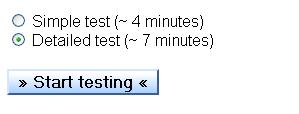
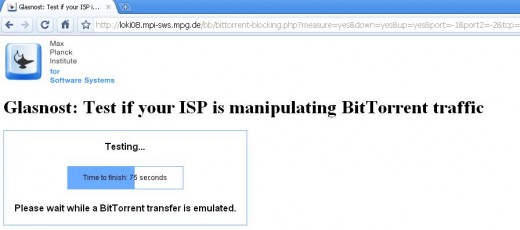
After clicking Start testing, you have to wait certain time and it may look like the following figure:
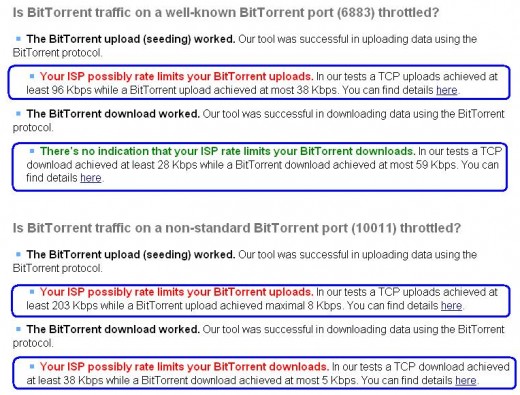
After finishing the test, you may find the result like the following figure. In this figure, I show you one example of the test result. If the test result contains any red colored writings the you will understand that there is a limitation or control of ISP. And if the color is green that the BitTorrent is down-loadable and ISP has no control to use BitTorrent files.
For example, one of the ISP controls the bandwidth of the user by using a restication to use torrent file. So, after testing the red colored marking lines are figured out. It means that ISP controls uploading by deploying a rule.
So, in this way, by using this tool from the web, you can easily find necessary information related to your BitTorrent downloads and Internet bandwidth related information. So, use it and figure out which ISP is best or most suitable to use BitTorrent. Moreover, you may know the BitTorrent bandwidth. You may also choose the best ISP for your Home Computer to use Internet etc. You may also find out why you are not able to download the BitTorrent files by using any torrent software.
© Written by rancidTaste
If you are enjoyed this post, please consider to give a thumbs up and leave a comment. You may Subscribe to rancidTaste's RSS feed to get new pages which will be delivered to your feed reader. You can also read more hubs by rancidTaste.
Want to express your knowledge and ideas, click here to join Hubpages.
It's simple, just like 1-2-3