- HubPages»
- Technology»
- Computers & Software»
- Computer Software
Mastering Oracle SQL Date Arithmetic

Topics Introduction
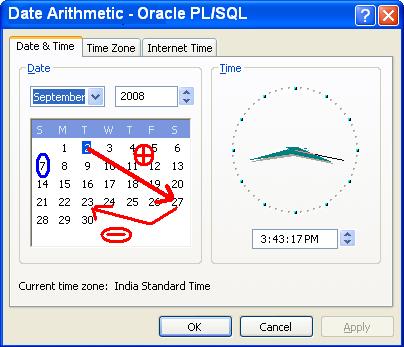
Date Arithmetic is the calculations based on date. Doing Date calculations is a night mare many times for a developer, especially in Oracle many developer felt this. But many of us never knew simple tricks and the new features (like INTERVAL introduced in Oracle 9). If you know and understand various date functions thoroughly, you may not feel this as a pain.
For a better understanding, let me put the various possible operations as topics here.
- Add days, months, years to Date
- Subtract days, months, years from date
- Difference between dates
- Comparing Dates
- Some Special Oracle date functions
- Interval and timestamp data types
- Type Conversion
If you explore these simple steps thoroughly, you may feel your self as an expert of date arithmetic in Oracle. After reading this ready the topic on Oracle Analytic Functions which could make you an expert.
Arithmetic fun
Add days, months, years to Date
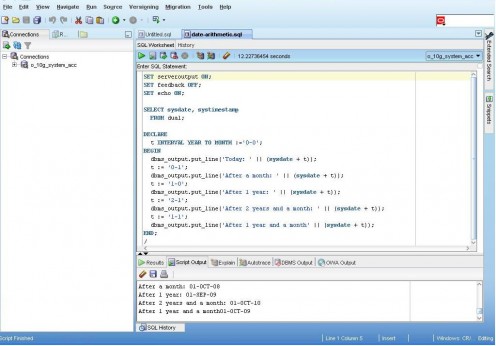
Adding to a date is as simple as adding numbers. Yes you can use ‘+' operator straight away. For example SYSDATE+7 gives you 7 days or a week after SYSDATE. So, if you want to add one month you will easily conclude SYSDATE + 30. Good. But this is not correct.
What would be the result of SYSDATE + 30 if the number of days in current month is 31? it would give one day lesser than what we expect. If SYSDATE is 01-SEP-2008, the result will give 01-OCT-2008 and which is seamlessly wrong. This is where Oracles ADD_MONTHS date function plays the role. ADD_MONTHS(SYSDATE, 1) will give the date after a month. The second parameter is number of months and here it says add 1 month to SYSDATE. No need to worry whether it is January or February or August etc.
Ok! I want to take you one step ahead, how to calculate the day after one year. I would give you a clue. And the clue is - 'A year has only 12 months'. Yes you are correct ADD_MONTHS(SYSDATE, 12) will give day after 1 year.
Did you thought ADD_YEARS(SYSDATE, 1)? Ha Ha! Good thinking! But Oracle has not yet provided such function. You can create a custom function using above calculation.
Example
DECLARE
today DATE :=sysdate;
future DATE;
BEGIN
future := today + 45;
dbms_output.put_line('Today is:' || today);
dbms_output.put_line('Day after 45 days is:' || future);
future := ADD_MONTHS(today, 2);
dbms_output.put_line('Day after 2 months is:' || future);
future := ADD_MONTHS(today, 12);
dbms_output.put_line('Day after 1 year is:' || future);
END;
/
Output will be
Today is:01-SEP-08
Day after 45 days is:16-OCT-08
Day after 2 months is:01-NOV-08
Day after 1 year is:01-SEP-09
Subtract days, months, years from a date in Oracle
Yes you will be picking up fast if you say just replace negative sign in place of the + operator. But what happens to ADD_MONTHS? Is there is a function SUBTRACT_MONTHS? Ahhhh! But not that. Just put the number of months to add in negative sign.
Example
DECLARE
today DATE :=sysdate;
past DATE;
BEGIN
past := today - 45;
dbms_output.put_line('Today is:' || today);
dbms_output.put_line('Day before 45 days is:' || past);
past := ADD_MONTHS(today, -2);
dbms_output.put_line('Day before 2 months is:' || past);
past := ADD_MONTHS(today, -12);
dbms_output.put_line('Day before 1 year is:' || past);
END;
/
Output will be
Today is:02-SEP-08
Day before 45 days is:19-JUL-08
Day before 2 months is:02-JUL-08
Day before 1 year is:02-SEP-07
Find Difference between dates in Oracle
Still we can use very simple of operations by using - operator which gives number of days between two dates. Refer below example.
DECLARE
d1 DATE := '01-Aug-2008';
today DATE := TRUNC(SYSDATE);
BEGIN
dbms_output.put_line('No of days between two dates:' || (today-d1) );
END;
/
Output will be
No of days between two dates:31
Looks very simple right? Errrr! But what is that TRUNC? This function cuts the time part of sysdate. Just place SYSDATE in place of TRUNC(SYSDATE), you will see the same output as fraction. The fraction reflects the time difference. So, Just to ignore that I have put this.
Now, you may think how to interpret into month or year? Here is the role of the Oracle date function MONTHS_BETWEEN comes.
MONTHS_BETWEEN(date1, date2) gives the number of months between two dates. Say I have joined in a company on '01-Jul-2007' and still working in that company. Below code will give my experience in months.
DECLARE
joined_on DATE := '01-JUL-2007';
today DATE := TRUNC(sysdate, 'mm');
BEGIN
dbms_output.put_line('I have bee working here for ' ||
MONTHS_BETWEEN(today, joined_on) || ‘ months' );
END;
/
Output will be
I have bee working here for 14 months
Interesting? I think now you are more confident with date arithmetic than you are earlier.
Comparing Dates
This is not as complex as previous ones. This similar to the fashion you compare other data (numeric/character). Ye you can use the operators <, >, =, <> operators.
Below example illustrates simply to you straight away. The example analyzes between three brothers John, Peter and David taking their date of birth.
DECLARE
johns_dob DATE := '01-JUL-1960';
peters_dob DATE := '01-JUL-1970';
davids_dob DATE := '01-JUL-1960';
BEGIN
IF johns_dob <> peters_dob THEN
--both born on different dates
IF johns_dob < peters_dob THEN
dbms_output.put_line('John is younger to Peter!');
ELSE
dbms_output.put_line('John is elder to Peter!');
END IF;
elsif johns_dob = peters_dob THEN
dbms_output.put_line('John and Peter are Twins!');
ELSE
dbms_output.put_line('This is impossible any way!! ');
--Find out why this is never possible if you give values!
--A logical test for you! Solve & Give your comments --
END IF;
IF johns_dob <> davids_dob THEN
--both born on different dates
IF johns_dob < davids_dob THEN
dbms_output.put_line('John is younger to David!');
ELSE
dbms_output.put_line('John is elder to David!');
END IF;
elsif johns_dob = davids_dob THEN
dbms_output.put_line('John and david are Twins!');
END IF;
END;
/
Output should be:
John is younger to Peter!
John and david are Twins!
I would expect your comments if you have read above example thoroughly.
Time Machine

Some special date functions
Yes there are more features in Oracle to perform date arithmetic. I list them here for your reference.
SYSDATE returns the current date and time of your operating system (the place where your oracle server is running). This is a pseudo column.
SYSTIMESTAMP similar to SYSDATE but it includes fractional seconds and time zone.
TRUNC(date) trims off the time portion of given date.
TRUNC(date, ‘mm') returns the first day of month for given date.
LAST_DAY(date) returns the last day of month for given date.
EXTRACT extracts and returns the specified value from a date or time. You can pull the day, month, year, hour and more from a date using below syntax.
EXTRACT (
{ YEAR | MONTH | DAY | HOUR | MINUTE | SECOND }
| { TIMEZONE_HOUR | TIMEZONE_MINUTE }
| { TIMEZONE_REGION | TIMEZONE_ABBR }
FROM { date_value | interval_value } )
But important thing is you can pull only a day, month or year from a date value. For pulling hours, minutes, time zone you need to use interval value using which you can't pull day/month/year.
Example
SELECT EXTRACT(DAY FROM SYSDATE) FROM DUAL;
EXTRACT(DAYFROMSYSDATE)
-----------------------
2
SELECT EXTRACT(MONTH FROM SYSDATE) FROM DUAL;
EXTRACT(MONTHFROMSYSDATE)
-------------------------
9
SELECT EXTRACT(YEAR FROM SYSDATE) FROM DUAL;
EXTRACT(YEARFROMSYSDATE)
------------------------
2008
Type Conversion of Oracle Date Data Type
Oracle provides many functions for date and time conversions. Apart from that, TO_DATE and TO_CHAR are very familiar functions.
- TO_DATE converts character data into a DATE.
- TO_CHAR converts DATE into character data.
Example
- TO_DATE(‘25/01/2008', ‘dd/mm/yyyy') - Returns the value '25-JAN-08' of type date.
- TO_CHAR(SYSDATE, ‘MON') - Returns the abbreviated month name
There are so many other functions available for conversion of intervals. I have listed them below.
- NUMTODSINTERVAL converts a NUMBER or expression into a DAY TO SECOND interval.
- NUMTOYMINTERVAL, converts a NUMBER or expression into a YEAR TO MONTH interval.
- TO_DSINTERVAL converts string to DAY TO SECOND interval.
- TO_YMINTERVAL converts a character string to YEAR TO MONTH type
- TO_TIMESTAMP converts to TIMESTAMP
- TO_TIMESTAMP_TZ converts character data to TIMESTAMP WITH TIME ZONE
I leave the examples for conversion as an exercise for you with the hope that you have got enough confidence now.
Imporve your aritmetic skills!
See Also - Other Articles on Oracle
Read my article on Oracle Exceptions to write efficient code with error handling features.
Oracle Interview Tips and Questions, Oracle 10g New Features in SQL, Over come the 255 Character Limit of DBMS_OUTPUT, Writing a better SQL, Oracle Analytic Functions
Click below example to enlarge.