How to Hold Windows Fast Shutdown

68
|
Microsoft Windows 7 Home Premium Upgrade
Price: Too low to display
List Price: $119.99 |
|
Microsoft Windows 7 Home Premium
Price: Too low to display
List Price: $199.99 |
|
Microsoft Windows 7 Ultimate Upgrade
Price: Too low to display
List Price: $219.99 |
|
3M 2141W Indoor 5-Window Insulator Kit
Price: $12.99
List Price: $22.54 |
You know how to shutdown your computer quickly. If you don't know you may read How to Shutdown Windows Quickly? Let, you double click on quick shutdown. Now, you computer will be turned off. Suddenly, you change your mind and then you want to cancel shutdown of your Windows. What do you do? I think most of you don't know this technique to stop. But after reading this page you will learn it and hope you will apply it to your life. If you ever apply your life this technique, don't forget rancidTaste's hub. Because you learn it from here. Yes, to cancel the previous shutdown command you need another command to stop that. We again create another file to stop that. Now, read the following and I think you find it useful.
Steps to Hold Fast Shutdown
Follow the following steps to hold fast shutdown:
Step 1:
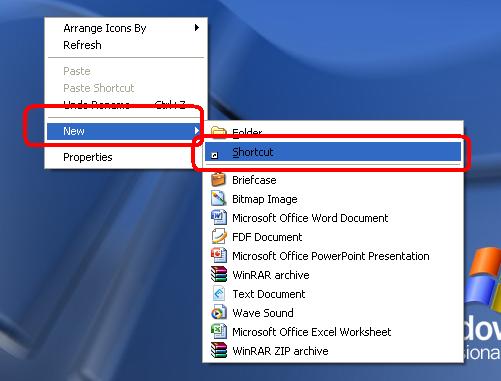
Right-click on the desktop with your mouse and choose New and then select Shortcut.
Step 2:
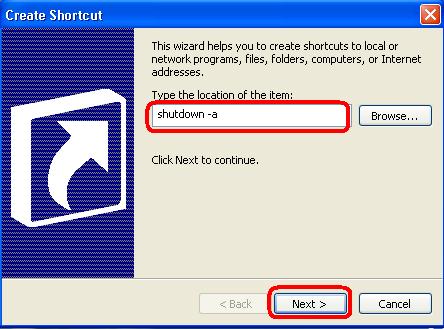
Now, a Create Shortcut window will be opened and there there is a text box below the writings Type the location of the space. Now write shutdown -a in that space. After writing this, click on Next button.
Note: The command shutdown -a and the custiomization of that command will be discussed at the end of these steps.
Step 3:
In this step you will be prompted Select a TItle for the Program dialog box. Write a name ot the shortcut in the Type a name for this shortcut text box. Say, you name it Stop. At last, click on Finish button.
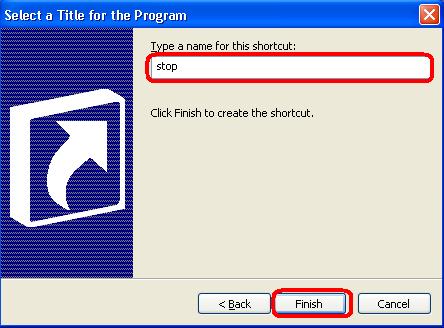
It's all about to shutdown your windows. Now, when you want to stop shutdown, just double click on that executable file which we saved as stop. After double-clicking you will see that your Windows operating system is stopped shutdown or turn off.
Expanation of "shutdown -a"
shutdown : this command is used to stop the local client
-a: It's a attribute which is used to stop to turn off your computer.
© Written by rancidTaste
If you are enjoyed this post, please consider to give a thumbs up and leave a comment. You may Subscribe to rancidTaste's RSS feed to get new pages which will be delivered to your feed reader. You can also read more hubs by rancidTaste.
JOIN HUBPAGES & ENJOY WORLD'S BEST WRITINGS

Recent Pages of itis123
- How to install Twitter widget into your blog?
Twitter, is becoming very popular day-by-day and a free social messaging utility for staying connected in real-time with your friends.
- How to add "Top of the page" icon to your blog?
"Top of the page" icon link is an important thing if your blog post is long.
- How to find out and change the size of your blog's header image?
Blogger header image gives the uniqueness of your blog among the millions of blogs.
- Troubleshooting
If you are a compute user, then you may face several types of problems at different times.
- ESET NOD32
Virus, Malware, Trojan, Worm, Spyware, Adware, Botnet etc.
- NOD32 keys
ESET NOD32 is one of the best effective and most proactive antivirus software and malware protection.
- How to Get Free ESET NOD32 Antivirus Key And Password
Different antivirus software are used to protect our PC form virus.
- Changing Your Blog's Header Image
You can easily add your favorite image or photo as a blog's header image.
rancidTaste's Recent Pages
- New Interface of Google Search: Try Google Search's New Interface Now!!
Google Search is always favourite to all from the starting of Google search. - 4 weeks ago
- Fresh and unique contents for Search Engine Optimization: The secret talks of SEO and generating site contents
Millions of websites with billions of webpages are available in the cyberspace. - 2 months ago
- Free malware protection with Portable Anti Trojan Elite: The best malware blocker and malware remover for your compter
Recently malware is spreading very rapidly. - 2 months ago
- rundll32.exe - Application Error â The memory could not be "read". Click on OK to terminate the program.
Windows operating system is corrupted due to several virus infections. - 2 months ago
- PPV or PPC?: "Pay Per View or Pay Per Click?" - Which One is Better?
Pay per view (PPV) and pay per click (PPC) are two types of marketing advertising solutions which is used by the advertisers to reach targeted group of visitors. - 2 months ago
- Make Good Money with Good Articles and Get Quick Cash
Before going to the main content, I want to ask you tow question? - 2 months ago
- Hot Secrets Behind Good Articles: How and Why Good Writers Always Write Good Articles?
Before writing to Hubpages, I have no idea about good articles. - 2 months ago
- Backlinks And Backlinking: Search Engine Optimization and the Importance of Backlinks And Backlinking
If you do a small research on search engine optimization or high search engine ranking, then you must come across the term backlinks or backlinking. - 2 months ago
PrintShare it! — Rate it: up down flag this hub