







I came across one of my articles in a Google search, complete with ads, that I seemingly deleted from my account. The chances are there could be lots more.
Can you tell us a little more about the article and where it appeared? I’m interested in any details you want to share.
It's this one. I deleted it from my account and it's not listed there, but obviously it's still available to anyone with the link.
https://discover.hubpages.com/living/Co … ock-Washer
I think it is due to clicking on older links you shared with others.
The articles might still be in the archives.
It's actually a live link though and turns up when I google it. So either there's a flaw in an automatic deletion process, or when we delete an article from our account page, it just removes the article from the list, and behind the scenes, a request is sent to the team to delete it. For another article, when I went into author view, nothing was displayed, and I had to contact Matt who put in a request for it to be deleted. But nothing happened. So I contacted him again. Eventually it got deleted a few days ago. Now I'm wondering how many more are still out there, or how to track them down.
Email team@hubpags.com. Include links to the articles you would like deleted.
So we have to search for all our previously published articles even though we deleted them manually months ago?
So another article which I contacted Matt about appeared to have been deleted in the last few days. Now it's back online. I told TAG on X that I was serving them with a DMCA takedown request.
I have somewhat of a guide on how to approach TAG with takedown requests, which includes the right email addresses and such. I know you have no problem figuring this out, but thought I’d put this here in case someone needs it:
https://medium.com/academic-adjacent/wa … f020510cb6
It seems now that deleting and unpublishing articles from the account page is no longer working.
I actually can’t open anyone’s profile right now besides my own. It’s concerning that you’re finding these deleted articles.
I'm using ChatGPT to do a search through all the categories on Discover and trying to get it to build a list of articles deleted from the account page, but still online.
Fascinating. How many of yours have you found so far?
I attempted to get it to do it, but it was somewhat ineffective and didn't generate a comprehensive list, only finding 42 posts. This is the long and convoluted conversation:
https://chatgpt.com/c/6a89630f-01dc-83e … c896f7f606
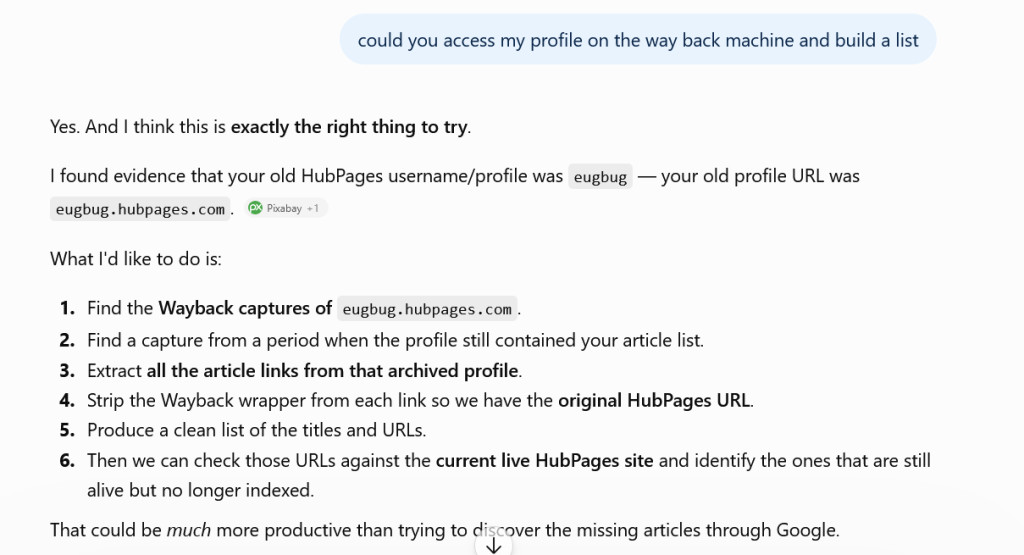
I'm going to try this approach now. Our profiles show a blank page and they're no longer indexed by Google. However, in theory, it would be possible to get ChatGPT to go through a Wayback Machine version of a profile, before someone deleted their content and use that. Now unfortunately, the links on the WBM point to archived copies of articles, ChatGPT should be able to strip off the wrappers around the addresses though.
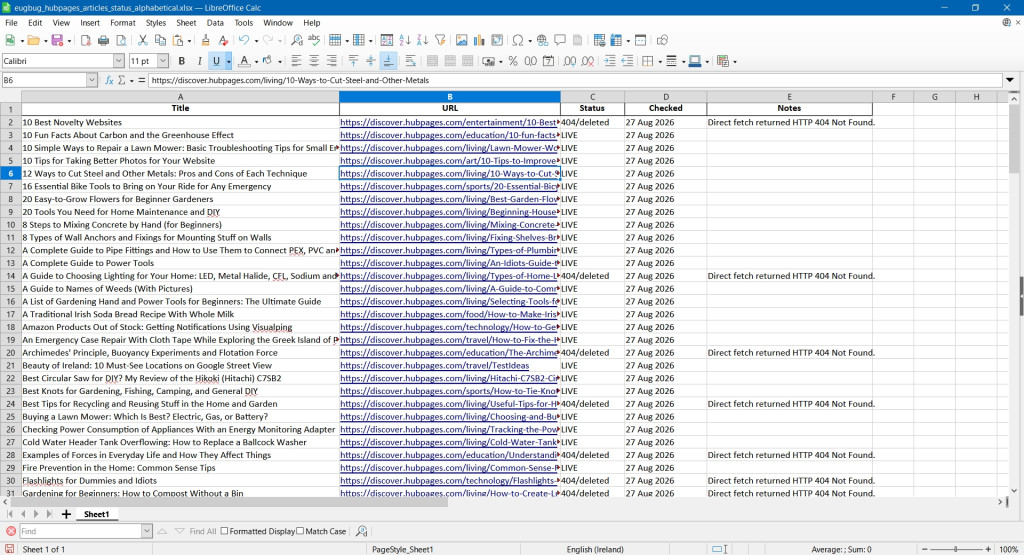
So this has actually worked. ChatGPT had difficulty directly accessing my archived HubPages profile on the Wayback Machine, because the site has become incredibly slow. It kept timing out. So I told it I would try and view the profile myself. It took a couple of minutes to load the webpage, and another few minutes to save it to my desktop as files were drip-fed by the WBM. Once I had the HTML file, I told ChatGPT to read it and extract the addresses, which it did and gave me a CSV file listing them all — one column with the article names and column with the URLs. But I want it to do more donkey work and make it even easier for me, so I was going to get it to makeup a table with the hyperlinked article name and the second column having the article status — still live at the original Hubpages Discover address, or giving a 404, indicating it's no longer online. However, I ran out of chat time, so have to wait until tomorrow to do that.
So it generated this nice spreadsheet for me, and sorted the articles in alphabetical order as requested. I haven't checked yet whether it actually checked the online/deleted status properly. That would take ages.
So basically what you need to do is go to the Internet Archive, AKA the Wayback Machine at https://archive.org.
Enter your Hubpages profile address in the search box.
You'll get a calendar, showing bargraphs of saves for each year.
Click into the year, then hover the cursor over a highlighted day in one of the months on the calendar that appears.
The time of the snapshot is displayed. Click on that and wait for your profile to load.
Save the webpage. It's best to do this onto desktop as you can check whether the homepage HTML file has appeared yet (it can take a couple of minutes. ChatGPT says there's a way of speeding this up by using a key combination that only downloads the homepage HTML file and not the auxiliary folder which always accompanies a webpage when it's saved and includes images on the page, JavaScript and CSS files etc).
Give ChatGPT the homepage file. Tell it you want it to go through the file and extract all the addresses of the articles shown in the file and to build a list, with accompanying status of those articles— still online, giving a 404 etc. It has enough intelligence probably to understand what "addresses of the articles shown in the file" would mean, although I had previous discussions with it, so you may have to explain it a bit better to it.
You can probably get it to display a table within the ChatGPT chat, rather than as a separate CSV or XLS spreadsheet file.
Now I've checked whether those statuses are actually correct in the file and some articles report as deleted and returning a 40 are actually still online and vice versa, so I'm working on getting it to fix that.
Forty live articles! That's crazy.
It's a lot of work though. I'll have to try it when I have a few hours to concentrate on it.
It found all my articles and the links, but as with all AI, ChatGPT is always super confident about having done something properly, but those status results are erroneous. I had a new discussion with it and it explained the reason why, but I haven't got back to getting it to fix the list. Anyway Matt has reported back that the ones that weren't deleted have been properly removed now.
I’m happy the articles are getting deleted. It’s still a weird situation, but at least they’re still complying with these requests.
I meant my ones that I notified him about that weren't deleted. Not sure about deletion in general and whether there's now a wholesale deletion of articles that were not deleted properly from the account page. The only way to find out is to go to your old profile on the Wayback Machine and get a list there. However, as I described above, the profile page links to versions of articles in the archive, not those on Hubpages, hence why I was trying the ChatGPT angle and getting it to build a link list. (which it did, but it cocked up on the status check)
It seems you have a new profile page. As do Jodah and Peggy W. Interesting. https://discover.hubpages.com/eugbug
I got a late start deleting my articles off of HubPages due to medical issues. Once I got started, I deleted each one as I copied and put them into draft form on another site. I am down to the last 87 articles, and they have eliminated my ability to delete them.
So, I wrote to team@hubpages.com with the urls of those remaining articles and asked them to delete them for me. So far, nothing has happened.
Since my articles all have copyrights with my name, if I shut down my HubPages site, will they automatically be deleted from the site? Any ideas?
I still have the option to delete if go into author view.
Are your articles on the network sites rather than Discover Hubpages?
I think your articles will remain, Peggy, even if you delete your account.
I had all of mine moved to Discover. All the remaining ones, when I go to author view, it pulls up a blank white page. Nothing shows. I can view them (not on author view), but cannot delete them.
So far, no response from team@hubpages.com
Is there any other email address I can use to request them to be dropped from the site? I appreciate your response.
that's odd. I have a delete button in author view. I haven't checked them all though. one of them showed a blank page. Then a couple of weeks later, i could view the author view. So far though, there's no movement on deleting my articles. TAG has no urgency to do so, presumably because they're making money on them.
You could try privacy@thearenagroup.net.
Thank you! I will try that email you suggested. I really appreciate your advice.
I tried the privacy@thearenagroup.net and it said it was not a valid email address.
I just tried sending another email to privacy@thearenagroup.net, and this time it went through. Hoping this works! I also sent a similar request to morgan.fitzgerald@paradium.ai
Your articles have been deleted. You only need to email team@hubpages.com.
I got responses from team@hubpages.com that all of my articles were deleted, but all of them are still showing up as published. I answered each email that they are still live. I wish they would activate the author view and let us do it. Hopefully, someone will eventually do it properly.
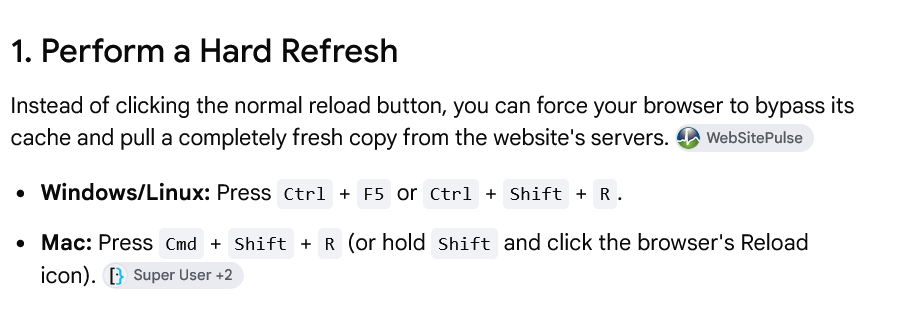
You may be seeing Google's cached version of the articles. Refresh the page in your browser as shown (Apparently, according to AI at least, simply using the refresh button on a browser doesn't always pull the live version of a page from the website. It may get it from the browser cache). Google eventually removes cached versions of articles, but you can go one step further and ask it to remove cached copies here:
https://search.google.com/search-consol … ed-content
Hi Eugene,
Thanks for all of your help. When I simply went to my articles, they all appeared live until I hit the refresh button individually which brought up a 404 notice. I found one lone article that still needs deleting and have asked team@hubpages.com to do it. I feel sure they will do it since they have now helped with all the others. Thanks again for your advice! Best wishes to you!
I emailed the team the week before last and the articles mentioned still haven't been deleted.
by Peggy Woods 5 weeks ago
I have manually deleted all of my articles as I moved them into draft form on another site. They have now disabled my ability to delete, and I have 87 articles remaining on HubPages. I sent emails to team@hubpages.com asking them to delete them. I sent all the urls of the remaining ones I wish...
by kerryg 15 years ago
I used to have an eHow account, but when they closed the Writer's Compensation Program back in May/June, I removed my articles from the site and deleted my account.A couple days ago, I republished one of the articles here, and yesterday I got an email informing me that the hub had been unpublished...
by Abid Taga 4 years ago
Hi,My previous account was banned because I made two HP accounts and followed my previous account with the new one unconsciously. My account was banned due to this. Now I again signed up as a new writer and tried to publish my previous articles that were featured, but now they are duplicated....
by Poppy 9 years ago
Hi everyone. I've been writing on Hubpages for three years now and really enjoying it. Two days ago I wrote "15 Nintendo 64 Games You're Never Too Old to Try". It took a few hours and I was pretty happy with it. I got a couple of comments and hoped it would be moved to LevelSkip.com like...
by Ruby Oliver 9 years ago
How long does it take for a deleted article to be removed from the articles page?
by Hafiz Muhammad Adnan 6 years ago
Why deleted article are not removed after 24 hours?
Copyright © 2026 The Arena Media Brands, LLC and respective content providers on this website. HubPages® is a registered trademark of The Arena Platform, Inc. Other product and company names shown may be trademarks of their respective owners. The Arena Media Brands, LLC and respective content providers to this website may receive compensation for some links to products and services on this website.
Copyright © 2026 Maven Media Brands, LLC and respective owners.
As a user in the EEA, your approval is needed on a few things. To provide a better website experience, hubpages.com uses cookies (and other similar technologies) and may collect, process, and share personal data. Please choose which areas of our service you consent to our doing so.
For more information on managing or withdrawing consents and how we handle data, visit our Privacy Policy at: https://corp.maven.io/privacy-policy
Show Details| Necessary | |
|---|---|
| HubPages Device ID | This is used to identify particular browsers or devices when the access the service, and is used for security reasons. |
| Login | This is necessary to sign in to the HubPages Service. |
| Google Recaptcha | This is used to prevent bots and spam. (Privacy Policy) |
| Akismet | This is used to detect comment spam. (Privacy Policy) |
| HubPages Google Analytics | This is used to provide data on traffic to our website, all personally identifyable data is anonymized. (Privacy Policy) |
| HubPages Traffic Pixel | This is used to collect data on traffic to articles and other pages on our site. Unless you are signed in to a HubPages account, all personally identifiable information is anonymized. |
| Amazon Web Services | This is a cloud services platform that we used to host our service. (Privacy Policy) |
| Cloudflare | This is a cloud CDN service that we use to efficiently deliver files required for our service to operate such as javascript, cascading style sheets, images, and videos. (Privacy Policy) |
| Google Hosted Libraries | Javascript software libraries such as jQuery are loaded at endpoints on the googleapis.com or gstatic.com domains, for performance and efficiency reasons. (Privacy Policy) |
| Features | |
|---|---|
| Google Custom Search | This is feature allows you to search the site. (Privacy Policy) |
| Google Maps | Some articles have Google Maps embedded in them. (Privacy Policy) |
| Google Charts | This is used to display charts and graphs on articles and the author center. (Privacy Policy) |
| Google AdSense Host API | This service allows you to sign up for or associate a Google AdSense account with HubPages, so that you can earn money from ads on your articles. No data is shared unless you engage with this feature. (Privacy Policy) |
| Google YouTube | Some articles have YouTube videos embedded in them. (Privacy Policy) |
| Vimeo | Some articles have Vimeo videos embedded in them. (Privacy Policy) |
| Paypal | This is used for a registered author who enrolls in the HubPages Earnings program and requests to be paid via PayPal. No data is shared with Paypal unless you engage with this feature. (Privacy Policy) |
| Facebook Login | You can use this to streamline signing up for, or signing in to your Hubpages account. No data is shared with Facebook unless you engage with this feature. (Privacy Policy) |
| Maven | This supports the Maven widget and search functionality. (Privacy Policy) |
| Marketing | |
|---|---|
| Google AdSense | This is an ad network. (Privacy Policy) |
| Google DoubleClick | Google provides ad serving technology and runs an ad network. (Privacy Policy) |
| Index Exchange | This is an ad network. (Privacy Policy) |
| Sovrn | This is an ad network. (Privacy Policy) |
| Facebook Ads | This is an ad network. (Privacy Policy) |
| Amazon Unified Ad Marketplace | This is an ad network. (Privacy Policy) |
| AppNexus | This is an ad network. (Privacy Policy) |
| Openx | This is an ad network. (Privacy Policy) |
| Rubicon Project | This is an ad network. (Privacy Policy) |
| TripleLift | This is an ad network. (Privacy Policy) |
| Say Media | We partner with Say Media to deliver ad campaigns on our sites. (Privacy Policy) |
| Remarketing Pixels | We may use remarketing pixels from advertising networks such as Google AdWords, Bing Ads, and Facebook in order to advertise the HubPages Service to people that have visited our sites. |
| Conversion Tracking Pixels | We may use conversion tracking pixels from advertising networks such as Google AdWords, Bing Ads, and Facebook in order to identify when an advertisement has successfully resulted in the desired action, such as signing up for the HubPages Service or publishing an article on the HubPages Service. |
| Statistics | |
|---|---|
| Author Google Analytics | This is used to provide traffic data and reports to the authors of articles on the HubPages Service. (Privacy Policy) |
| Comscore | ComScore is a media measurement and analytics company providing marketing data and analytics to enterprises, media and advertising agencies, and publishers. Non-consent will result in ComScore only processing obfuscated personal data. (Privacy Policy) |
| Amazon Tracking Pixel | Some articles display amazon products as part of the Amazon Affiliate program, this pixel provides traffic statistics for those products (Privacy Policy) |
| Clicksco | This is a data management platform studying reader behavior (Privacy Policy) |