Disabling Autoplay of Audio CDs and USB Drives

62Modern computers support USB drives like pen drives and CDs or DVDs. When you want to connect a pen drive through the USP port of your computer, you generally see that an
auto run window will be opened. Moreover, if you insert a CD or DVD onto your CD/DVD ROM/RAM, you will also see a
auto run window. Most often, this option is very harmful for your PC or
laptop for spreading virus or trojan. Most of the viruse or other harmful threats are spreading through pen drive. And if your computer has the option the autoplay enabled, you may also be affected these types of threats. So, better to disable auto play option and open the pen drives or CD/DVD by explore option. This page will tell you the ways to disable autoplay option of your computer. Just keep reading...
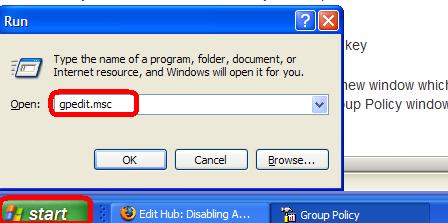
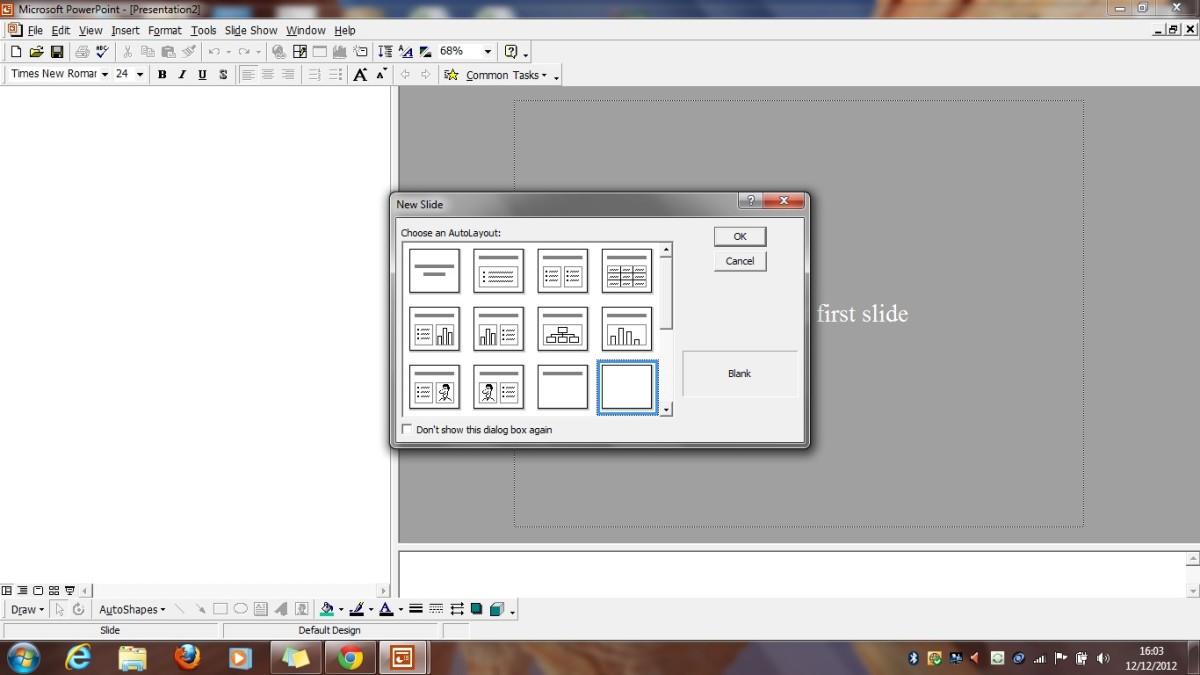
Step 01: Running '"gpedit.msc" command
- Firstly, click on the Start menu of your computer.
- Then clike on Run.
- Type the command gpedit.msc and hit Enter key
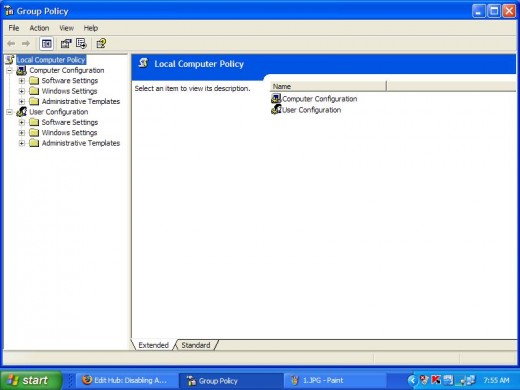
After finishing all the above steps, you will notice a new window which is referred as Group Policy window will be appeared. The Group Policy window will look like the following figure.
- Speed Up Disk Cleanup Scanning Time in Windows
- How to Remove AVG Anti-virus?
- How to Change Desktop Background Picture or Image?
- How to Delete Undeleted File
- Seven Hacks And Tweaks for Your Computer Sanity
- How to Create Folder(s)
- How to Configure IP Address on Windows XP?
- How to create a batch file
- Screen Optimizing Firefox 3 Hacks And Tweaks
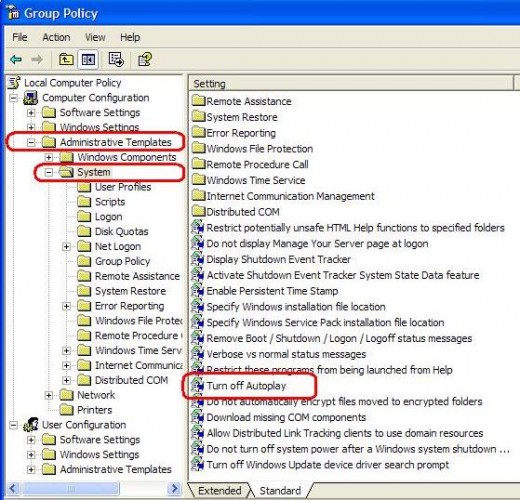
Step 02: Exploring "Turn off Auto Play"
- From the Group Policy window, click on Administrative Templates and it will expand.
- Click on System under Administrative Templates and you will find some folders and file names will be appeared to the right side.
- Now find Turn off Autoplay and double click on it.
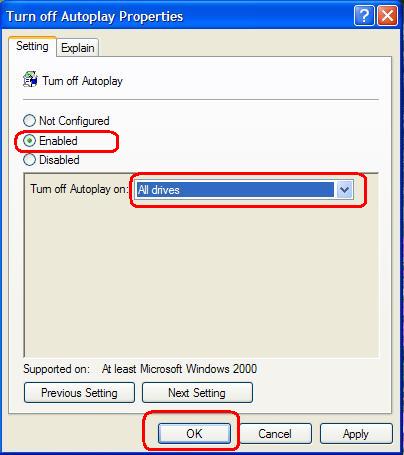
Configuring "Turn of Autoplay Properties"
When you double click on Turn off Autoplay, a new window will be opened. Form that window, change the following settings:
- From the Setting tab, set the radio button to Enabled.
- Change the Turn off Autoplay on to All Drives.
- At last, click on OK and finished the configuration.
By following the above steps, you can easily disable auto play option and can safe form the attack of virus or any other types of threats.
© Written by rancidTaste
If you are enjoyed this post, please consider to leave a comment at the comment section of this page or Subscribe to rancidTaste's RSS feed to get new pages which will be delivered to your feed reader. You can also read more hubs by rancidTaste.

Recent Pages of itis123
- How to install Twitter widget into your blog?
Twitter, is becoming very popular day-by-day and a free social messaging utility for staying connected in real-time with your friends.
- How to add "Top of the page" icon to your blog?
"Top of the page" icon link is an important thing if your blog post is long.
- How to find out and change the size of your blog's header image?
Blogger header image gives the uniqueness of your blog among the millions of blogs.
- Troubleshooting
If you are a compute user, then you may face several types of problems at different times.
- ESET NOD32
Virus, Malware, Trojan, Worm, Spyware, Adware, Botnet etc.
- NOD32 keys
ESET NOD32 is one of the best effective and most proactive antivirus software and malware protection.
- How to Get Free ESET NOD32 Antivirus Key And Password
Different antivirus software are used to protect our PC form virus.
- Changing Your Blog's Header Image
You can easily add your favorite image or photo as a blog's header image.
Recet Pages of rancidTaste
- rundll32.exe - Application Error â The memory could not be "read". Click on OK to terminate the program.
Windows operating system is corrupted due to several virus infections. - 4 days ago
- PPV or PPC?: "Pay Per View or Pay Per Click?" - Which One is Better?
Pay per view (PPV) and pay per click (PPC) are two types of marketing advertising solutions which is used by the advertisers to reach targeted group of visitors. - 4 days ago
- Make Good Money with Good Articles and Get Quick Cash
Before going to the main content, I want to ask you tow question? - 5 days ago
- Hot Secrets Behind Good Articles: How and Why Good Writers Always Write Good Articles?
Before writing to Hubpages, I have no idea about good articles. - 5 days ago
- Backlinks And Backlinking: Search Engine Optimization and the Importance of Backlinks And Backlinking
If you do a small research on search engine optimization or high search engine ranking, then you must come across the term backlinks or backlinking. - 8 days ago
- Validate with a Validation List: Create you own Validation List in Excel
Excel enables you to restrict the values a user can enter in a cell. - 8 days ago
- Google Adwords and Web Traffic: The secret to drive high traffic of your site or blog using Googel Adwords
To generate wealth in e-commerce or Internet based business, the biggest issue is the Traffic. - 8 days ago
- How to Reset/Remove/Bypass a BIOS or CMOS Password? : A Complete Guide to Reset/Remove/Bypass BIOS or CMOS Password
User level passwords are used to restrict unauthorized access of a computer. - 10 days ago
PrintShare it! — Rate it: up down flag this hub


ocbill says:
7 months ago
excellent thing to do.. I just finished changing it on mine.