How to Quickly Minimize All Windows

Your are working in different windows. All the windows are open. Now, you need a file which is on the desktop. Do you like to jump to your desktop? Or you close or minimize all the opened windows? If you minimize one by one, don't you feel boar? Suppose, there are 20 windows open at that time. To minimize all the window, you may need 20 clicks on your mouse.
Is it handy? Certainly not. There are some ways to jump your desktop very quickly. Do you know that? You may click on the Taskbar and right click on your mouse and then select Show the Desktop. Now, the desktop window will be appeared. This is enough time consuming I think. What do you think? I think you are with my side that it consumes much time.
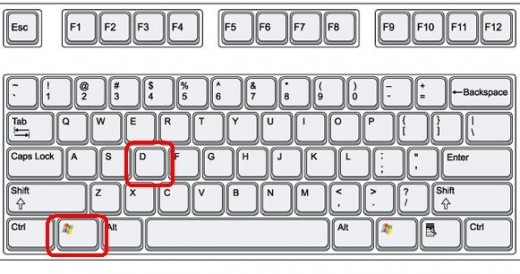
So, are you thinking which is the best way to minimize the time to jump the desktop? Yes, I will tell you now. The best and quickest way to jump your desktop is Windows Key + D Key all together. Hold windows key and then press D key and you have done. Very soon, you will reach your own desktop. Isn't it funny and amazing!!
WINDOWS+D is the best and quickest way to minimize all windows and jump to your desktop.
Press WINDOWS+D again and you will find all the previous windows i.e. all of your hidden window will reappear on your computer screen.
© Written by rancidTaste
If you are enjoyed this post, please consider to give a thumbs up and leave a comment. You may Subscribe to rancidTaste's RSS feed to get new pages which will be delivered to your feed reader. You can also read more hubs by rancidTaste.
JOIN HUBPAGES & EARN MONEY