Windows 7 Multi Touch Test - Multitouch

You may have heard a lot about the addition of Multi-Touch to Windows 7.
Just because a computer has a touchscreen does not mean it supports multi-touch. Before you buy a new touchscreen computer you should check if it supports Multi-Touch.
So how do you check if a TouchScreen has Multi-Touch?
The Multi-Touch Test
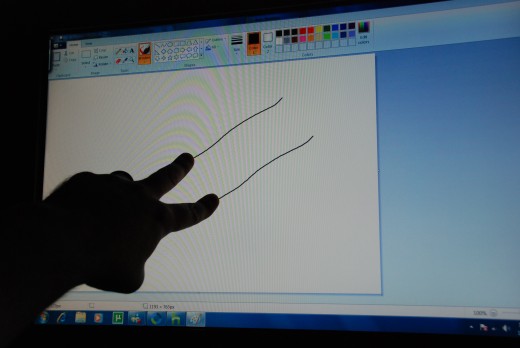
The easiest way to check the if a computer supports multitouch is through Microsoft Paint. Open MS Paint, then take two fingers and run then across the screen. If you see two lines then the computer supports Multi-touch.
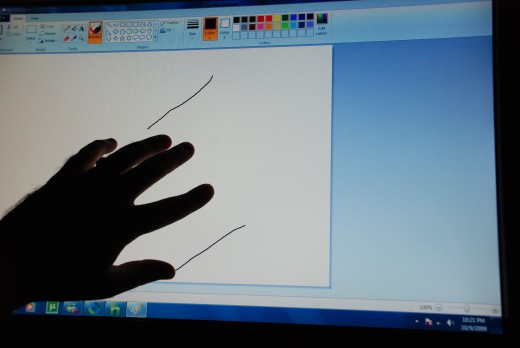
How Many is Multi
Its called Multi-Touch and not Duo-Touch as some touchscreens can support more than two inputs at once. To check how many inputs a touch screen can take run all 5 of your fingers across the screen.
Having four or more inputs means you can fully manipulate two objects at one time or a second person can interact with you on the one screen.
Don't worry when you find out your multi-touch only supports two inputs. Most consumer level Multi-Touch screens only support two at one time.
Just One Line
If this test only yeilds one line, it does rule out that the touchscreens hardware can't support multi-touch. Multi-touch is new technology and when your computer was shipped it may have been shipped with drivers that do not support multi-touch even though the hardware is capable of it. If you do some searching you may be able to find updated drivers for your touchscreen.
Additional TouchScreen Articles
- Buying a TouchSceen Computer
With the improved touchscreen experience of Windows 7 the sale of touchscreen computers is antisipated to increase. There are several types of TouchScreen computers that you can purchase. No mater what... - Windows 7 Touch Experience
Microsoft has vastly improved the experience of using a touch screen computer in Windows 7. This page will help you get the most out of your touchscreen with Windows 7. Microsofts Windows 7 nativity... - BumpTop - The New Desktop
Bumptop gives your computers desktop a long needed face lift adding 3D Productivity and Multi-Touch Features. Bumptop is both fun and functional with many innovative features that will let you improve your...