- HubPages»
- Technology»
- Computers & Software»
- Operating Systems
How to remove shortcut arrow from desktop icons?

Your desktop has many shortcuts. There is an arrow on those shortcut. Do you like the arrow? Do you like to remove the arrow key. If yes, then just read this page. This page contains information to remove the arrow from the shortcuts.
Steps to remove shortcut arrow from desktop icons
Follow the following steps to remove shortcut arrow from desktop icons:
Step 1. Click on the Start menu and then click on Run.
Step 2. Type regedit in the "Run" text-box and hit Enter key of your keyboard. Very soon Registry Window will be opened.
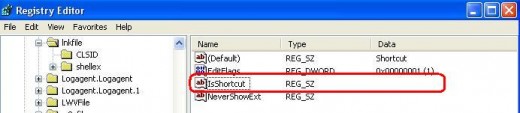
Step 3. Navigate to the location HKEY_CLASSES_ROOT/lnkfile form the "Registry Editor Window".
Step 4. Look right side and you will find a registry file named as IsShortcut. Select that registry file and Delete that.
And that's all. You will not find any arrow of the shortcuts. You may need to restart your computer to effect it completely. This technique works both Windows XP and Vista.
© Written by rancidTaste